- MQL5 74.9%
- JavaScript 18.1%
- CSS 3.3%
- HTML 2.5%
- MQL4 1.2%
| Имя файла | Текст последнего коммита | Дата последнего коммита |
|---|---|---|
| Images | ||
| Sets | ||
| Src | ||
| dependencies.json | ||
| LICENSE | ||
| README.md | ||
| Secrets.mqh | ||






Ready-to-use examples for FastNL, the pure MQL5 economic calendar library: expert advisors, utility scripts and a small web viewer for the calendar data files.
Every example is a working starting point: copy the part you need into your own bot.
Main Features
- News filter EA: a minimal bot skeleton that pauses trading a few seconds around every high/medium/low impact event, ready to receive your own strategy
- News trader EA: opens buy/sell positions when an event is released, using the expected market reaction of the event, with full risk management
- Calendar scripts: generate the calendar data files, translate event codes to ids, and inspect the history of any event
- Calendar file viewer: a static web page that opens the calendar event
.binfiles and shows the event info and its values table, without installing anything
News filter: FilterNewsEaSimple.mq5
Creates the calendar, filters it by the chart symbol, subscribes all countries and draws the events on the chart. When an event is about to be released, OnTickEvent returns true once, so you can suspend your own logic for a few seconds:
g_calendar = CiNewsLeo_CreateEconomicCalendar();

TSNSTD_TRY_EF(g_calendar.FilterBySymbol(_Symbol), true, CiNewsLeo_FormatTraceFirst(_what))
TSNSTD_TRY_EF(g_calendar.AddAllCountries("High|Medium|Low"), true, CiNewsLeo_FormatTraceFirst(_what))
g_calendar.SetNoticiasChecker(seg_antes_despues, 10);
TSNSTD_TRY_EF(g_calendar.SetCalendar(desde, hasta), true, CiNewsLeo_FormatTraceFirst(_what))
void OnTick()
 {
  const datetime time_curr = TimeCurrent();

  if(controler_d1.IsNewBar(time_curr))
    g_calendar.OnNewDay(time_curr);

  // true only once, right when the "seconds before the event" are reached
  if(g_calendar.OnTickEvent(time_curr))
    suspended_time = time_curr + (seg_antes_despues * 2);

  if(time_curr > suspended_time)
   {
    // Your EA code
   }
 }
News trader: EAs\NewsTrader
A strategy hooked to the calendar. When the events of the day are released, it asks the library for the theoretical movement of the event and opens a position in that direction:
TSN::calendar.AddHook(&strategy); // the strategy receives the events

void CNewsTrader::OnNews(const EconomicEventData& events[], const int res, const datetime curr_time)
 {
  // ...
  const double pred = TeoricMovementOfEvent(events[i], cid, country_id_profit, true);
  if(pred > 0.0)
    OpenOrder(POSITION_TYPE_BUY);
  else
    if(pred < 0.0)
      OpenOrder(POSITION_TYPE_SELL);
 }
What it includes:
- Event lists per currency: USD, EUR, CAD, CHF, GBP, AUD, NZD and JPY, each one a comma-separated list of MQL5 calendar event codes you can edit
- Take profit / stop loss: by fixed points or by ATR multiplier
- Risk management: lot by risk per operation, maximum daily/weekly/total loss, maximum daily profit and a dynamic risk per operation (GMLPO), for personal accounts or prop firms
- Optional trailing stop: ATR, SAR, moving averages (MA, AMA), previous low/high, fixed points or swings
Backtest
Next a backtest on XAUUSD M5
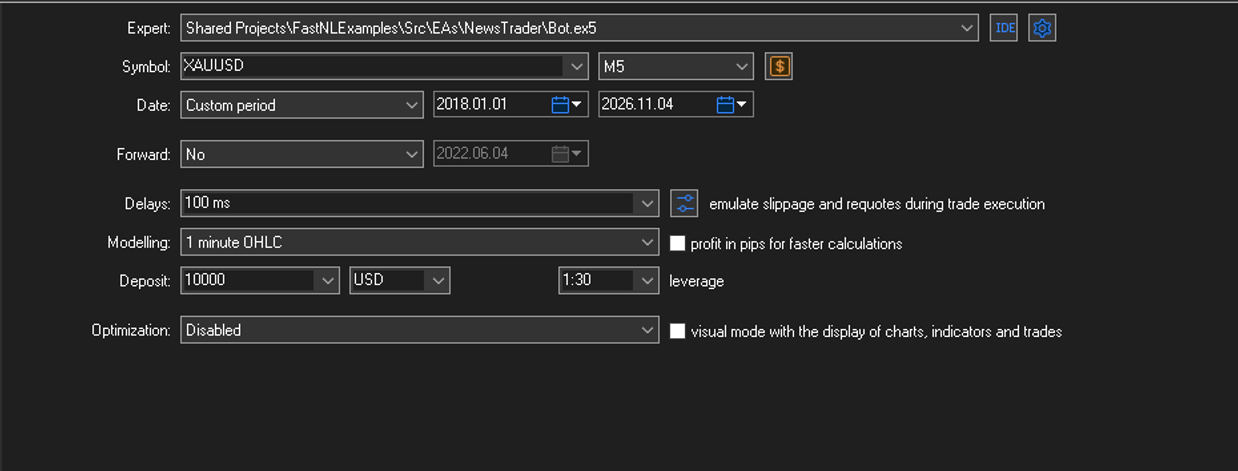
- Config:
- Balance\Equity Graph:
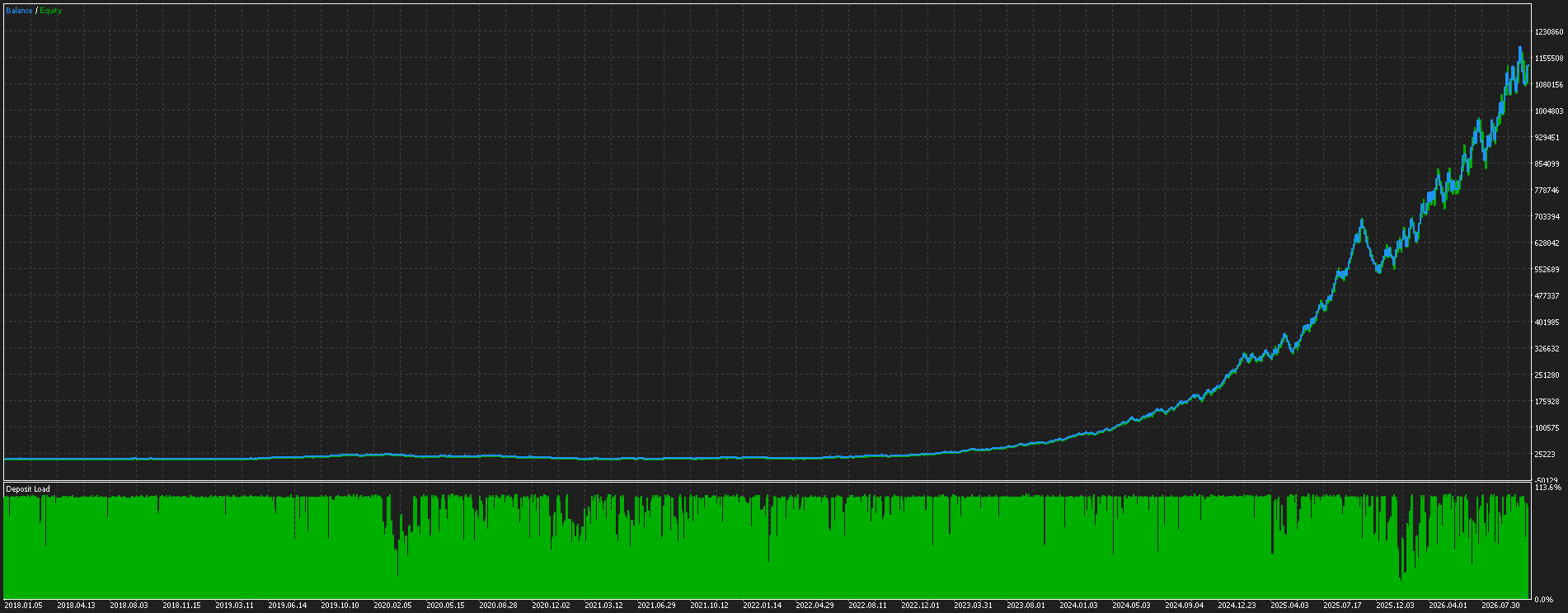
Warning: These results were generated using OCHLM1 data on FTMO. Using real tick data yields similar, though slightly lower, results—but the issue isn't whether the system works; it’s the conditions required for it to function. Backtests simulate scenarios where the current value of an event—which is necessary for predicting the direction of the subsequent market move—is delivered within a few hundred milliseconds (the faster, the better). However, since this Expert Advisor (EA) relies on the MQL5 calendar, data delivery can take anywhere from 5 to 60+ seconds, or even days. Consequently, this EA will not perform well in a live environment and will likely open very few trades. For it to function effectively, it would require access to a low-latency, paid API capable of delivering current event data within a few hundred milliseconds—or even less—to allow for rapid reaction.
Calendar scripts: Scripts\
| Script | What it does |
|---|---|
Generador Archivos CSV Calendario.mq5 |
Generates the calendar data files from a start date (all importances by default) |
EventCodeToId.mq5 |
Converts US MQL5 event codes (e.g. producer-price-index-mm) into their event ids, or prints the full info of an id when the input starts with # |
Test2.mq5 |
Loads a list of events and prints their last value: actual, forecast, previous, impact, unit and country |
Test.mq5 |
Experiment: computes the Kendall correlation between the recent values of the US events and a target event (US CPI m/m) |
TSNSTD_TRY_EF(calendar.AddAllCountries(importances_events), true, CiNewsLeo_FormatTraceFirst(_what))
TSNSTD_TRY_EF(calendar.SetCalendar(desde, h), true, CiNewsLeo_FormatTraceFirst(_what))
TSNSTD_TRY_EF(calendar.GenerateFiles(), true, CiNewsLeo_FormatTraceFirst(_what))
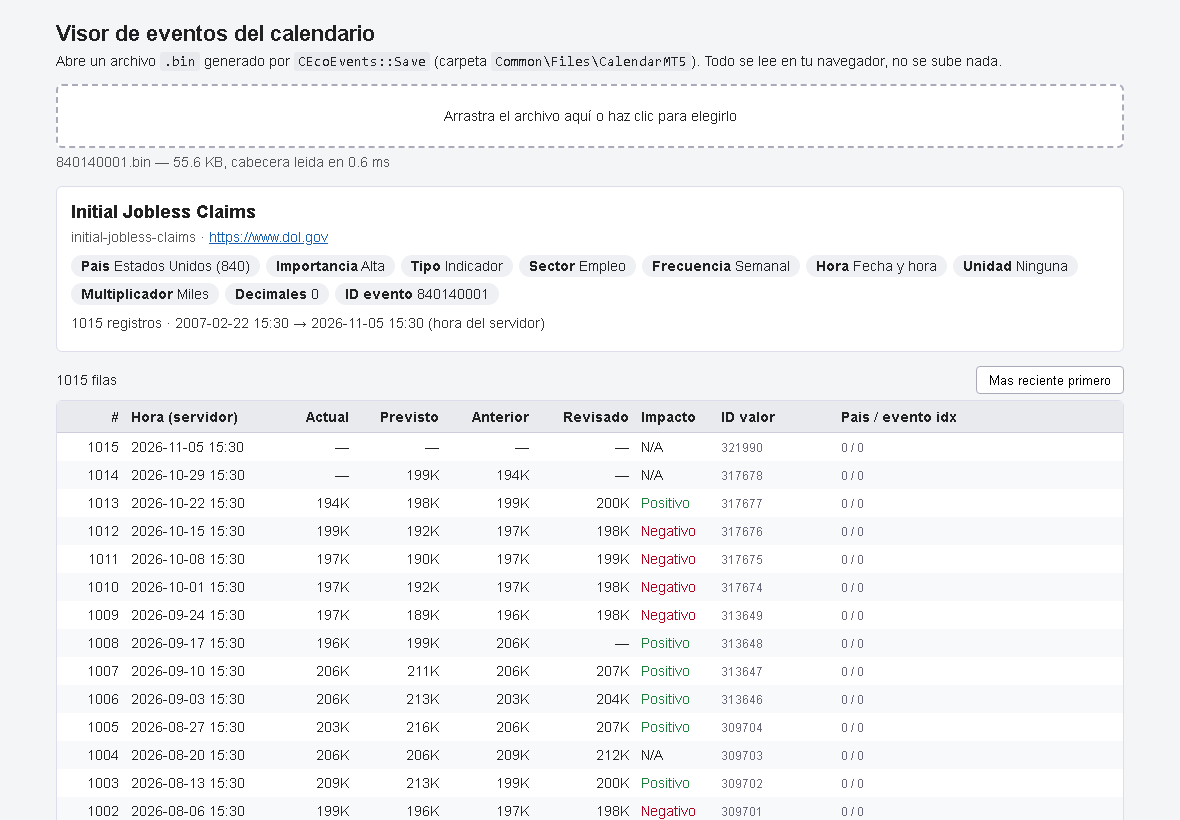
Calendar file viewer: CalendarFormat\
A static web page (HTML + JS, no server, no dependencies) that opens an event .bin file from Common\Files\CalendarMT5 and shows:
- the event info: name, code, source, country, importance, type, sector, frequency, unit and decimals
- a table with the history: time, actual, forecast, previous, revised, impact and value id
Large histories stay fast: only the rows near the screen are drawn, the rest is read from the file when you scroll.
To use it, open Src\CalendarFormat\index.html in your browser and drop a .bin file onto the page. Nothing is uploaded, the file is read locally.
Repository Structure
FastNLExamples/
├── Images/              # Screenshots used in this README
└── Src/
    ├── EAs/             # Example bots (news filter and news trader)
    ├── Scripts/         # Calendar utility scripts and experiments
    └── CalendarFormat/  # Web viewer for the calendar event files
⚠️ License Notice
A FastNL license is required to use these examples. Get it on The Bot Place: the purchase gives you your TBP user id, which the examples need to initialize the calendar. Without a license the examples will not run.
Requirements
See dependencies.json for the full list.
Installation
cd "C:\Users\YOUR_USER\AppData\Roaming\MetaQuotes\Terminal\YOUR_ID\MQL5\Shared Projects"
tsndep install "https://forge.mql5.io/nique_372/FastNLExamples.git"
Requires the tsndep package, available on PyPI. It automatically downloads and installs all declared dependencies.
Quick Start
You need your TBP user id first: it comes with the FastNL license.
Option A: ready-made bots (no compiling)
1. Download NewsFilter or NewsTrader from the Releases page and copy the .ex5 to MQL5\Experts.
2. Attach it to a chart and paste your TBP user id in the InpTbpLicense input.
Option B: compile from source
1. Enable the public mode: at the top of Src\EAs\FilterNewsEaSimple.mq5 (or Src\EAs\NewsTrader\Bot.mq5), before the includes, uncomment PUBLIC_VERSION and define REPOSECRETS_MQH, so the author's private Secrets.mqh is not included (you can also just delete that #include):
#define REPOSECRETS_MQH   // do not include the author's Secrets.mqh
#define PUBLIC_VERSION    // adds the InpTbpLicense input
#include "..\\..\\Secrets.mqh"
2. Compile and run: press F7 in MetaEditor, attach the EA to a chart and paste your TBP user id in the InpTbpLicense input. The events appear on the chart and, around each event, suspended_time tells you when your own logic should wait.
3. Scripts: The scripts do not use InpTbpLicense; instead, they use your ID as specified via a #define directive (located in TSN\ConfigTbpId.mqh). Therefore, you only need to define REPOSECRETS_MQH.
Backtesting with FastNL
Generate the calendar files first with Generador Archivos CSV Calendario.mq5, using the same start date as the EA input fecha_desde_incio_noticias.
License
Read Full License By downloading or using this repository, you accept the license terms.
Contact
- Platform: MQL5 Community
- Profile: https://www.mql5.com/es/users/nique_372
- Articles: https://www.mql5.com/es/users/nique_372/publications
Copyright © 2026 Niquel & Leo — TSN Ecosystem