
6.3 KiB
Economic calendar watcher that sends a heads-up to Telegram before a scheduled news event hits.





Main Features
- Zero-code setup: Just a Telegram bot token and chat id, and the EA does the rest.
- Runs off the real economic calendar: pulls events via Fast NewsLibrary (internal use MQL5 News API)
- Configurable heads-up window: choose how many seconds before the event the alert should fire.
- Choose what you track: no filter (every country), current chart symbol only, or a custom list of country codes (ISO 3166-1 alpha-2) you define yourself.
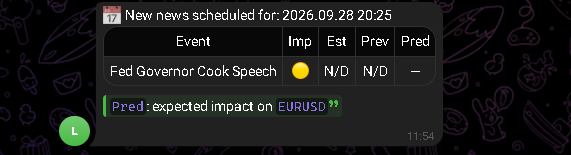
- Rich Markdown messages: each alert is a clean table Event, importance (🔴/🟡/⚪), estimate, previous value, and predicted impact emoji (📈/📉/📊).
- Symbol-aware predictions: no matter which filter you pick, the forecast-vs-previous comparison in the "Pred" column is always resolved against the symbol of the chart the EA is attached to (up / down / neutral), so it always speaks to what you're actually trading.
Usage: the process
1. Create your Telegram bot talk to @BotFather on Telegram, run /newbot, and copy the token it gives you. Get your chat id (a DM with @userinfobot works, or your group/channel id if you want it posted there).
2. Drop the token and chat id into the EA's inputs, pick your date range, alert window, and which importance levels you want:
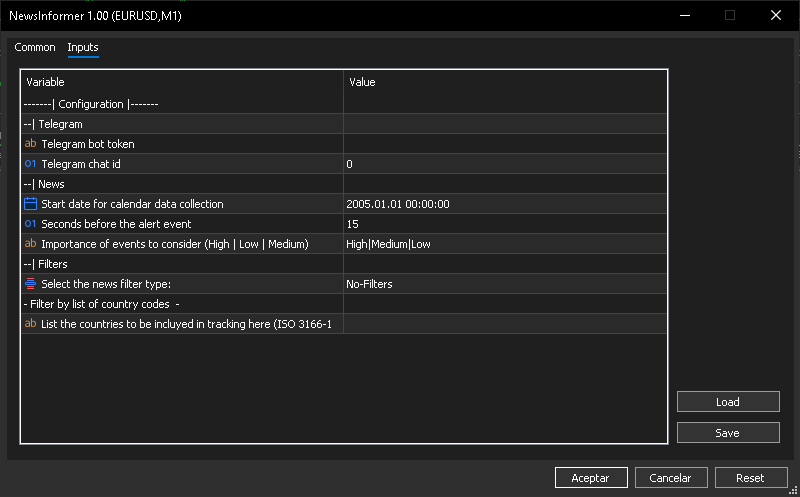
3. Pick what you want to track with the Filters group no filter, current chart symbol only (the EA resolves which countries matter for that symbol on its own), or a custom country list (comma-separated ISO codes, e.g. US,GB,JP) if you only care about specific economies.
4. Attach it to any chart and leave it running. When a filtered event is about to happen, you get a message like this in your chat, with the prediction always read against the chart's own symbol regardless of which filter you used:
5. Done no further action needed, the EA keeps watching the calendar and alerts you before every matching event.
Repository Structure
TlgNewsInformer/
├── NewsInformer.mq5      # Main EA sets up the calendar, wires up Telegram, drives OnTick
├── Secrets.mqh           # Internal license/import switch (Market build vs. dev build)
├── dependencies.json     # tsndep manifest (repos required to compile from source)
├── Src/
│   └── Main.mqh          # CTelegramsNews: builds the Markdown alert and sends it via Telegram
└── Market/                # Screenshots used in this README and the MQL5 Market listing
⚠️ License Activation
In case:
- You use the Forge release version.
- You might want to compile the source code (dev).
You will need to have purchased the following product.
- FastNL (Fast NewsLibrary)
How to activate
-
Purchase products from my TheBotPlace profile:
-
Retrieve your TBP ID from your account:
Installation
MetaTrader 5 build 5430 or later is required either way. Pick the path that matches what you want to do:
For developers
Check dependencies.json, and:
- Install them with
tsndep(available on PyPI) from yourShared Projectsfolder it reads dependencies.json and downloads everything declared there:
cd "C:\Users\YOUR_USER\AppData\Roaming\MetaQuotes\Terminal\YOUR_ID\MQL5\Shared Projects"
tsndep install "https://forge.mql5.io/nique_372/TlgNewsInformer.git"
For users
Want to use it right away? Don't get bogged down or overcomplicate things dealing with dependencies, includes, and the like—here are two options to download the ready-to-use .ex5 file.
Option A Manual (from the repo's releases)
- Download the latest compiled EA from Releases.
- Move it into your terminal's
MQL5/Expertsfolder.
Option B MQL5 Market (recommended, no manual steps)
- Get TlgNewsInformer from the MQL5 Market open it via the MT5 GUI, hit download, and it's placed straight into
Experts\Marketready to attach to a chart.
Either way, once the EA is in place, jump to Usage: the process above.
Important: The MT5 Market version uses its own license; the license for this repository applies only to the source code found here, whereas the .ex5 file distributed via the MQL5 Market is subject to that platform's license.
License
By downloading, cloning, forking, or otherwise using this repository, you accept the license terms.
Disclaimer
Trading involves substantial risk of loss.
- This software is a technical tool, not financial advice
- Past performance does not guarantee future results
- You are solely responsible for your trading decisions
- Always test thoroughly before deploying with real capital
- Use appropriate risk management at all times
The authors assume no liability for trading losses, system failures, or any damages arising from the use of this software.
Contact
- Platform: MQL5 Community
- Profile: https://www.mql5.com/es/users/nique_372
- Articles: https://www.mql5.com/es/users/nique_372/publications