- MQL5 66.4%
- MQL4 24%
- Python 9.6%
| Filename | Latest commit message | Latest commit date |
|---|---|---|
|
|
||
| docs | ||
| LICENSES | ||
| mql4 | ||
| mql5 | ||
| tests | ||
| .gitignore | ||
| LICENSE | ||
| README.md | ||
| requirements.txt | ||

Prop Rules Monitor (MetaTrader 5 and MetaTrader 4)
A free indicator that shows, live, how close the account is to a prop-firm style daily loss limit and max loss, measured on equity with the reset time and time zone you type in, and warns at a level you choose and at a breach. It only watches: it never opens, closes or changes a trade, so it works without automated trading enabled. Source for both editions, the tests of its rule engine, and the maths in plain words.
Website: allanninal.dev/mql5 (utilities) · MT4 editions · allanninal.dev · Contact: message me on LinkedIn.
It measures limits you type in; it does not know any firm's rules and does not enforce anything. Check your own firm's rule pages. Nothing here is a profit claim or a promise that an account passes (see Honest limits).
Get it on the MQL5 Market
| Edition | Platform | Price | Link |
|---|---|---|---|
| Prop Rules Monitor | MT5 | free | https://www.mql5.com/en/market/product/201817 |
| Prop Rules Monitor MT4 | MT4 | free | https://www.mql5.com/en/market/product/202433 |
The Market builds are the same calculation as the source in this repository.
Contents
- What it is and who it is for
- Why it was built
- How it works
- How it was tested
- Architecture
- Inputs, alerts, install and compile
- Run the tests
- Honest limits
- Licence
What it is and who it is for
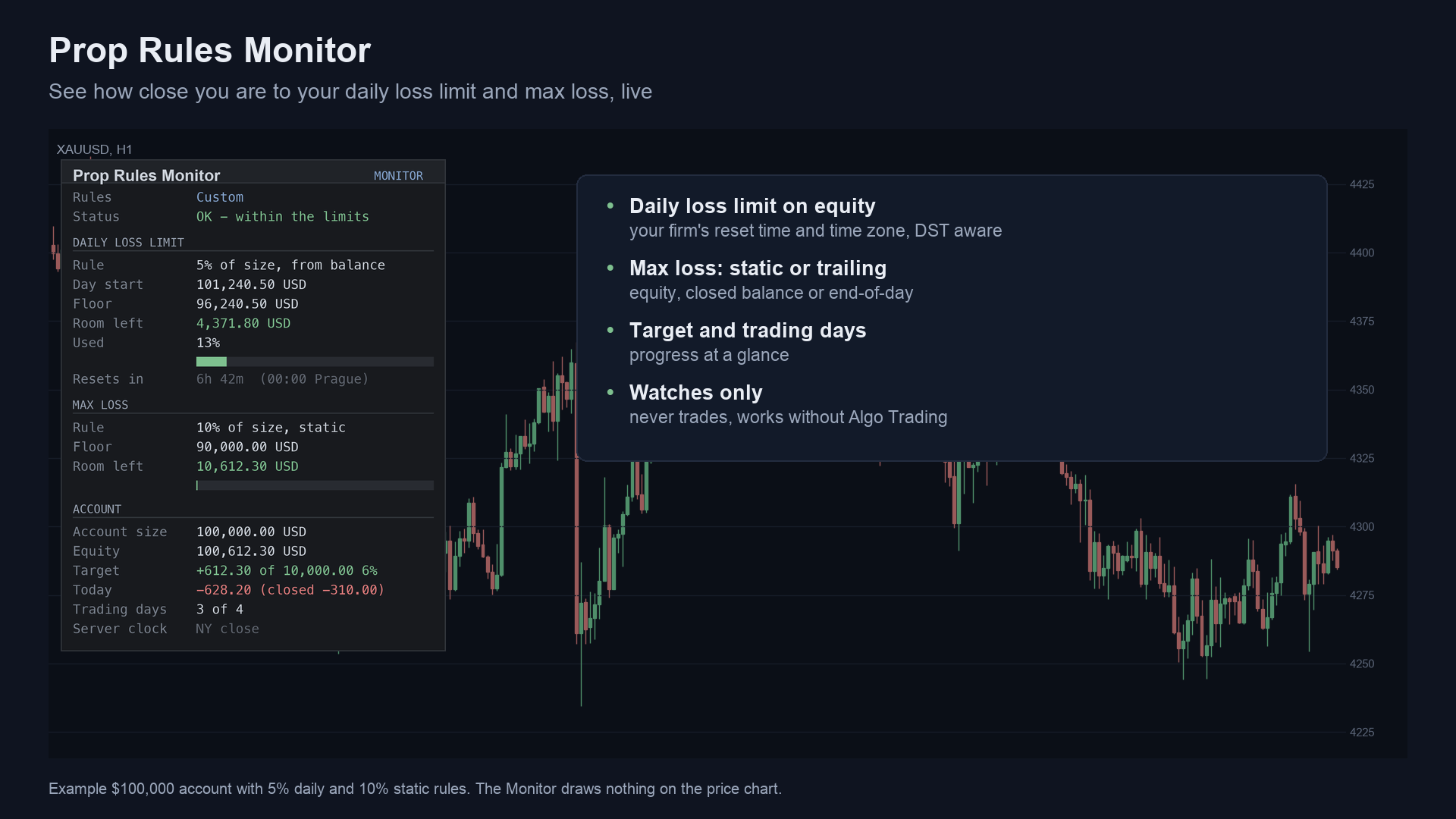
What: a panel on the chart with
- the daily loss limit: the day-start reference, the floor, the room left, the share used (with a bar) and the time to the reset;
- the max loss (static, trailing or two-stage): the floor, the room left and the share used;
- the account: size, equity, profit against the profit target, today's result, trading days against a minimum;
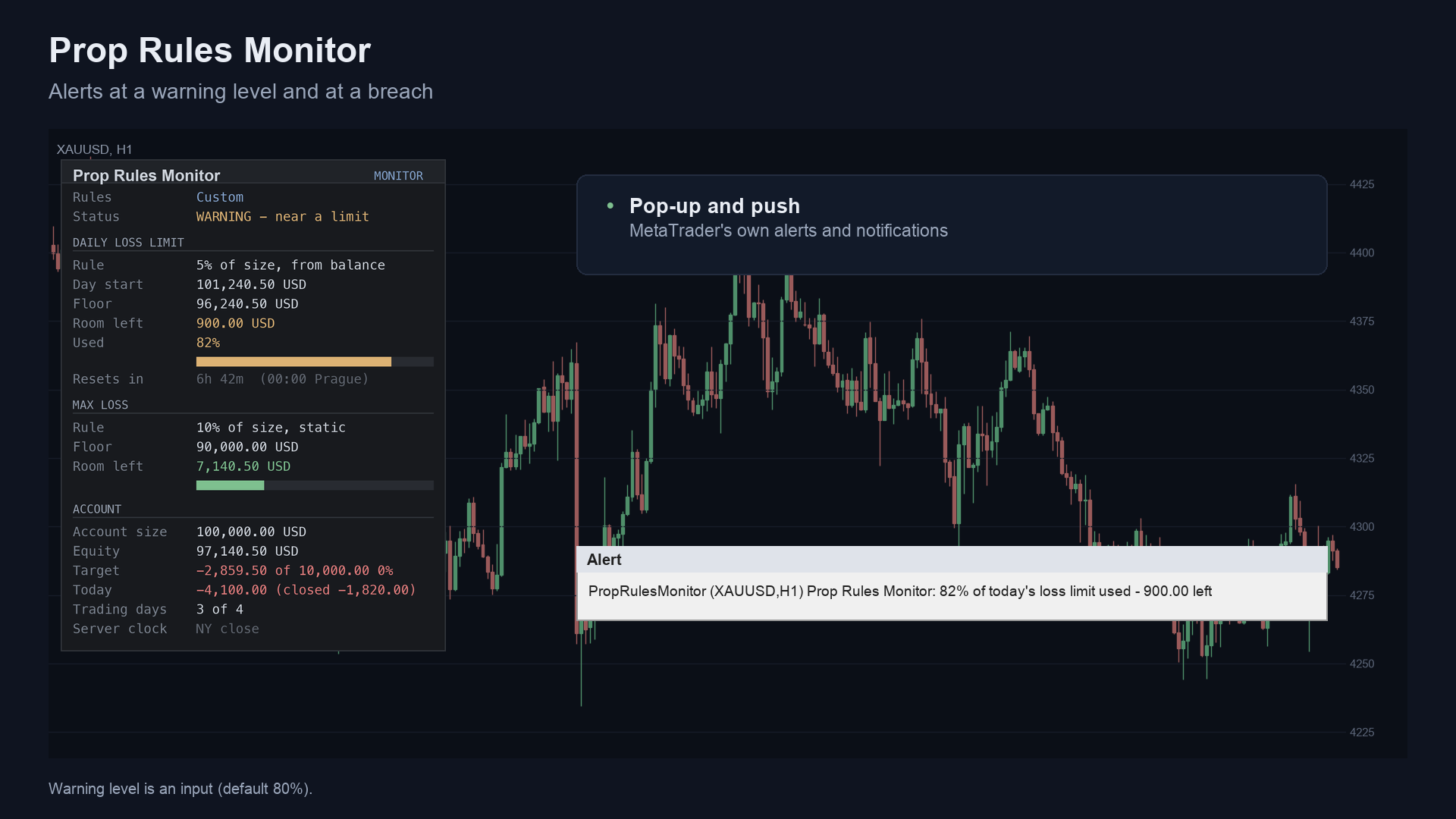
- a status line (OK, WARNING near a limit, a breach) and alerts by pop-up and push notification.
For: traders on prop-firm evaluations or funded accounts who want to see their distance to the limits at a glance. Also for developers who want a tested rule engine for day-start, reset zones and floors.
Not for: anyone who wants it to protect the account. It warns; it does not act.
 |
 |
 |
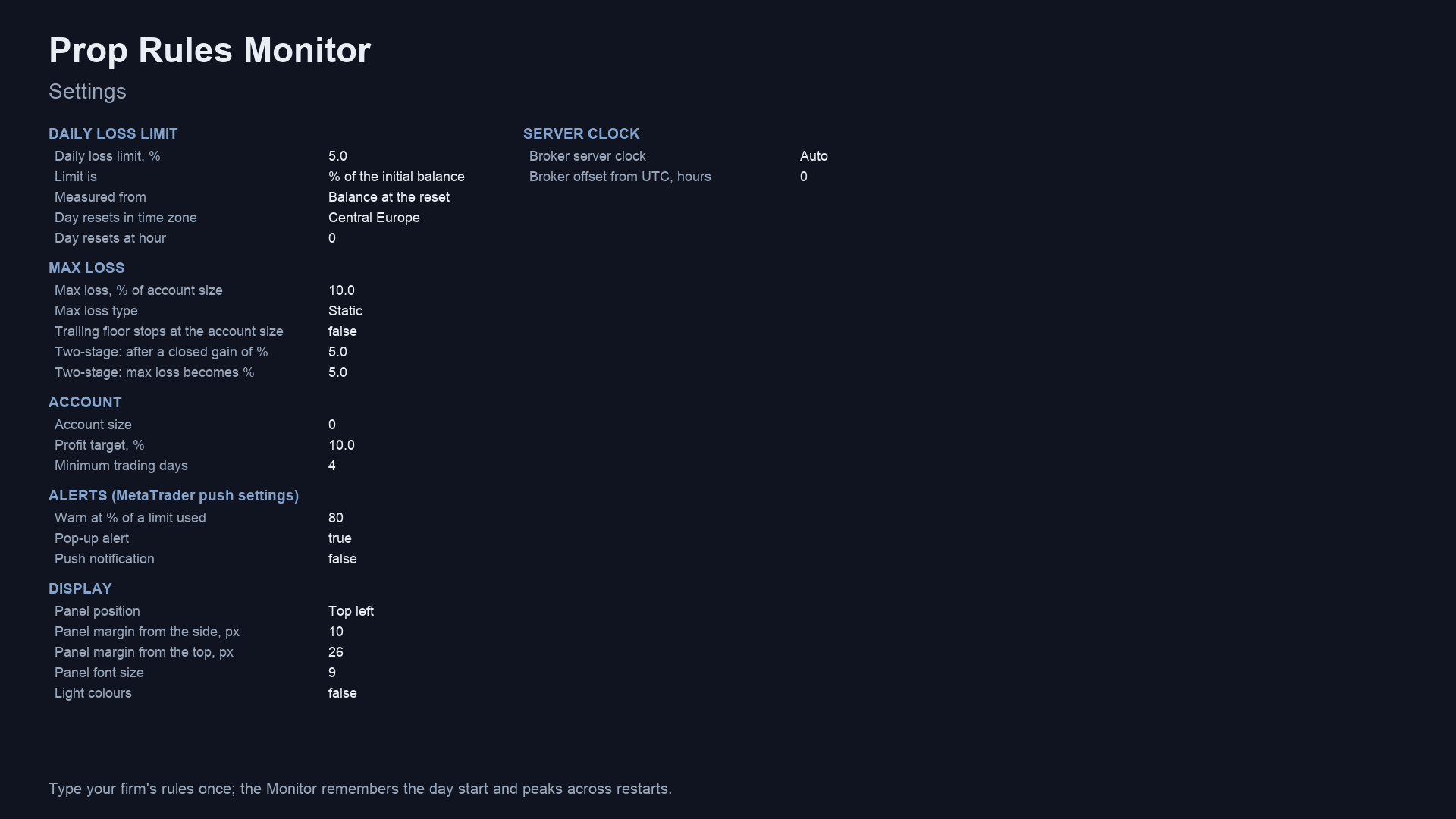 |
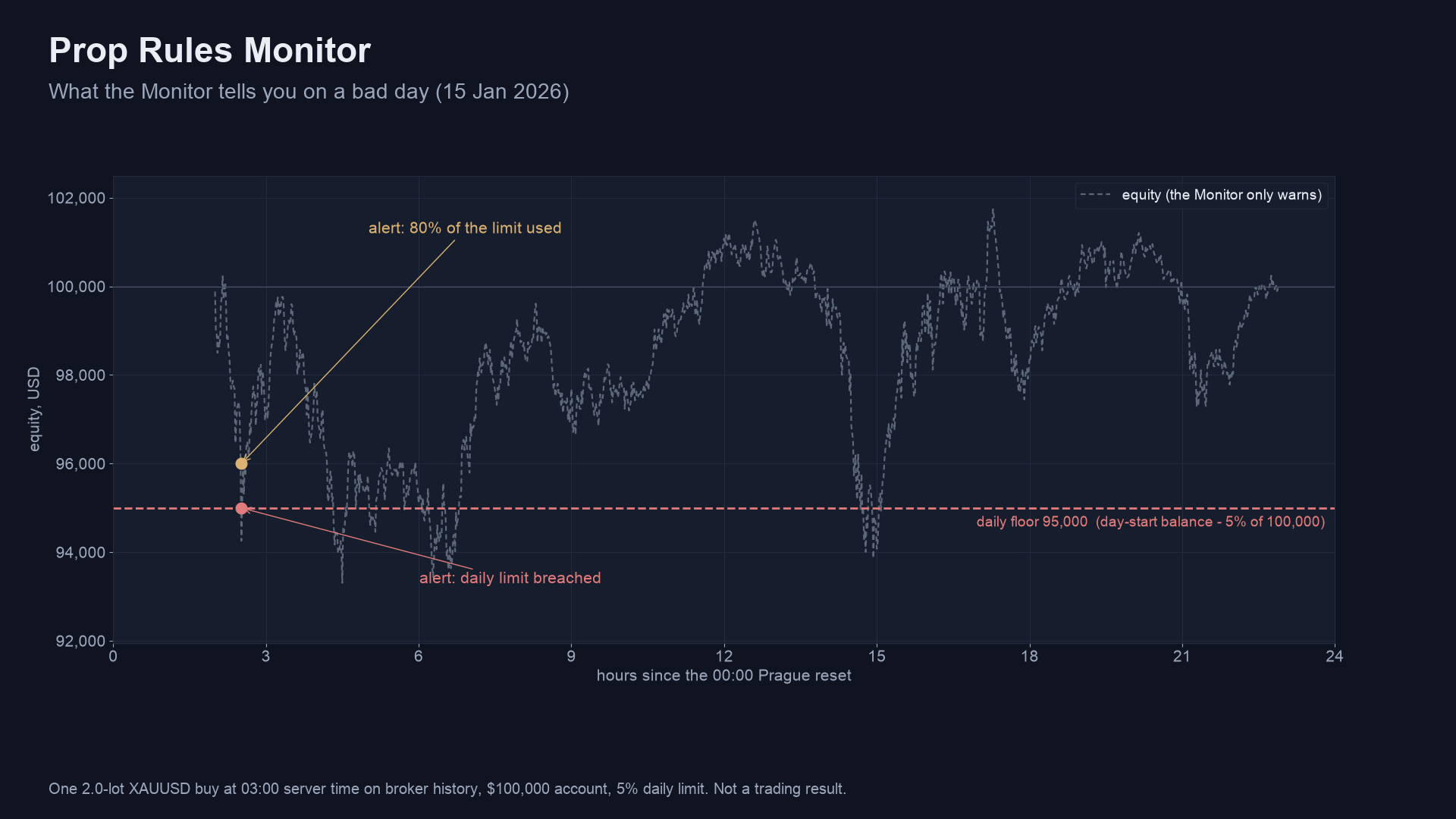
Image notes: panel values are an example $100,000 account; charts are drawn from broker history or illustrate how each floor moves;
they are illustrations, not terminal captures, and not trading results. MT4 versions are in docs/images/mt4/.
Why it was built
- The limits are easy to misread. Firms measure the day from a reset in their own time zone and measure max loss in different ways (static, trailing from equity, balance or end-of-day balance, two-stage). A panel that does the arithmetic live removes a common source of mistakes.
- Demand, from our October 2026 look at the MQL5 Freelance board: 76 of 2,014 scraped jobs (Nov 2025 to Oct 2026) were in the prop-firm / guard group, and equity and daily-drawdown protection appeared in 93 jobs (medians roughly 75 to 115 USD). Those are bespoke jobs, not proven Market demand, and supply is crowded; so this is a free tool.
- Provable maths. The reset-time and daylight-saving logic is checked against the system time-zone database, and the history scan against an independent Python rebuild.
mindmap
  root((Prop Rules Monitor))
    Problem
      Limits measured from a reset in another time zone
      Several ways to measure max loss
      Easy to misjudge the room left
    Design rules
      Measure on equity, open trades count
      Reset time and zone typed in, daylight saving built in
      Watches only, never trades
    Proof
      Reset maths vs time-zone database
      History scan vs Python rebuild
      Market validation
How it works
The maths, step by step
- Day start. The reset is an hour (0-23) in a zone you pick: broker server time, Central Europe, UTC, New York, London or
UTC+3. The broker's own clock is detected (or set: New York close, EET, fixed offset); daylight saving uses built-in rules (US:
second Sunday of March to first Sunday of November; EU: last Sunday of March to last Sunday of October). The reference is the
balance, the equity or the higher of the two at the reset instant. If the indicator was not running through the reset, the day
start is rebuilt as
balance - (money moved since the reset)and the panel says "rebuilt". - Daily floor.
limit = daily% x account size(orx day-start reference),floor = reference - limit. Breach:equity <= floor.used = (reference - equity) / limit. - Max-loss floor.
amount = max% x account size.- Static:
floor = account size - amount. - Trailing:
floor = peak - amount, withpeakthe highest equity, closed balance or end-of-day balance (optionally the floor stops rising at the account size). - Two-stage:
account size - max%until the closed balance has gained a set %, thenaccount size - a smaller %. used = (amount - (equity - floor)) / amount.
- Static:
- Account size is the input, or the first deposit in the history.
- Alerts. One warning when
used >= the warning level(daily: once a day; max loss: once, re-armed after a clear recovery), and a breach alert when equity is at or below a floor. Nothing is sent in the Strategy Tester. - Late first tick. At the reset crossing, money already closed after the reset instant (a gap, the terminal off, stops filled) is taken out of the new day start and of yesterday's end-of-day balance.
Per-update algorithm
flowchart TD
    A[Timer or tick] --> B{Balance or open-trade count changed?}
    B -- yes --> C[Scan the history: account size,<br/>peaks, trading days, today's closed result]
    B -- no --> D
    C --> D[Past the next reset?]
    D -- yes --> E[New day start measured,<br/>yesterday's end-of-day balance fixed]
    D -- no --> F
    E --> F[Daily floor and used %]
    F --> G[Max-loss floor and used %]
    G --> H{Warning level or breach?}
    H -- yes --> I[Alert, once per day or episode]
    H -- no --> J
    I --> J[Redraw only what changed]
Status states
stateDiagram-v2
    [*] --> OK
    OK --> Warning: a limit is used up to the warning level
    Warning --> OK: room recovers (max loss re-arms after a clear recovery)
    Warning --> Breached: equity at or below a floor
    OK --> Breached: equity at or below a floor
    Breached --> OK: the daily reset (daily limit only)
Alert flow
sequenceDiagram
    participant T as Terminal
    participant I as Prop Rules Monitor
    participant E as Engine
    participant U as You
    T->>I: timer every second
    I->>E: update (equity, balance, day start, floors)
    E-->>I: used % and breach flags
    alt warning level reached for the first time today
        I->>U: pop-up (and push if on): "% of today's loss limit used"
    else a floor is breached
        I->>U: pop-up (and push if on): "LIMIT BREACHED"
    else nothing new
        I-->>I: redraw only
    end
How it was tested
1. Reset and zone maths against the system time-zone database. tests/check_day_start.py is a
line-by-line port of the day-start, broker-offset and zone-offset code, checked against the operating system's time-zone data for
every half hour of 2020-2026, on two broker clocks (New York close and EET) and five reset rules (00:00 Central Europe, 00:00 UTC,
17:00 New York, 22:00 London, 23:00 Central Europe): the reset instant must be the last moment the zone's wall clock showed the
reset hour.
| Check | Result |
|---|---|
| Half-hour times compared | 1,227,360 |
| Mismatches | 0 |
Source: tests/results/day-start-check.txt.
2. The history scan and day start in the MetaTrader 4 Strategy Tester. tests/mt4/PrgTrader.mq4 trades
a seeded random mix (market orders, stop loss and take profit, partial and full closes), runs the engine as the indicator does, and
writes the engine's results many times during the run and every order at the end.
tests/mt4/check_mt4.py rebuilds each snapshot from the raw orders on its own (closed result and trading
days per reset day, account size, peak balance, peak end-of-day balance, the rebuilt day start) and compares.
| Result | |
|---|---|
| Runs | 17 (4 reset rules x 4 symbols, plus one every-tick run) |
| Snapshots compared | 32,096 |
| Trade operations made by the test | 81,578 |
| Result | ALL PASS |
Source: tests/results/parity-mt4.txt. The four reset rules are 00:00 Central Europe, 17:00 New York,
22:00 London on an EET clock, and server midnight.
flowchart LR
    Z[check_day_start.py<br/>reset maths vs time-zone database] --> V
    T[PrgTrader EA<br/>MT4 tester trades, snapshots] --> S[state.csv + orders.csv]
    S --> C[check_mt4.py<br/>rebuilds each snapshot from raw orders]
    C --> V{all pass?}
    V -- yes --> M[Market validation]
    V -- no --> F[fix, rerun everything]
3. Market validation. Both Market builds passed the MQL5 Market's automated product validation before publication (the Market's own check, not part of this repository).
What the tests do not cover. The engine tests ran on the MT4 edition (the MT5 engine is the same calculation using the MT5 deal list instead of orders; it was not run through the same tester harness for this repository). The panel text and the alert delivery are not compared. The Strategy Tester has no real server clock, so Auto clock detection is only exercised live.
Architecture
flowchart TB
    subgraph MT5["mql5"]
        A5[Indicators/PropRulesMonitor/PropRulesMonitor.mq5<br/>inputs, alerts, timer]
        V5[Include/PropRulesMonitor/MonView.mqh<br/>panel body]
        E5[Include/PropRulesMonitor/MonEngine.mqh<br/>clock, day start, floors, history scan]
        P5[Include/PropRulesMonitor/MonPanel.mqh<br/>chart objects]
        A5 --> V5
        V5 --> E5
        V5 --> P5
    end
    subgraph MT4["mql4"]
        A4[Indicators/PropRulesMonitor/PropRulesMonitor.mq4]
        V4[Include/PropRulesMonitor/MonView.mqh and MonPanel.mqh<br/>exact copies]
        E4[Include/PropRulesMonitor/MonEngine.mqh<br/>orders-based history scan]
        A4 --> V4
        V4 --> E4
    end
    subgraph TESTS[tests]
        K1[check_day_start.py]
        K2[mt4/check_mt4.py]
        D4[mt4/PrgTrader.mq4]
    end
    D4 -. includes .-> E4
    K2 --> D4
classDiagram
    class PropRulesMonitor {
        +InpDailyPct double
        +InpMaxPct double
        +InpMaxMode enum
        +InpWarnAt double
        +OnInit()
        +OnTimer()
        +CheckAlerts()
        +Draw()
    }
    class MonEngine {
        +MonRules g_rules
        +PrgState g_st
        +PrgInit()
        +PrgUpdate()
        +PrgScanHistory()
        +PrgDayStart()
    }
    class MonView {
        +DrawBody()
    }
    class MonPanel {
        +Row()
        +Bar()
        +Section()
    }
    PropRulesMonitor --> MonView
    MonView --> MonEngine
    MonView --> MonPanel
The indicator has no buffers and no iCustom interface: it is a panel.
Inputs, alerts, install and compile
| Input | Default | Meaning |
|---|---|---|
| Daily loss limit, % | 5 (0 = off) | Of the account size or of the day start |
| Limit is / Measured from | % of the initial balance / balance at the reset | Daily rule |
| Day resets in time zone / at hour | Central Europe / 0 | Reset rule |
| Max loss, % of account size | 10 (0 = off) | Overall limit |
| Max loss type | Static | Static, trailing from equity, closed balance or end-of-day balance, or two-stage |
| Trailing floor stops at the account size | false | Trailing types only |
| Two-stage: after a closed gain of % / max loss becomes % | 5 / 5 | Two-stage only |
| Account size | 0 (first deposit) | |
| Profit target, % / Minimum trading days | 10 / 4 | Shown on the panel |
| Warn at % of a limit used | 80 | |
| Pop-up alert / Push notification | true / false | Push needs your MetaQuotes ID |
| Panel position, margins, font size, light colours | left, 10, 26, 9, false | Display |
| Broker server clock / offset from UTC | Auto / 0 | Auto, New York close, EET or fixed |
| Debug log for bug reports | false | Writes extra lines to the Experts tab, to attach when you report a problem |
Install from source. MT5: copy mql5/Indicators/PropRulesMonitor/ into <terminal data folder>/MQL5/Indicators/ and
mql5/Include/PropRulesMonitor/ into <data folder>/MQL5/Include/. MT4: the same with mql4/. Open PropRulesMonitor.mq5 or
.mq4 in MetaEditor and press Compile (F7). Both compile with 0 errors and 0 warnings (checked with the MetaEditor of a MetaTrader 5
and a MetaTrader 4 build on a Windows machine; the compiled files are not in the repository). The indicator keeps the day start and
the peaks in terminal global variables named PRG.<login>.MON.<field>. The debug log needs the Chart Kit file as well: copy mql5/Include/ChartKit/ (MT5) or mql4/Include/ChartKit/ (MT4) into the Include folder of the data folder.
Run the tests
python3 tests/check_day_start.py # reset maths vs the time-zone database (Python 3.9+, standard library only)
For the MT4 engine test: compile tests/mt4/PrgTrader.mq4 (it includes <PropRulesMonitor\MonEngine.mqh>, so install
mql4/Include/PropRulesMonitor/ first), run it in the MetaTrader 4 Strategy Tester (open prices) for each symbol with the inputs in
tests/mt4/configs.tsv, collect the *_state.csv and *_orders.csv files it writes, and run
python3 tests/mt4/check_mt4.py <folder with the files>.
Honest limits
- You type the rules. The Monitor knows no firm's rules; firms change them. Read your firm's own pages, and compare the day start and floors on the panel with the firm's dashboard.
- It cannot know a missed reset exactly. If it was not running at the reset, the day-start equity is rebuilt from the balance and the panel says "rebuilt".
- One copy per account. Copies share the stored day start and peaks (
PRG.<login>.MON.*), so two copies with different reset rules would mix them. (A test found this: the test EA and the indicator, run together with different resets, disagreed on the peak end-of-day balance.) - A watcher, not a guard. It never closes anything. In a fast market, a gap or a closed market equity can pass a floor before you react.
- Tests. The engine was compared in the MT4 tester and the zone maths against a time-zone database; the MT5 engine and the panel text were not run through the same harness (see above). No profit or pass claim is made.
Licence
Everything is © 2026 Allan Niñal under the
PolyForm Noncommercial License 1.0.0: source-available, free for personal and other
noncommercial use, not for commercial use. Each source file has an SPDX-License-Identifier line; the text is in
LICENSE. The licence applies to this source, not to anything you build or trade with the indicator. Trading involves
risk; the software is provided as is.
Website: allanninal.dev/mql5 · MT4 · allanninal.dev · Questions: message me on LinkedIn.