
Candlestick Scanner (MetaTrader 5 and MetaTrader 4)
A scanner indicator that watches many symbols and timeframes for 21 candlestick patterns in one panel on your chart, can keep only patterns at a recent high or low, shows a statistics table next to a baseline, and sends an alert when a new pattern appears.
This is a showcase repository: documentation and images only. There is no source code here. The product is sold on the MQL5 Market. The free single-chart indicator it builds on has public source: allanninal/candlestick-signal-alerts.
Website: allanninal.dev/mql5 (indicators) · MT4 editions · allanninal.dev · Contact: message me on LinkedIn.
Get it on the MQL5 Market
| Product | Platform | Price | Link |
|---|---|---|---|
| Candlestick Scanner | MT5 | paid | https://www.mql5.com/en/market/product/201779 |
| Candlestick Scanner MT4 | MT4 | paid | https://www.mql5.com/en/market/product/202406 |
| Candlestick Signal Alerts (single chart, source on GitHub) | MT5 | free | https://www.mql5.com/en/market/product/201775 |
| Candlestick Signal Alerts MT4 (single chart, source on GitHub) | MT4 | free | https://www.mql5.com/en/market/product/202358 |
The scanner is standalone: you do not need to install the free indicator to use it. Details, current price and the Strategy Tester demo are on the Market pages.
What it does
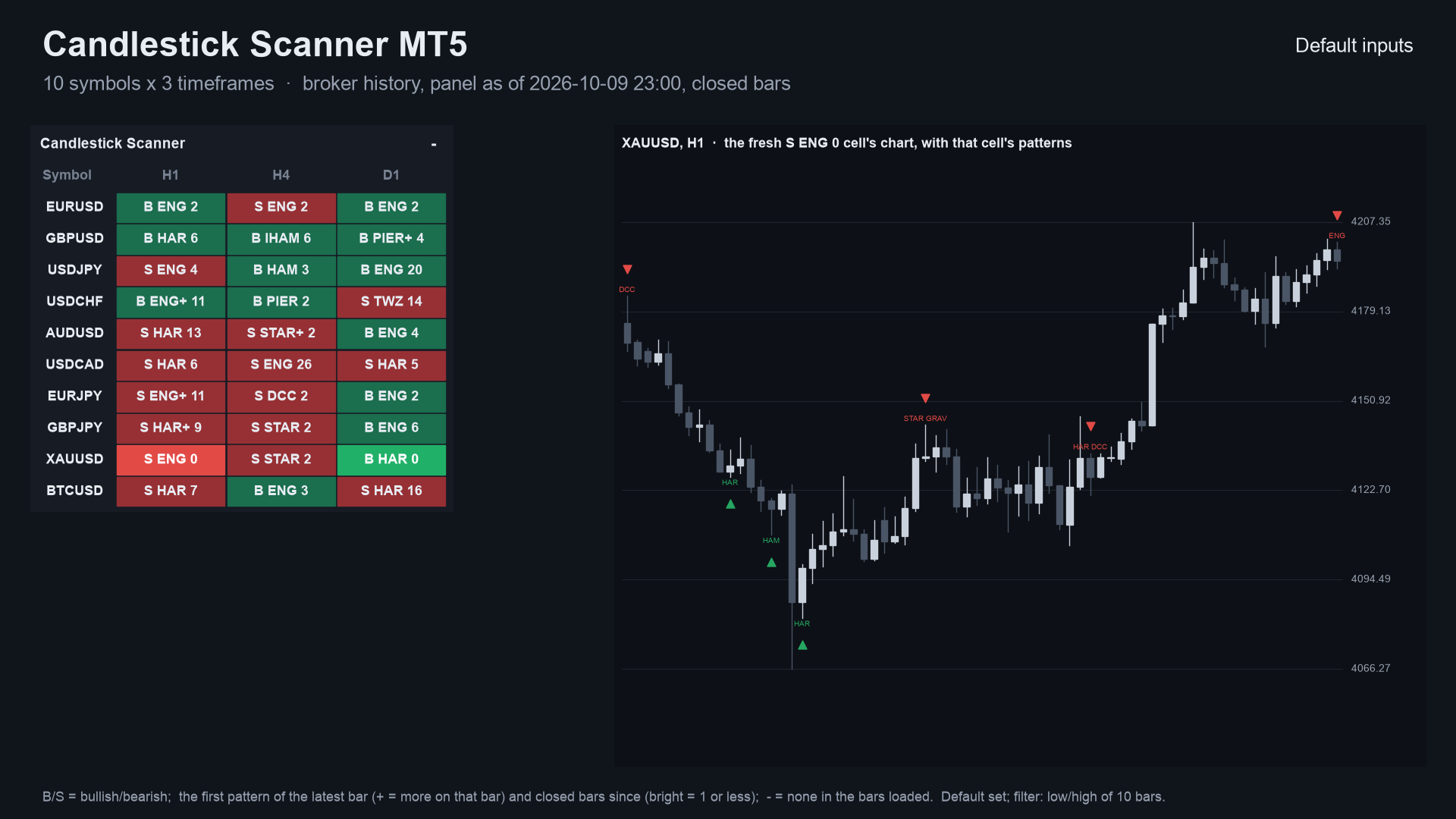
- A panel on the chart with symbols as rows and timeframes as columns (Market Watch symbols, or your own list).
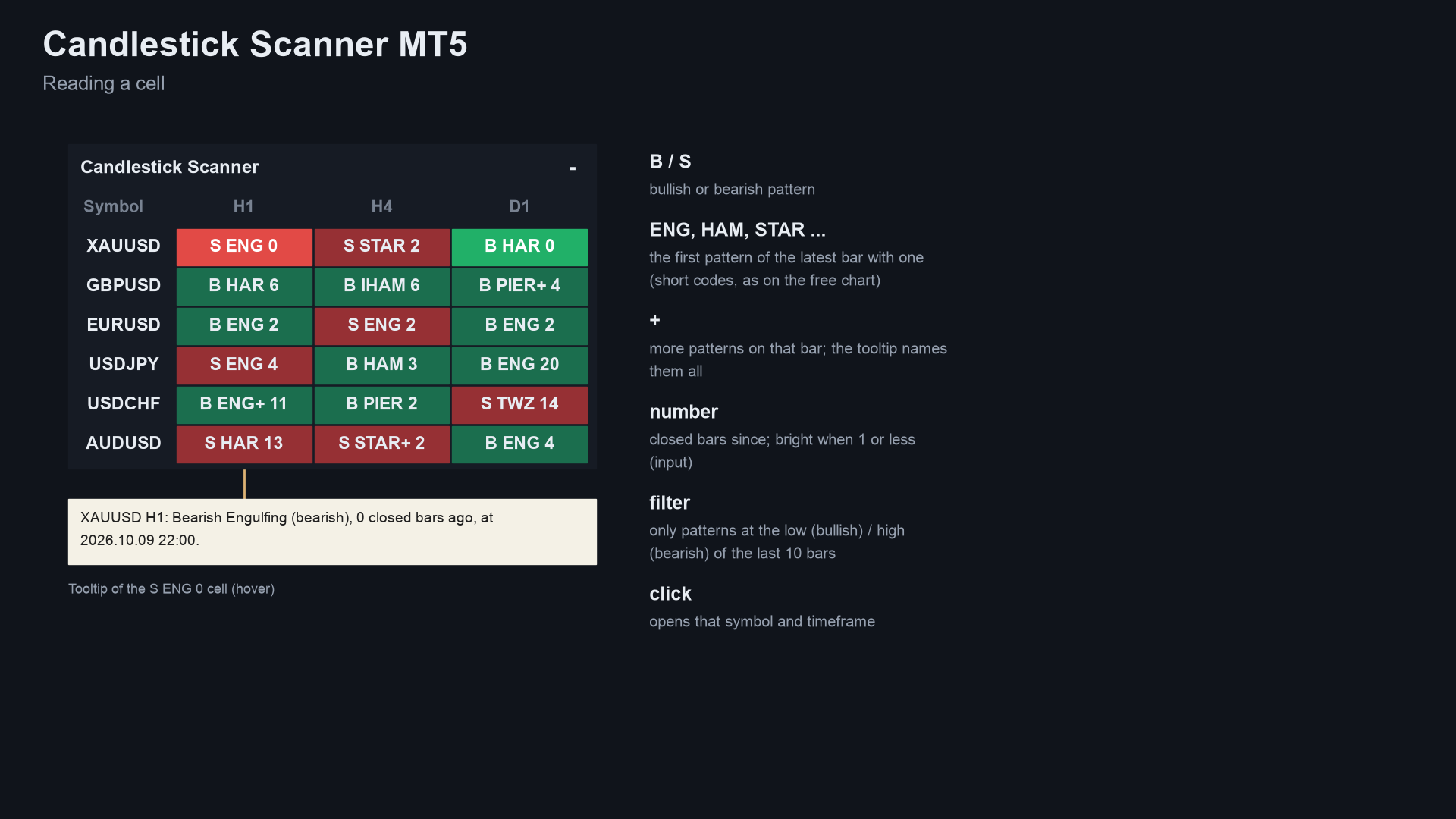
- In each cell: the latest pattern on that symbol and timeframe, its direction (
Bbullish,Sbearish) and how many closed bars ago it formed, for exampleB ENG 2. A+means more patterns completed on that bar; the tooltip lists them. - 21 patterns: the 13 of the free indicator plus 8 more. See the Market listing for the full list.
- A brighter cell when the latest pattern is recent (you choose how many bars count as fresh).
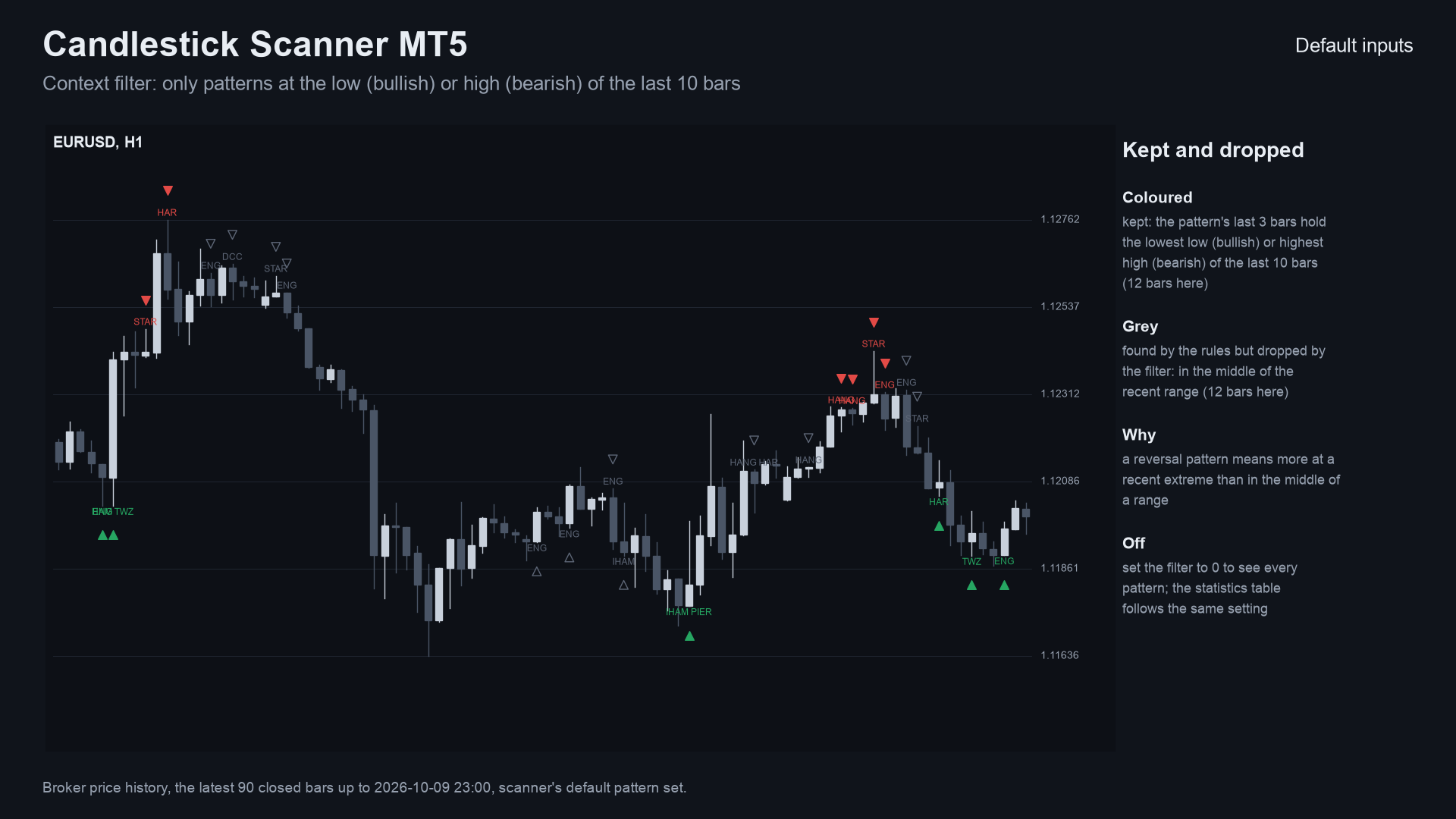
- An optional context filter: keep only patterns that sit at the lowest low (bullish) or highest high (bearish) of the last N bars, N adjustable, 0 = off.
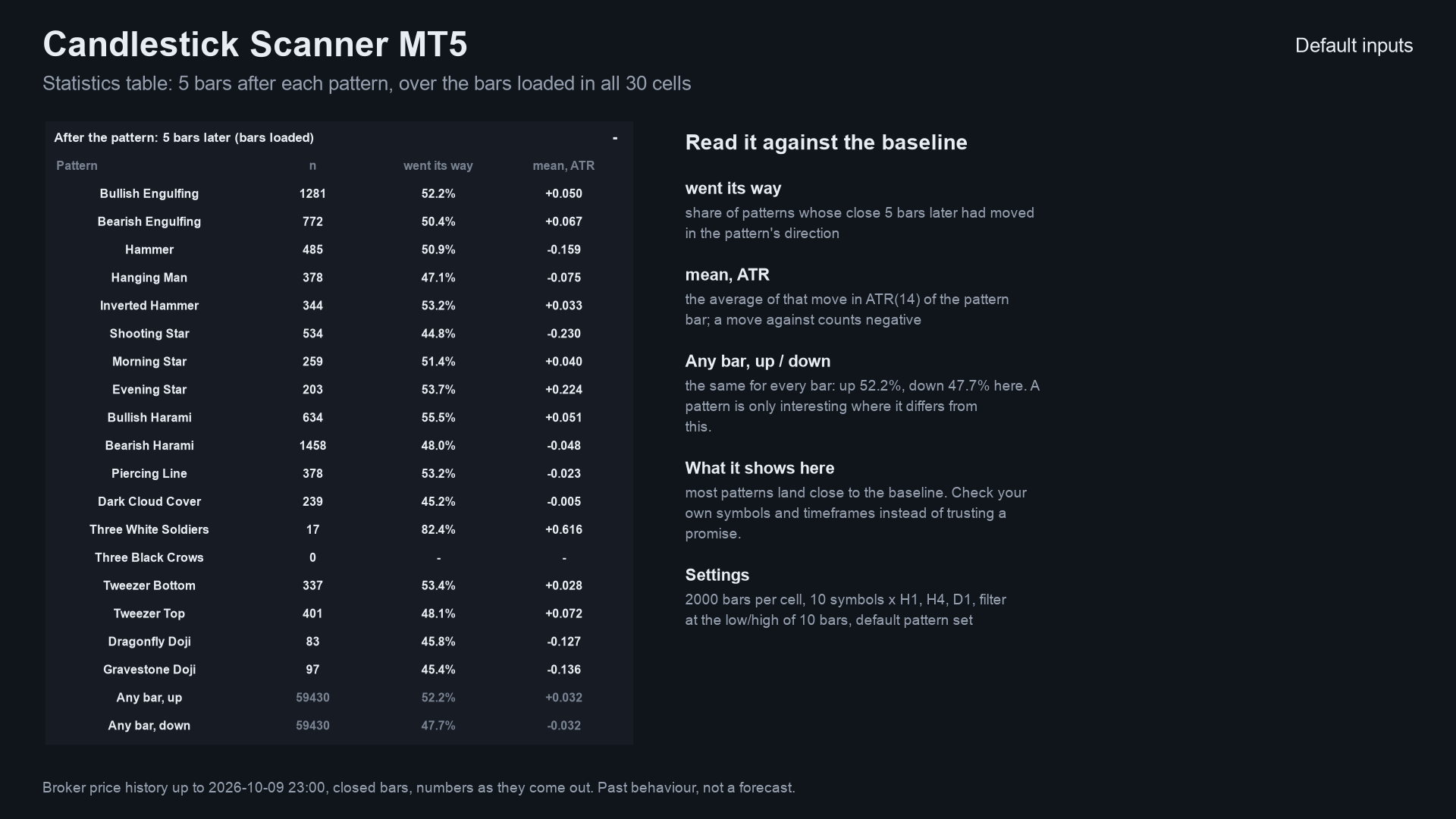
- A statistics table: for each pattern, how many there were in the loaded bars, how often the close N bars later had moved in the pattern's direction, and the average move in ATR, next to the same measures for any bar, so you can see where a pattern differs from nothing special.
- Click a cell to open that symbol and timeframe.
- Alerts: pop-up (on by default), sound, push notification and e-mail, each switched separately. Nothing is sent while history loads, never twice for the same cell and bar, and not in the Strategy Tester. Alerts of the same second come as one message.
- Closed bars only. A cell does not change after its bar has closed. It places no orders.
flowchart LR
    A[Attach to any chart] --> B[Pick symbols:<br/>Market Watch or your own list]
    B --> C[Pick timeframes:<br/>default H1, H4, D1]
    C --> D[Panel shows the latest pattern<br/>and bars since it formed]
    D --> E{New pattern?}
    E -- yes --> F[Brighter cell + alert]
    E -- no --> D
    F --> G[Click the cell<br/>to open that chart]
The grid at a glance
Each cell is one symbol on one timeframe. You read a whole watchlist in a single look instead of flipping through charts.
flowchart TB
    subgraph PANEL[Panel on your chart]
        direction TB
        H[Symbol / H1 / H4 / D1]
        R1[EURUSD: cell, cell, cell]
        R2[XAUUSD: cell, cell, cell]
        R3[GBPJPY: cell, cell, cell]
        R4[BTCUSD: cell, cell, cell]
    end
    PANEL --> K[Click a cell: opens that symbol and timeframe]
    PANEL --> T[Statistics table beside the panel]
What a cell can show
stateDiagram-v2
    [*] --> loading: terminal still downloading history
    loading --> pattern: fills in by itself
    loading --> none: no pattern in the bars loaded
    loading --> na: symbol or timeframe unavailable
    none --> pattern: a closed bar completes a pattern
    pattern --> pattern: a newer pattern replaces it
    pattern --> fresh: formed within the fresh-bars setting
    fresh --> pattern: ages out of the fresh window
 |
 |
 |
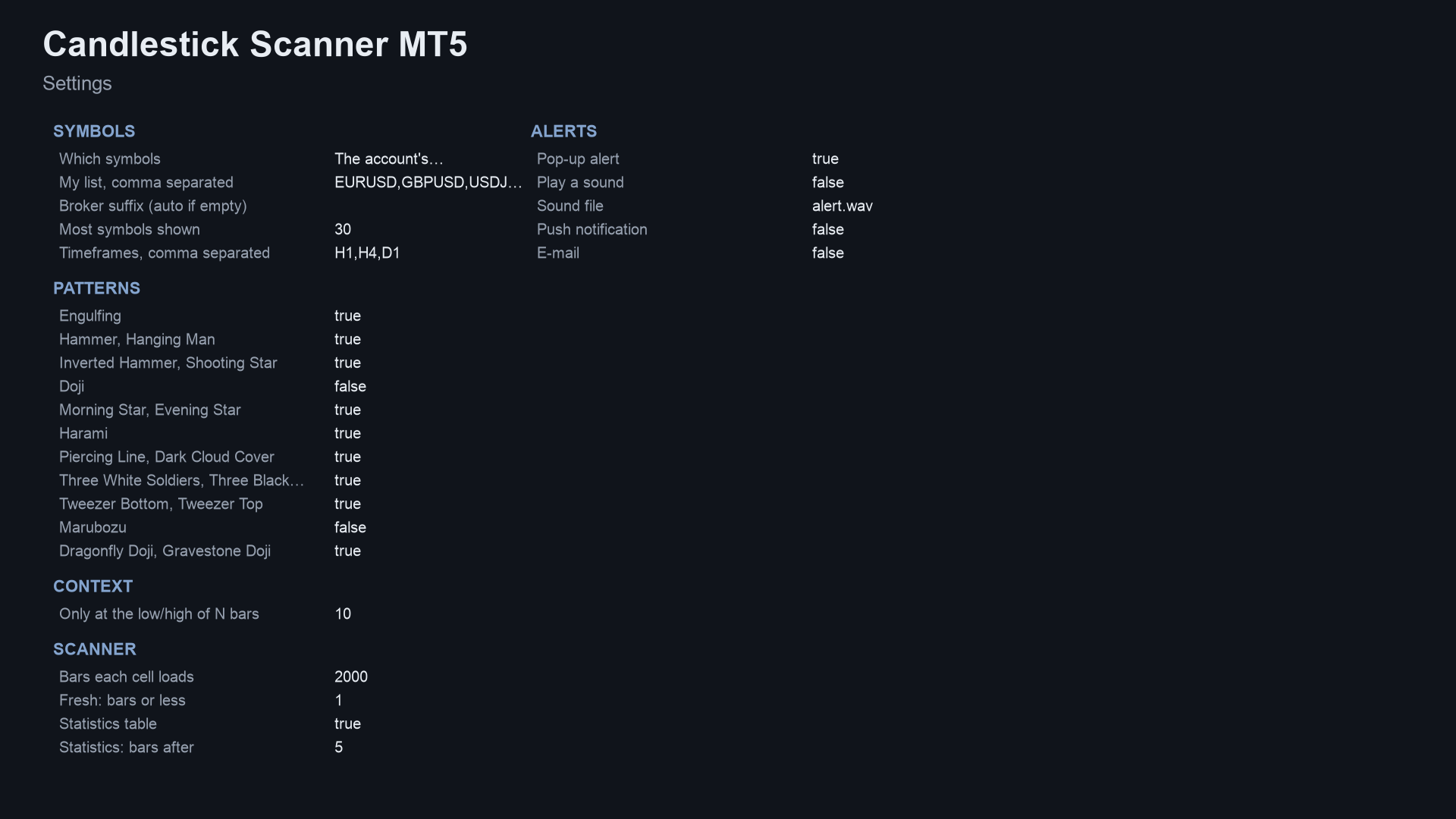 |
MT4 edition screenshots: panel on a chart, how to read a cell, statistics. Some screenshots are illustrations built from broker history, not terminal captures.


Who it is for
Traders who read candlestick patterns on several symbols. If you watch one chart, the free Candlestick Signal Alerts marks 13 patterns there.
Why it was built
- Candlestick patterns are the most-read chart method, and the free single-chart indicator covers one chart at a time.
- Our October 2026 market research (MQL5 Market, forums, freelance boards, book and course audiences) found multi-symbol scanners are a recurring want, but also that pattern indicators are a crowded category (roughly 170 on the Market, about 54 free) with little to tell them apart. So the scanner adds two things that are easy to check: a whole-watchlist view, and a statistics table that shows each pattern against the any-bar baseline instead of asking you to trust it.
- Design rule carried over from the free indicator: trust. Cells use closed bars only, so what you saw does not change.
What the statistics show
Descriptive only. For each pattern the table gives a count, how often price moved the pattern's way N bars later, and the mean move in ATR, beside the same numbers for every bar. On broker history most patterns land close to that baseline, so a pattern is only interesting where it differs from it. The table lets you check your own symbols and timeframes. It is past behaviour, not a forecast, and no edge is claimed.
How it was checked (results)
Every cell value, pattern flag and statistics counter was compared with an independent Python calculation, with all 21 patterns on.
| Check | MT5 edition | MT4 edition |
|---|---|---|
| Test files compared | 32 (EURUSD, GBPJPY, XAUUSD, BTCUSD x M15, H1, H4, D1 x 2 settings) | 108 (the same four symbols x M15, H1, H4, D1, two settings) |
| Result | 0 mismatches over 36,181 pattern bars, statistics counters included | 6,556,230 values compared, 0 differences |
| Panel counts vs the test's own cells | - | 8,674,389 checks matched after start-up |
| Cells using the forming bar | none | none |
xychart-beta
    title "MT4 edition: checks that passed (millions)"
    x-axis ["Values compared", "Panel checks matched"]
    y-axis "millions" 0 --> 10
    bar [6.6, 8.7]
The free indicator that shares the pattern rules also has its own published results (parity against a reference on every bar, and an every-tick repaint test with 0 changed marks); see its repository. These are code checks, not trading results.
Honest limits
- A scanner shows the state of a technical rule. It does not predict the market, and past patterns are no indication of future results. No profit or accuracy claim is made.
- It is an indicator: it places no orders and manages no risk.
- Pattern names have several textbook definitions; the scanner uses one fixed set of thresholds, so counts will differ from other tools.
- It needs the terminal running to alert, and push needs your MetaQuotes ID set up in the terminal.
- The source is not published; this repository documents what the product does and the results of its checks.
Free vs paid
| Candlestick Signal Alerts (free) | Candlestick Scanner (paid) | |
|---|---|---|
| Scope | one chart | many symbols x timeframes in one panel |
| Patterns | 13 | 21 |
| Output | arrows and labels on the chart | latest-pattern cells, context filter, statistics table |
| Alerts | pop-up, sound, push, e-mail | pop-up, sound, push, e-mail |
| MT5 | 201775 | 201779 |
| MT4 | 202358 | 202406 |
| Source | public on GitHub | not published |
Website: allanninal.dev/mql5 · MT4 · allanninal.dev · Questions: message me on LinkedIn. All rights reserved, see LICENSE. Copyright 2026 Allan Niñal (https://www.allanninal.dev/mql5). All rights reserved.
This repository contains documentation and images only; it contains no source code. The text and images may not be copied, redistributed or used commercially without written permission. The Candlestick Scanner products themselves are distributed only through the MQL5 Market under the Market's own terms.