

EA Health Monitor Pro (MetaTrader 5 and MetaTrader 4)
An indicator that watches every Expert Advisor on your account: one row per EA (by magic number), manual trades on their own row, a result curve per EA, results by period, and alarms when floating loss or drawdown passes your limit or an EA goes quiet. It only reads the account history and the open positions. It never opens, changes or closes a trade.
This is a showcase repository: documentation and images only. There is no source code here. The product is sold on the MQL5 Market. The free per-EA table it builds on has public source: allanninal/ea-health-monitor.
Website: allanninal.dev/mql5 (utilities) · MT4 editions · allanninal.dev · Contact: message me on LinkedIn.
Get it on the MQL5 Market
| Product | Platform | Price | Link |
|---|---|---|---|
| EA Health Monitor Pro | MT5 | paid | https://www.mql5.com/en/market/product/201799 |
| EA Health Monitor Pro MT4 | MT4 | paid | https://www.mql5.com/en/market/product/202431 |
| EA Health Monitor (per-EA table, source on GitHub) | MT5 | free | https://www.mql5.com/en/market/product/201797 |
| EA Health Monitor MT4 (per-EA table, source on GitHub) | MT4 | free | https://www.mql5.com/en/market/product/202428 |
The Pro indicator is standalone: you do not need to install the free one. Details, current price and the Strategy Tester demo are on the Market pages.
What it does
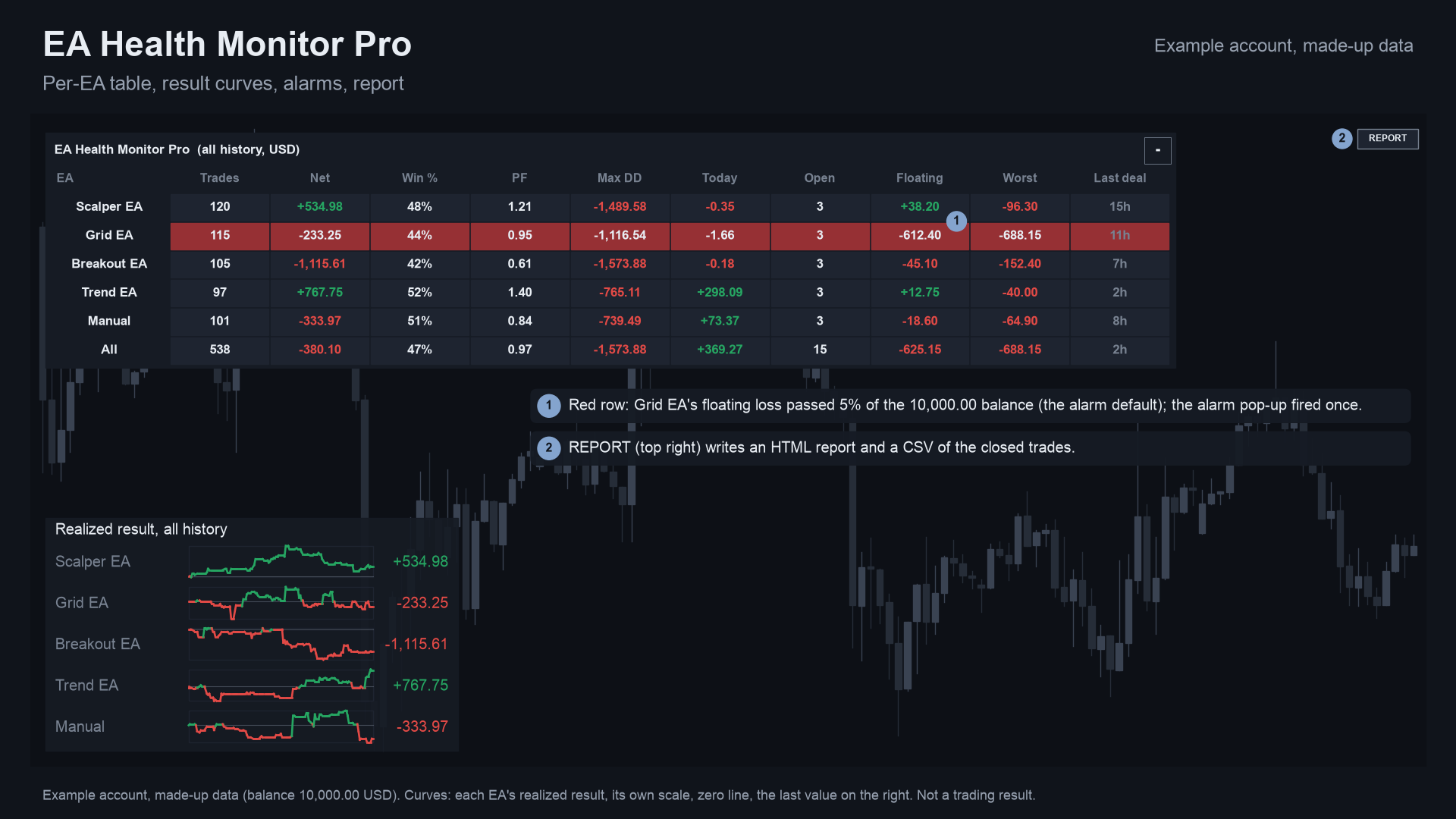
- Per EA: closed trades, net result, win rate, profit factor, expectancy and max drawdown of the realized result; today's result, open positions, floating P/L, the worst floating P/L it has shown, and the time of the latest deal.
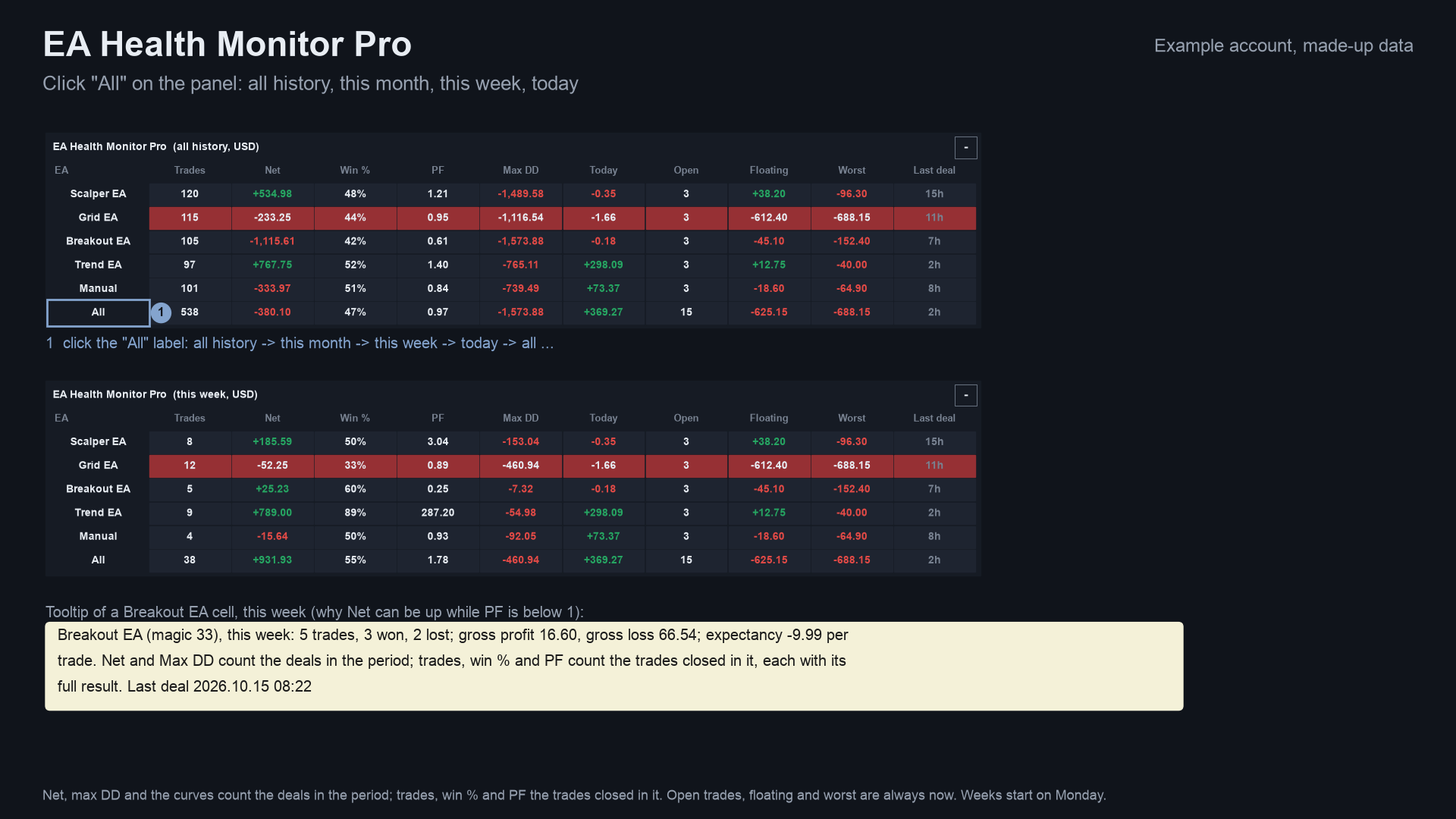
- Period: all history, this month, this week or today (click "All" on the panel to switch). Net and max drawdown count the deals in the period; trades, win rate and profit factor count the trades closed in it, each with its full result.
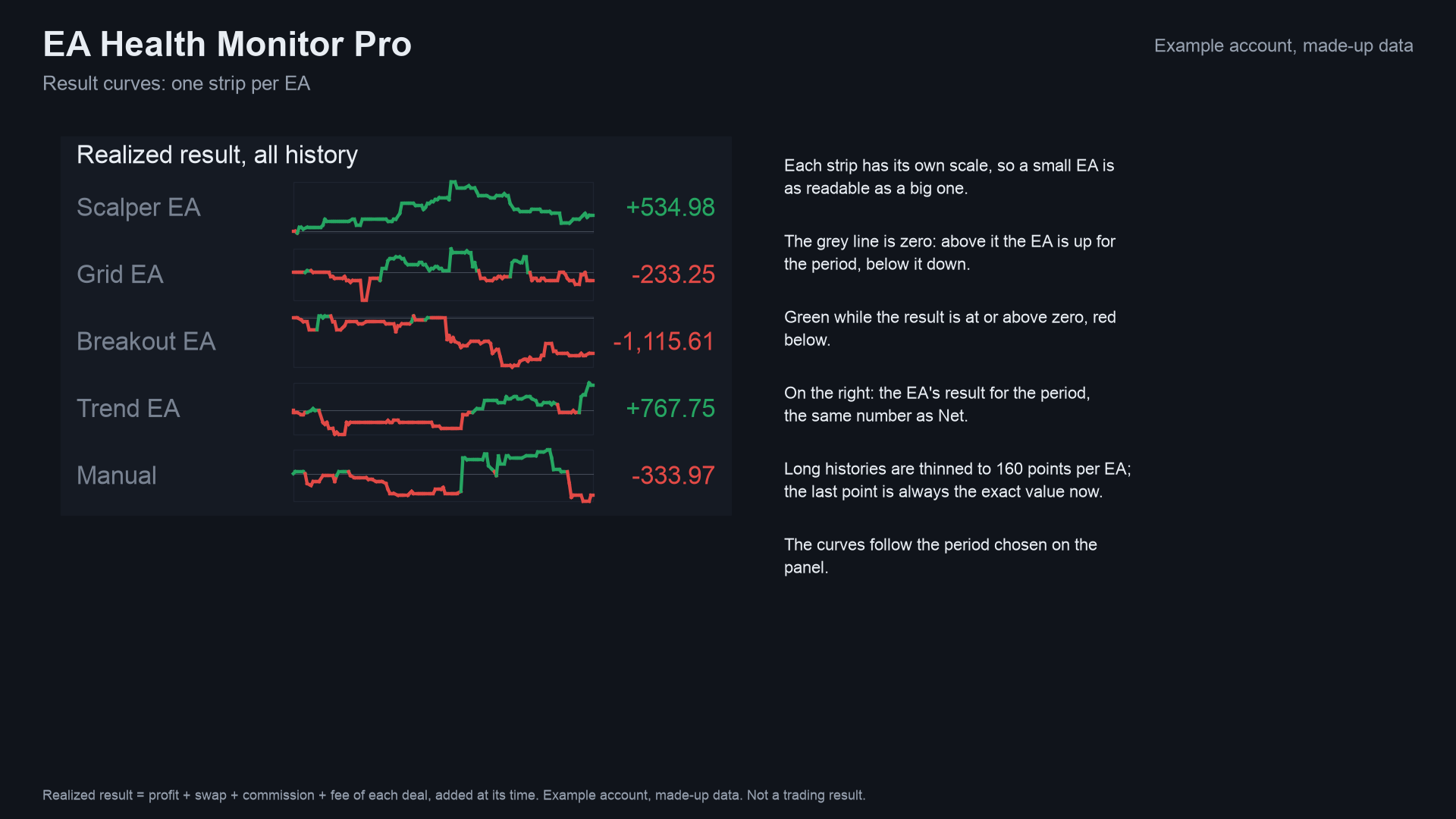
- A result curve per EA for the period, each on its own scale, with the last value.
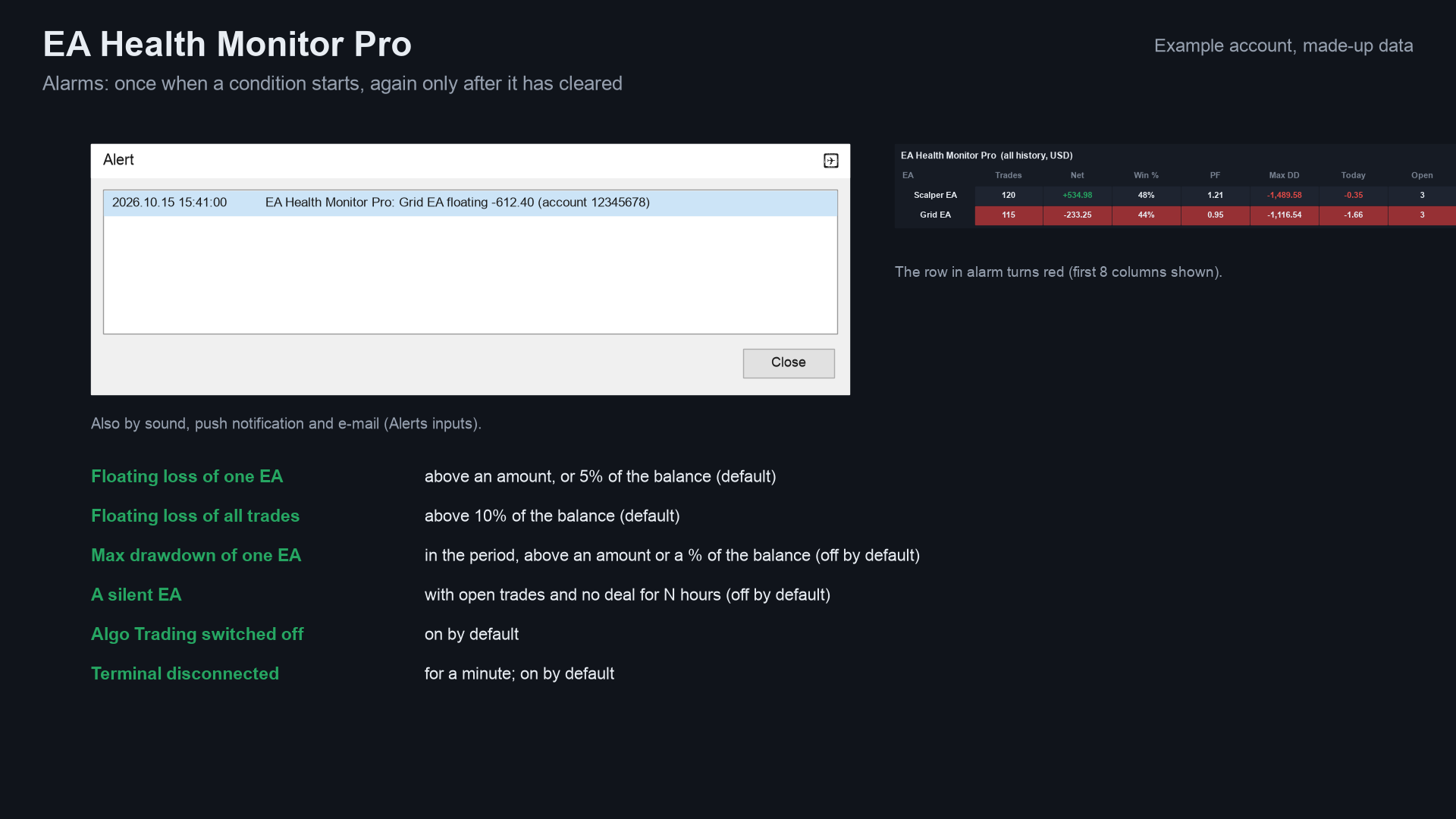
- Alarms (each fires once when its condition starts, and again only after it has cleared; pop-up, sound, push, e-mail): floating loss of one EA above an amount or a % of the balance (5% by default) and of all trades (10%); max drawdown of one EA in the period; an EA with open trades that has made no deal for a number of hours; automated trading switched off or the terminal disconnected. Rows in alarm turn red.
- REPORT button: an HTML report and a CSV of the closed trades.
- Counted correctly: a trade belongs to the EA that opened it even if you close it by hand; partial closes are one trade; entry commissions are included; net = profit + swap + commission + fee.
flowchart LR
    A[Attach to any chart] --> B[Names: magic=name<br/>so rows show your EA names]
    B --> C[Panel: one row per EA,<br/>manual row, total]
    C --> D[Pick the period:<br/>all, month, week, today]
    C --> E{An alarm condition starts?}
    E -- yes --> F[Row turns red + alert, once]
    E -- no --> C
    C --> G[REPORT: HTML + CSV]
The panel at a glance
flowchart TB
    subgraph PANEL[Panel on your chart]
        direction TB
        H[EA / Trades / Net / Win % / PF / Max DD / Today / Open / Floating / Worst / Last deal]
        R1[Trend EA: row + result curve]
        R2[Grid EA: row + result curve]
        R3[Manual: row + result curve]
        R4[All: total row]
    end
    PANEL --> K[Click All: all history, month, week, today]
An alarm
stateDiagram-v2
    [*] --> Clear
    Clear --> Firing: the condition starts (one alert)
    Firing --> Firing: still true, no new alert
    Firing --> Clear: the condition clears
 |
 |
 |
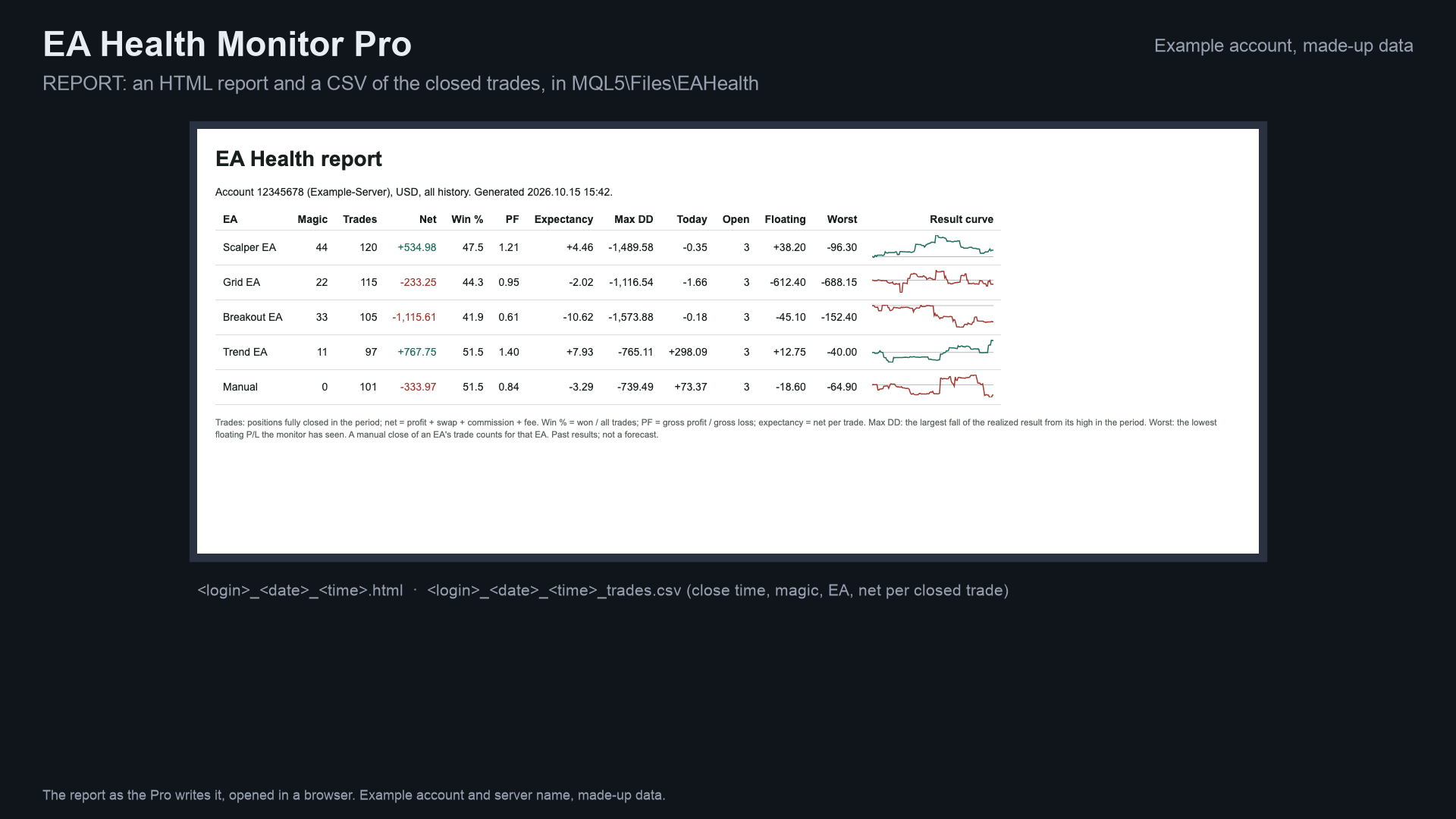 |
MT4 edition screenshots: panel, curves and report, periods. All screenshots use an example account with made-up data; they are illustrations, not terminal captures, and not trading results.


Who it is for
Traders who run several Expert Advisors on one account and want to see each one's health in one place, not one combined equity curve. If you only want the per-EA table for all history, the free EA Health Monitor shows it.
Why it was built
- A combined account statement hides which EA is carrying the others. A per-magic table answers that.
- Our October 2026 market research was thin on this: a Myfxbook reply listing checks people skip for bots (open-basket floating loss, restart during an open trade) and a Programming-forum thread on EA portfolio analysis (235 views), with a handful of equity and drawdown panels already on the Market.
- Honest scale: that is a small, scattered signal, not proof of mass demand. So the free table is open source and the Pro adds the period filter, curves, alarms and reports for people who run several EAs.
How it was checked (results)
The statistics are the same core as the free indicator, compared with an independent Python calculation.
| Check | Result |
|---|---|
| MT5 core, 6 synthetic deal histories (1 to 30 magics, partial and manual closes, reversals, entry commissions), whole history and a period inside it | all pass |
| MT4 edition, MetaTrader 4 Strategy Tester (2 seeds x 4 symbols + one every-tick run) | 146 snapshots, all pass |
| MT4 trade operations made by the test | 10,402 |
| MT4 trades in the final snapshots | 6,146 |
xychart-beta
    title "MT4 edition: what the test covered"
    x-axis ["Snapshots", "Trade operations (hundreds)", "Trades (hundreds)"]
    y-axis "count" 0 --> 110
    bar [1.46, 104.02, 61.46]
Not covered: the panel text in the MT4 tester (it gives an indicator run through iCustom no chart); the test account was a
cent account, so many orders were refused for margin and some runs ended early. These are code checks, not trading results.
Honest limits
- It reports what your account did. It does not judge whether an EA will work, and past results do not predict future results.
- Alarms work while the terminal runs; a VPS keeps it running.
- The source is not published; this repository documents what the product does and the results of its checks.
Free vs paid
| EA Health Monitor (free) | EA Health Monitor Pro (paid) | |
|---|---|---|
| Per-EA table, all history | yes | yes |
| Periods, result curves, alarms, report | no | yes |
| MT5 | 201797 | 201799 |
| MT4 | 202428 | 202431 |
| Source | public on GitHub | not published |
Website: allanninal.dev/mql5 · MT4 · allanninal.dev · Questions: message me on LinkedIn. All rights reserved, see LICENSE.