 7febb24656
Generated by the publish tool from the private source; all publish gates pass, compile 0 errors 0 warnings on MT5 and MT4.

Co-Authored-By: Claude Opus 5.5 <noreply@anthropic.com>
Gann HiLo Swing (MetaTrader 5 and MetaTrader 4)
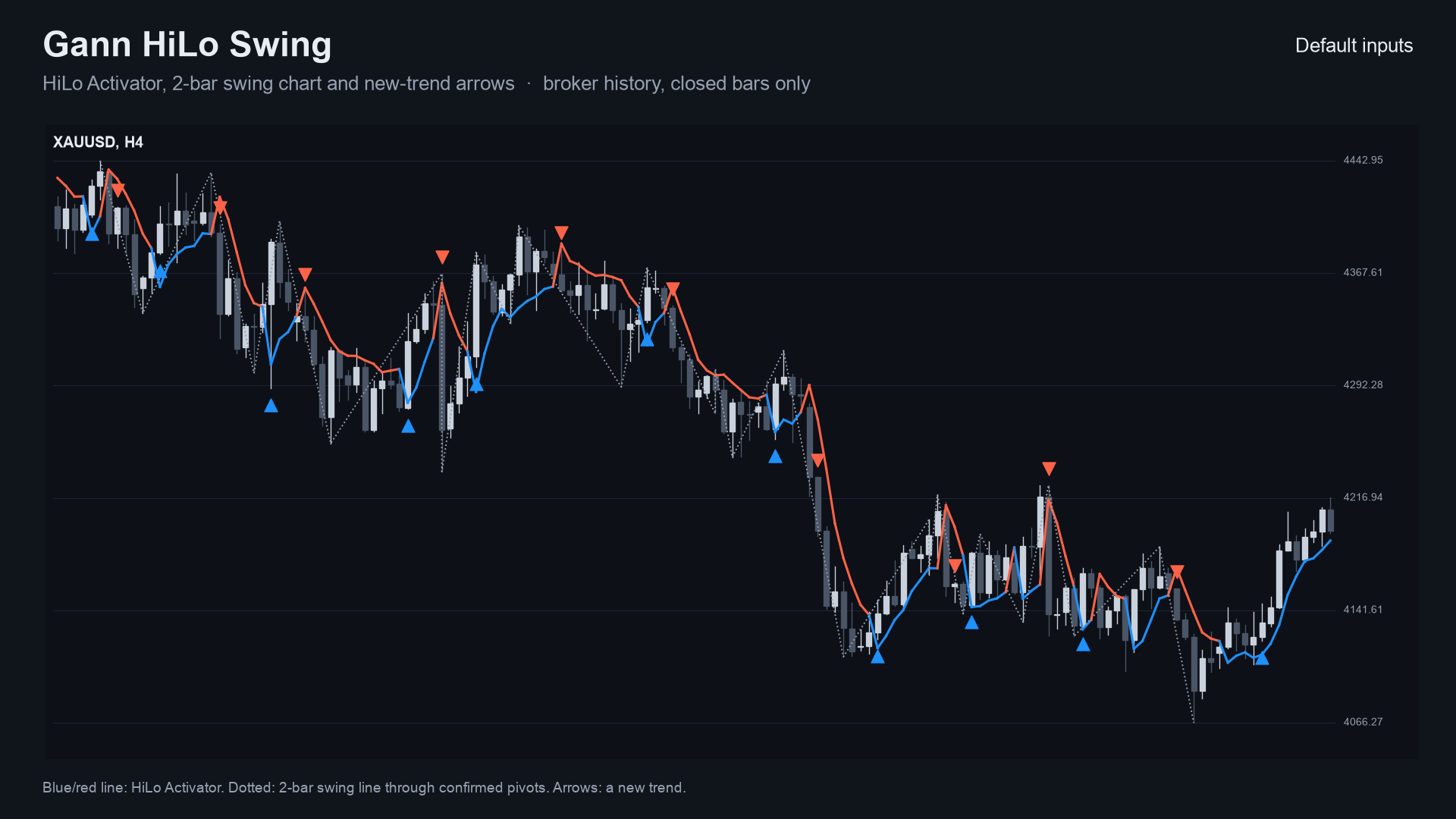
A free indicator with two of W.D. Gann's simple tools on closed bars only: the HiLo Activator line (blue in an uptrend, red in a downtrend) and the 2-bar swing chart (a dotted line through confirmed swing highs and lows), with an arrow and an alert on the bar where a new trend starts. Source for both editions, a Python reference of the rules, and the tests that were used to check that the MT5 and MT4 code, the Python reference and each other all agree.
Website: allanninal.dev/mql5 (indicators) · MT4 editions · allanninal.dev · Contact: message me on LinkedIn.
It is an indicator, not a strategy. It draws a line and arrows and places no trades. Nothing here is a profit claim (see Honest limits).
Get it on the MQL5 Market
| Edition | Platform | Price | Link |
|---|---|---|---|
| Gann HiLo Swing | MT5 | free | https://www.mql5.com/en/market/product/201806 |
| Gann HiLo Swing MT4 | MT4 | free | https://www.mql5.com/en/market/product/202367 |
The Market builds are the same calculation as the source in this repository.
Contents
- What it is and who it is for
- Why it was built
- How it works
- Non-repainting: the proof and how it was tested
- Architecture and buffers
- Inputs, alerts, install and compile
- Run the Python reference and the tests
- Honest limits
- Licence
What it is and who it is for
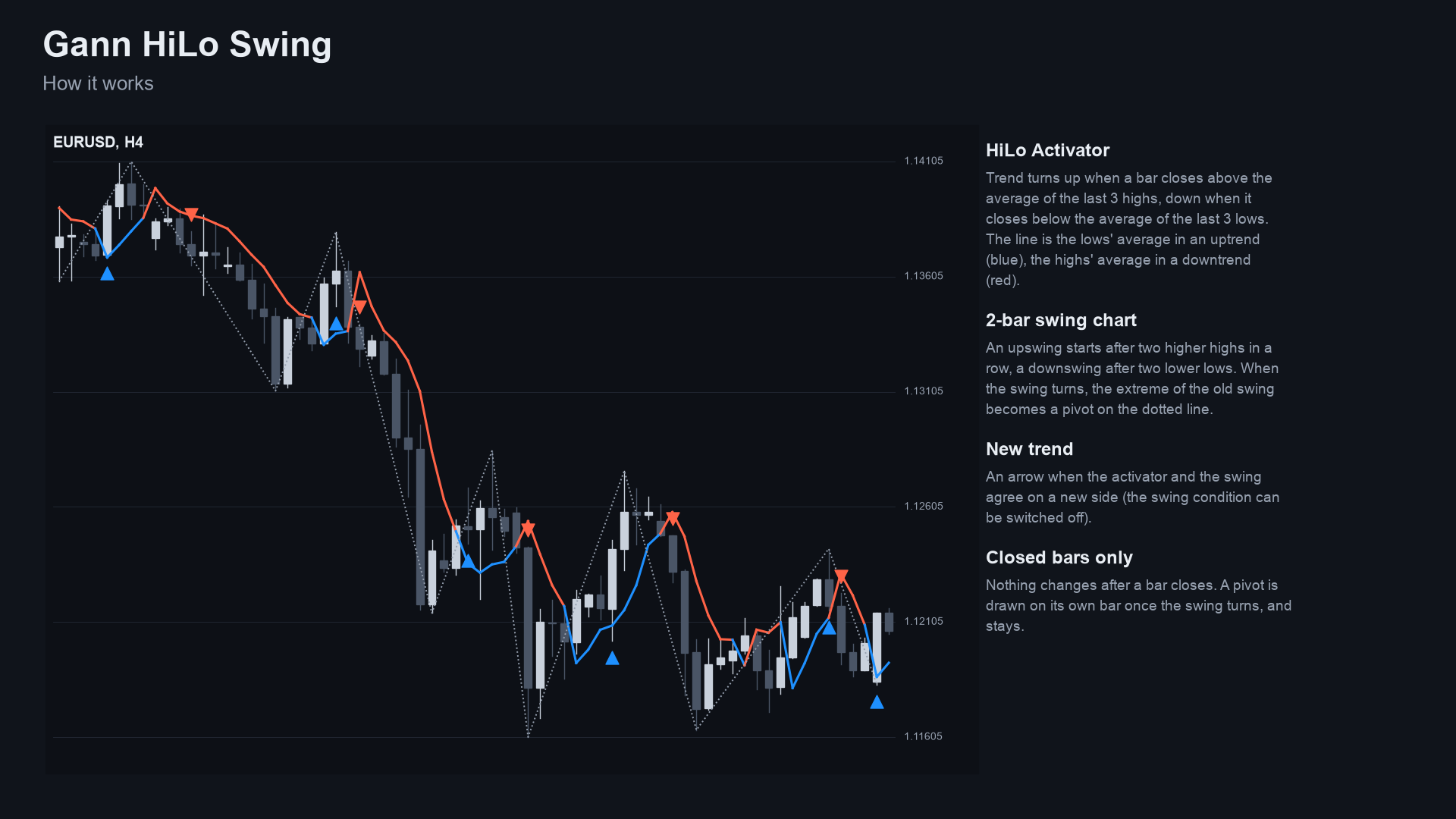
What: the HiLo Activator with Gann's own period of 3, plus the 2-bar swing chart. The line shows the trend side; the dotted swing line connects confirmed pivots; an arrow marks the bar where a new trend starts (the activator and the swing agree on a new side; the swing condition can be switched off). Alerts: pop-up (on by default), sound, push notification, e-mail.
For: traders who read the trend with Gann's simple tools. Also for developers who want a small, tested trend engine
with documented buffers to read from an EA with iCustom.
Not for: anyone who expects the arrows to be entries that win. Period 3 follows price closely and flips often.
 |
 |
 |
 |
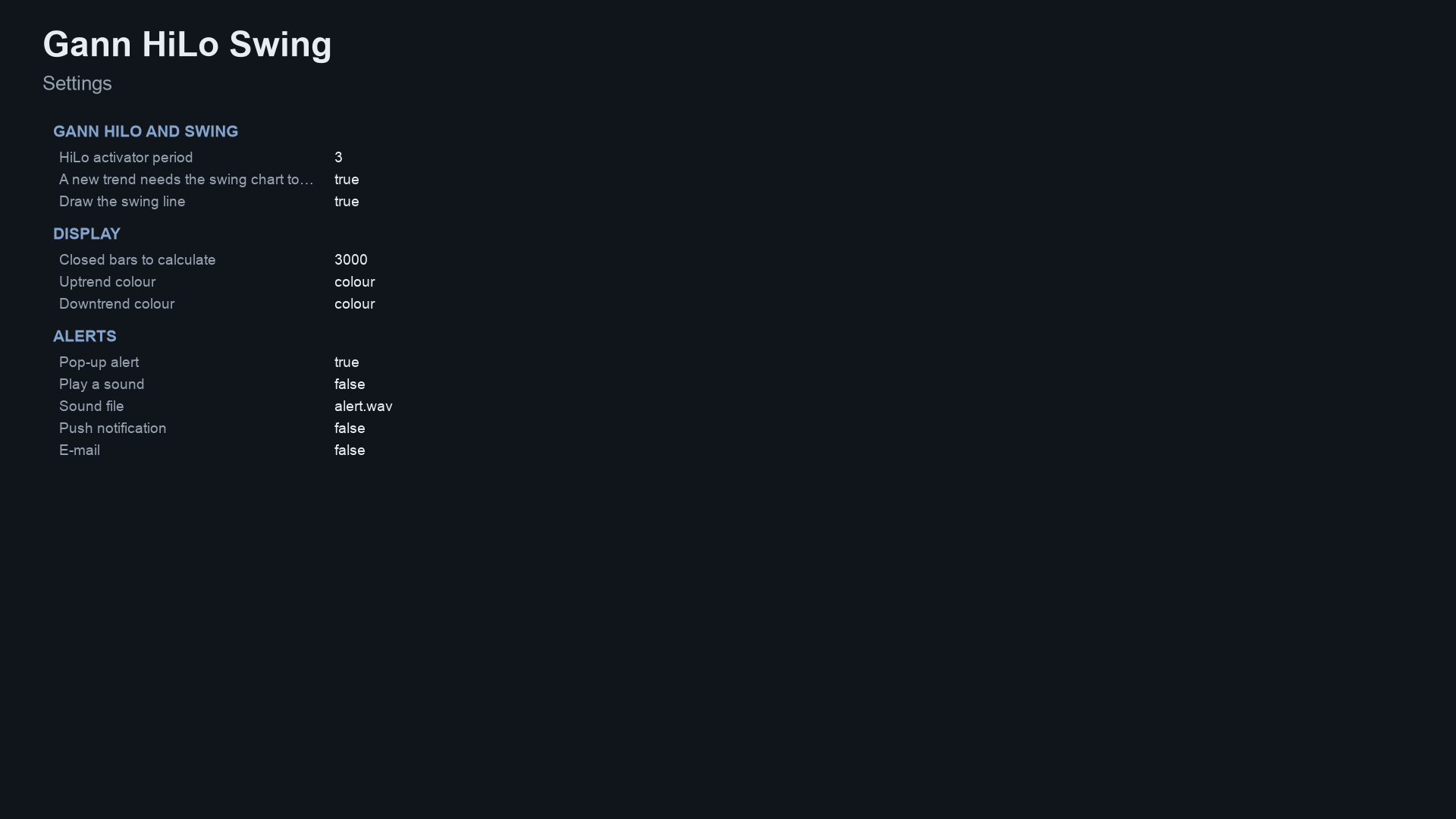 |
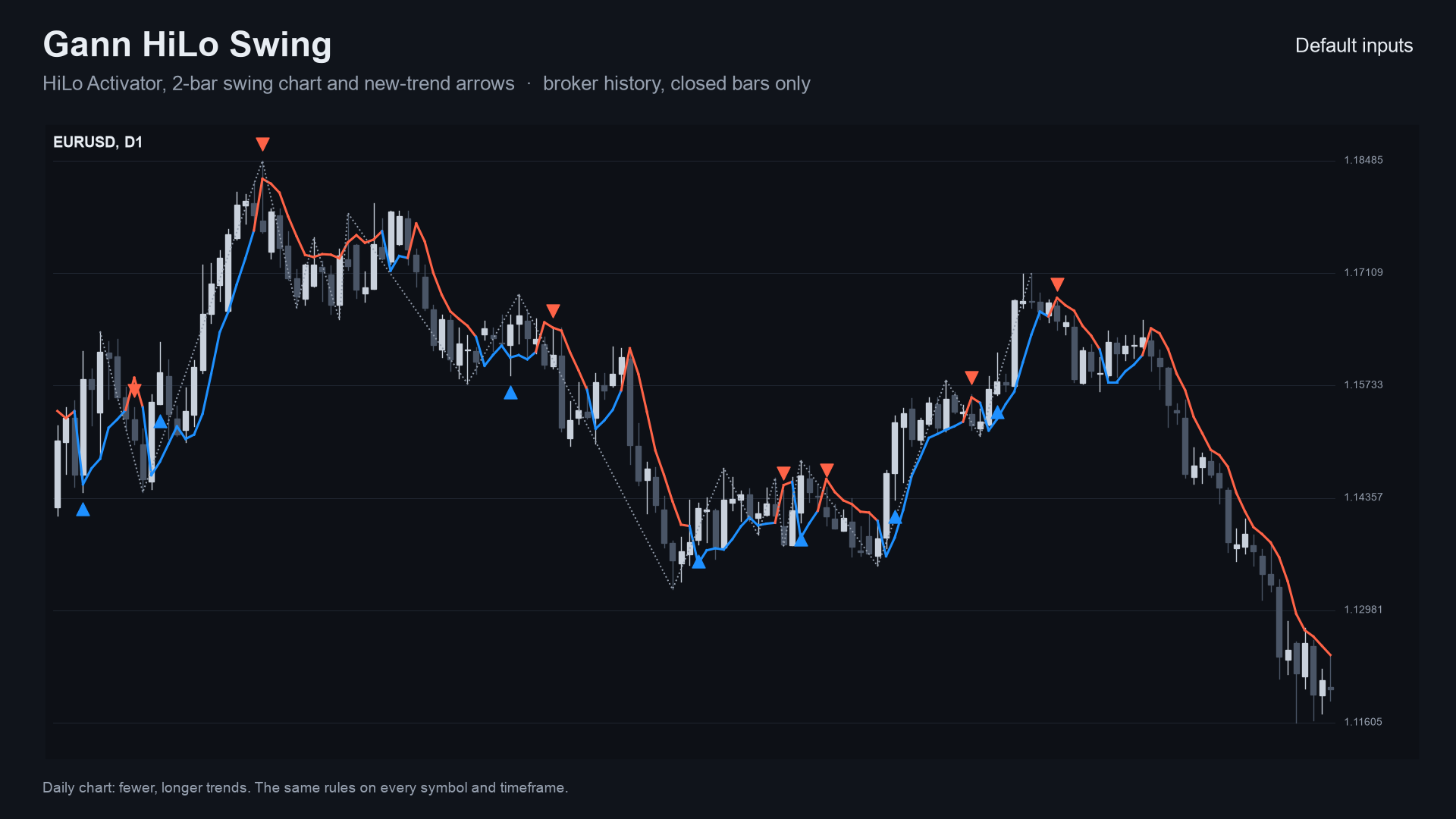
Image notes: the charts are drawn by the Python reference on broker price history (the same numbers the indicator shows);
the explanation, frequency, checks and settings sheets are illustrations, not terminal captures. MT4 versions are in
docs/images/mt4/.
Why it was built
The HiLo Activator and the 2-bar swing chart are classic, simple tools that are rarely offered as a plain, readable indicator with alerts. The motivations, stated with the evidence we actually have:
- Readable rules. Both tools are a few lines of arithmetic, in
tests/reference.pyand in the.mqhengine. - Trust in the line. Everything is calculated from closed bars, so nothing on the chart changes after its bar has closed. A swing pivot is drawn on its own bar once the swing has turned and never moves.
- Honest scale of demand. Our market research (October 2026) found Gann is the best-priced classic method on the MQL5 Market (about 119 Gann indicators, 16 of them free), but buyers mostly want Gann levels and geometry; plain HiLo products sell poorly. So this is a free reference tool, not a claim of demand for HiLo arrows.
- No edge claimed. An expert advisor that traded these same rules was tested out of sample and did not pass (0 of 37 settings), which is why this is published as a chart tool and not as a signal.
- Provable behaviour. Every number in this README comes from an executed check, listed below.
mindmap
  root((Gann HiLo Swing))
    Problem
      Simple Gann tools without a readable indicator
      Lines and arrows that change after the bar closed
      Alerts that fire twice or during history load
    Design rules
      Closed bars only
      Pivot drawn once on its own bar
      One alert per new trend
      Same rules on MT5 MT4 and Python
    Proof
      Python reference
      Bar by bar parity
      Tester repaint probe
      Market validation
How it works
The rules, step by step
H, L, C are a bar's high, low, close; N is the HiLo period (default 3); bars are numbered oldest first.
HiLo Activator
avgHigh[k],avgLow[k]= simple averages of the lastNhighs and lows, ending at bark.- The trend is decided with the averages as of the bar before: the trend turns up if
C[k] - avgHigh[k-1] > eps, down ifavgLow[k-1] - C[k] > eps(eps = 1e-9 x C); otherwise it is unchanged. - The line is
avgLow[k]in an uptrend andavgHigh[k]in a downtrend. Nothing is drawn beforeNbars exist.
2-bar swing chart
- An upswing starts when
H[k] > H[k-1] > H[k-2](two higher highs in a row); a downswing whenL[k] < L[k-1] < L[k-2]. If both happen on one bar, the close decides (C[k] > C[k-1]means up). - When the swing turns up, the lowest low of the downswing (this bar included) becomes a swing-low pivot, confirmed on this bar and drawn on the bar where that low was; a turn down mirrors it with a swing-high pivot. The first swing direction creates no pivot.
Side and new trend
- With the swing condition on (default) the side is
+1when the activator is up and the swing is up,-1when both are down, and otherwise keeps its previous value. With it off the side is the activator trend. - A new trend is a change of side from a non-zero side, after at least
N + 2bars. It gets the arrow and the alert.
Per-bar algorithm
flowchart TD
    A[New or updated bar] --> B{Is it a closed bar?}
    B -- no, the forming bar --> Z[Nothing drawn, no alert]
    B -- yes --> C[Feed H L C to the engine]
    C --> D[Averages of the last N highs and lows]
    D --> E{Close beyond the previous averages?}
    E -- above the highs average --> U[Trend up]
    E -- below the lows average --> W[Trend down]
    E -- neither --> K[Trend unchanged]
    U --> L[Line = lows average]
    W --> L2[Line = highs average]
    K --> L3[Line follows the trend]
    C --> S{Two higher highs or two lower lows?}
    S -- yes and the swing turns --> P[Pivot of the old swing, drawn on its own bar]
    S -- no --> S2[Track the extremes of the swing]
    L --> F[Side from the activator, and the swing if confirmation is on]
    L2 --> F
    L3 --> F
    P --> F
    S2 --> F
    F --> G{Side changed from a non-zero side?}
    G -- no --> Z2[No arrow]
    G -- yes --> H[Arrow on the bar]
    H --> I{Latest closed bar, after the history load?}
    I -- yes --> J[One alert]
    I -- no --> Z3[Drawn, no alert]
Trend states
stateDiagram-v2
    [*] --> Warmup
    Warmup --> Up: averages ready and close above the highs average
    Warmup --> Down: averages ready and close below the lows average
    Up --> Up: close stays inside or above, line = lows average
    Down --> Down: close stays inside or below, line = highs average
    Up --> Down: close below the lows average and the swing agrees (arrow, alert)
    Down --> Up: close above the highs average and the swing agrees (arrow, alert)
    Up --> Up: activator flips but the swing disagrees (no arrow yet)
    Down --> Down: activator flips but the swing disagrees (no arrow yet)
Alert flow
sequenceDiagram
    participant T as Terminal
    participant I as Gann indicator
    participant E as Engine (Gann.mqh)
    participant U as You
    T->>I: OnCalculate (history load, prev_calculated = 0)
    I->>E: feed the last InpHistory closed bars
    E-->>I: line, side, pivots, arrows (drawn, no alert)
    T->>I: OnCalculate (new bar closes, prev_calculated > 0)
    I->>E: feed the one bar that just closed
    E-->>I: did a new trend start?
    alt new trend and bar time is newer than the last alert and not in the tester
        I->>U: pop-up (optional sound, push, e-mail)
    else no new trend, same bar again or tester run
        I-->>T: nothing sent
    end
How often a new trend starts (measured)
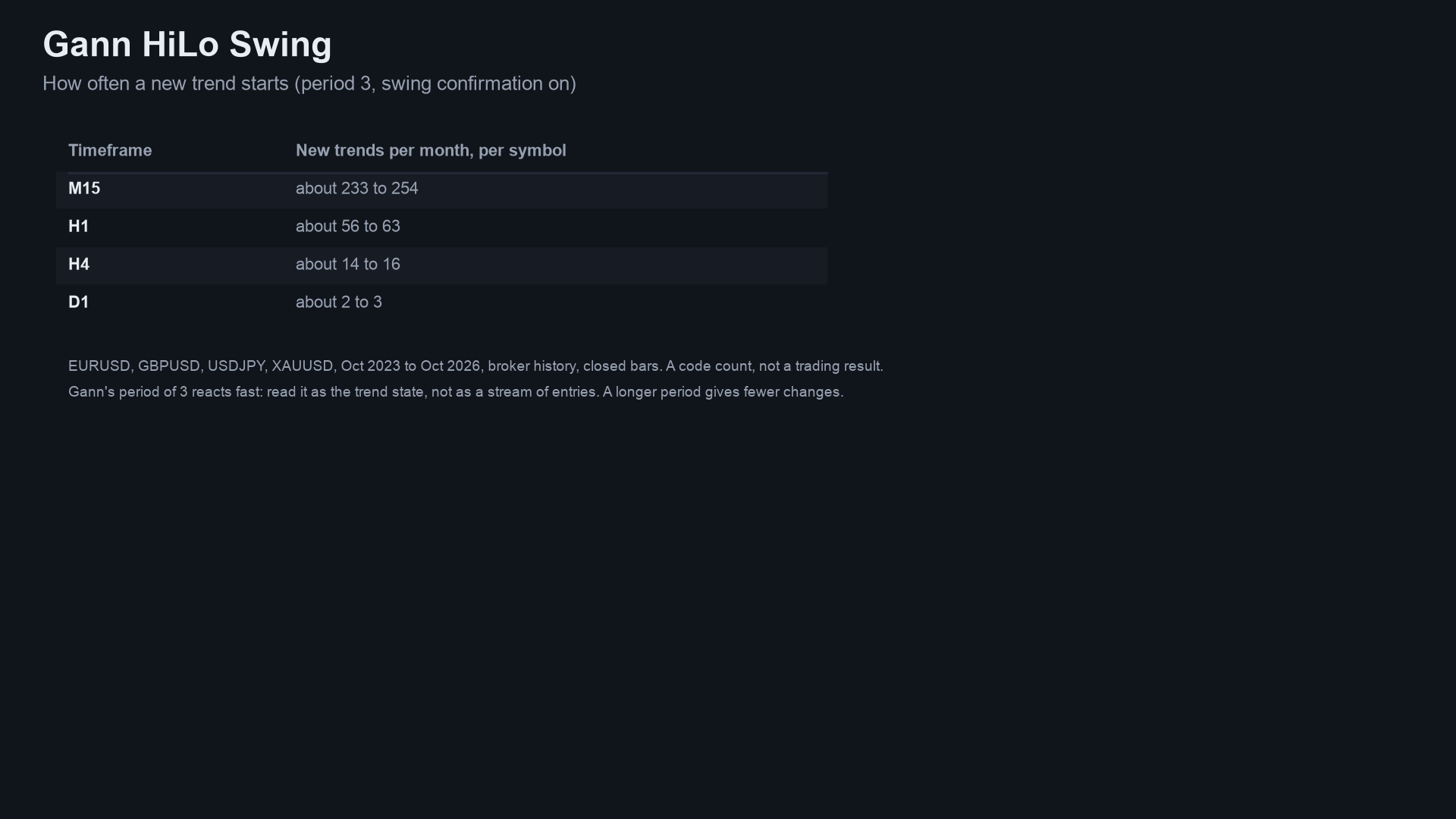
New trends per 1,000 closed bars, default inputs (period 3, swing confirmation on), on broker history of EURUSD, GBPJPY,
XAUUSD and BTCUSD (H1: 284,859 bars; H4: 72,039; M15: 19,112 because the M15 history in the tester was shorter). It counts
trend changes only, not what price does afterwards. Source: docs/data/trend-frequency.json,
made by tests/frequency.py.
xychart-beta
    title "New trends per 1,000 closed bars (4 symbols, defaults)"
    x-axis ["M15", "H1", "H4"]
    y-axis "new trends per 1,000 bars" 0 --> 140
    bar [125.84, 115.23, 111.34]
About one new trend every 8 to 9 bars on every timeframe. This is why the arrows should be read as the trend state, not as a stream of entries; a longer period gives fewer changes.
Non-repainting: the proof and how it was tested
"Non-repainting" is easy to claim. Here is what was actually run. Raw result files are in tests/results/.
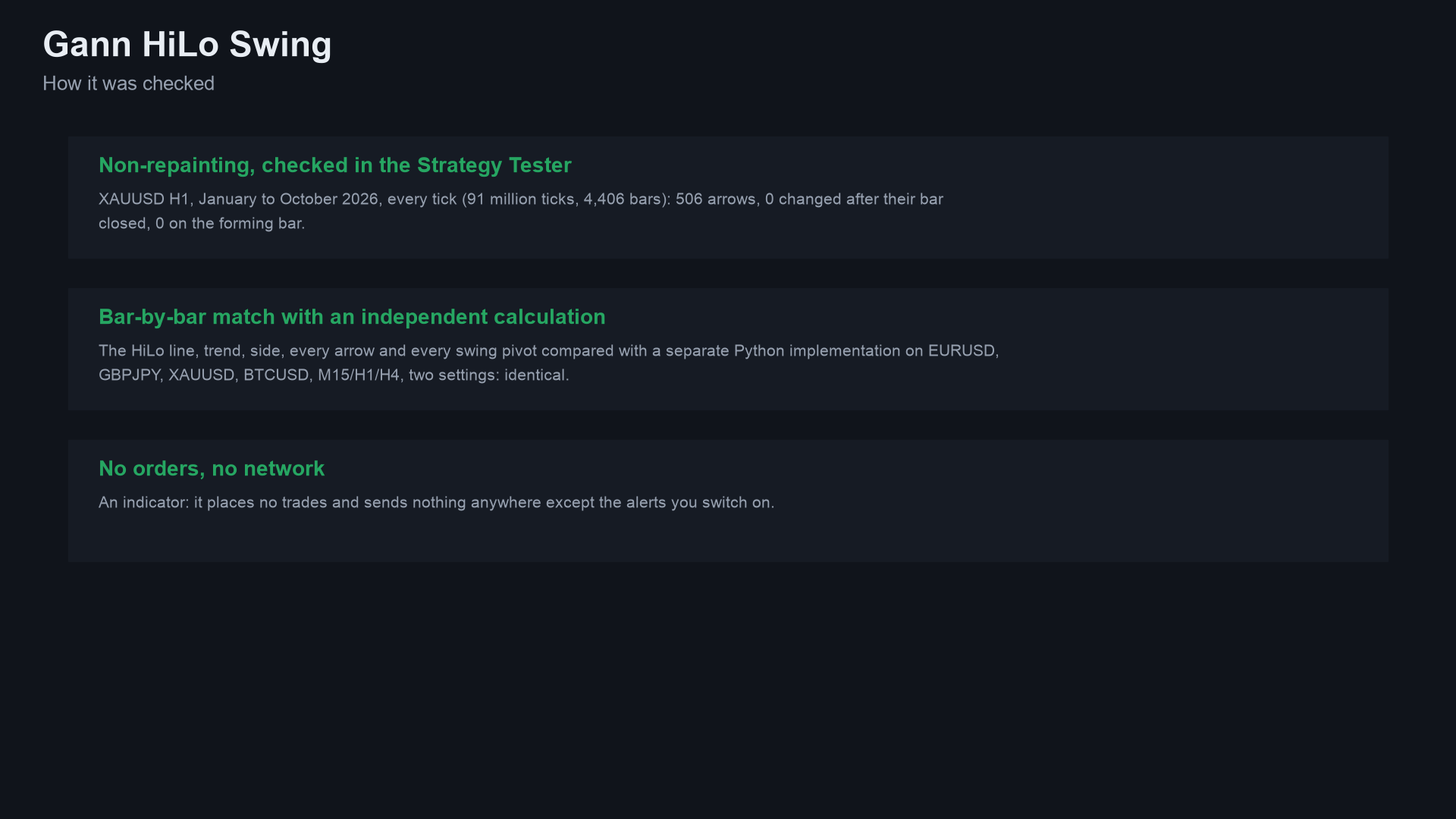
1. Implementations compared bar by bar. The Python reference (tests/reference.py) holds the rules, operation for operation. The MT5 and MT4 indicators were dumped bar by bar (every buffer) in the MetaTrader Strategy Tester (MT4) or by a script (MT5), and tests/check_parity.py compared each dump with the reference: line, side, trend, arrows and swing pivots must be identical on every closed bar.
Run on this exact code: compile 0 errors, 0 warnings (both editions); MT5 24 dumps and MT4 25 dumps (EURUSD, GBPJPY, XAUUSD, BTCUSD on M15, H1 and H4 with the repository's input sets; MT4 adds an every-tick run on EURUSD H1), all identical to the reference on every closed bar; the repaint probes found 0 closed bars that changed afterwards.
The wider matrix, made with the Market builds before this repository was cut from them (the same calculation; four symbols EURUSD, GBPJPY, XAUUSD, BTCUSD, M15, H1 and H4, the repository's input sets), checked here against the same reference:
| MT5 | MT4 | |
|---|---|---|
| dumps compared | 24 | 25 |
| bars compared | 72,000 | 509,548 |
| failures | 0 | 0 |
| result | ALL PASS | ALL PASS |
Sources: tests/results/parity-wide-run-mt5.txt, tests/results/parity-wide-run-mt4.txt. MT5 history starts later than MT4's test history on some pairs, which is why the bar counts differ.
2. Repaint probe. An EA records which signal buffers are set on each bar at the moment it closes, then reads the same bars again at the end and counts any value that changed. It also counts any signal ever shown on the still-forming bar.
| Run | Closed bars checked | Signals seen at close | Changed afterwards | Signals on the live bar |
|---|---|---|---|---|
| MT5, Market build, XAUUSD H1, every tick, 91,052,717 ticks | 4,406 | 506 | 0 | 0 |
| MT4, Market build, 25 runs combined | 506,172 | 60,813 | 0 | 0 |
Source: tests/results/repaint-summary.md. The MT5 probe was run once per build on one symbol and timeframe; the MT4 probe ran on every dump run.
3. Market validation. Both Market builds passed the MQL5 Market's automated product validation before publication (this is the Market's own check, not part of this repository).
flowchart LR
    R[reference.py<br/>Python rules] --> P
    S5[MT5 indicator] --> T5[Tester script<br/>DumpIndicator<br/>every bar to CSV]
    S4[MT4 indicator] --> T4[Tester EA<br/>Dump4.mqh<br/>CSV + repaint log]
    T5 --> P[check_parity.py<br/>identical on every closed bar]
    T4 --> P
    S5 --> RP[RepaintProbe EA<br/>values at close vs final]
    T4 --> RL[repaint log<br/>per run]
    P --> V{all pass?}
    RP --> V
    RL --> V
    V -- yes --> M[Market validation]
    V -- no --> F[fix, rerun everything]
Why the design cannot repaint
- The engine is fed only bars up to
rates_total - 2, i.e. never the forming bar. - Each decision uses that bar and earlier bars only. The activator compares the close with averages ending at the bar before.
- A swing pivot is confirmed on the bar where the swing turns and is written to the (earlier) bar where the extreme was. It is written once and never moves; the MT4 test therefore re-reads the swing buffer for the last 100 bars at every new bar to prove that nothing changes afterwards.
- Alerts fire only for the bar that just closed, only after the history load, once per bar, and never in the tester.
Architecture and buffers
flowchart TB
    subgraph MT5["mql5/Indicators/GannHiLoSwing"]
        A5[GannHiLoSwing.mq5<br/>inputs, buffers, OnCalculate]
        E5[Gann.mqh<br/>HiLo, swing, pivots, new trend]
        B5[SignalAlerts.mqh<br/>alert inputs, SignalAlertMessage]
        A5 -- include --> E5
        A5 -- include --> B5
    end
    subgraph MT4["mql4/Indicators/GannHiLoSwing"]
        A4[GannHiLoSwing.mq4]
        E4[Gann.mqh<br/>identical to the MT5 file]
        B4[SignalAlerts.mqh<br/>MT4 edition]
        A4 -- include --> E4
        A4 -- include --> B4
    end
    subgraph TESTS[tests]
        R[reference.py]
        C[check_parity.py]
        D5[mql5: DumpIndicator, RepaintProbe, Params.mqh]
        D4[mql4: GannDump.mq4, Dump4.mqh]
        C --> R
    end
    D5 -. IndicatorCreate .-> A5
    D4 -. iCustom .-> A4
classDiagram
    class GannHiLoSwing {
        +InpHiLo int
        +InpSwing bool
        +InpShowSwing bool
        +InpHistory int
        +OnInit()
        +OnCalculate()
    }
    class GNState {
        +cnt int
        +hi lo cl double[64]
        +trend sd side int
        +line double
        +ev int
        +piv_px piv_bar piv_new
    }
    class Engine {
        +GNInit()
        +GNFeed()
        +GNPivot()
    }
    class SignalAlerts {
        +InpAlertPopup bool
        +InpAlertSound bool
        +InpAlertPush bool
        +InpAlertEmail bool
        +SignalAlertMessage()
    }
    class reference {
        +run()
    }
    GannHiLoSwing --> Engine : feeds closed bars
    Engine --> GNState : ring of 64 bars
    GannHiLoSwing --> SignalAlerts : alerts
    reference ..> Engine : same rules, compared by check_parity
iCustom buffer table (for EA developers)
| Buffer | MT5 | MT4 |
|---|---|---|
| 0 | New uptrend arrow price (bar low), empty otherwise | same (below the low on MT4) |
| 1 | New downtrend arrow price (bar high), empty otherwise | same (above the high on MT4) |
| 2 | HiLo line | HiLo line (not drawn; read this one) |
| 3 | colour index of the line (0 up, 1 down) | same value; the drawn line uses buffers 7 and 8 |
| 4 | swing line: the pivot price, on the pivot's own bar | same |
| 5 | side (+1, -1, 0) | same |
| 6 | activator trend (+1, -1, 0) | same |
Empty value is EMPTY_VALUE. Read values on closed bars (shift 1 and higher). iCustom parameters follow the input
order: HiLo period, swing condition, draw the swing line, history, up colour, down colour, (MT4 only: arrow gap), pop-up,
sound, sound file, push, e-mail, debug. In MT5 the input group headings also count as string parameters when you build a handle
with IndicatorCreate (see tests/mql5/Include/IndTest/Params.mqh and the strings in tests/check_parity.py).
Inputs, alerts, install and compile
| Input | Default | Meaning |
|---|---|---|
| HiLo activator period | 3 (1-50) | Gann's own is 3; longer gives fewer trend changes |
| A new trend needs the swing chart to agree | true | Off: the side is the activator trend alone |
| Draw the swing line | true | Show or hide the dotted line |
| Closed bars to calculate | 3000 (200-50000) | How far back the chart is drawn |
| Uptrend colour, Downtrend colour | blue, red | Look only |
| Arrow distance from the candle (MT4 only) | 0.3 x ATR(14) | MT4 cannot shift arrows by pixels |
| Pop-up alert | true | Terminal alert window |
| Play a sound / sound file | false / alert.wav | File from the terminal's Sounds folder |
| Push notification | false | Needs your MetaQuotes ID in Options |
| false | Needs e-mail set up in Options | |
| Debug log for bug reports | false | Writes extra lines to the Experts tab, to attach when you report a problem |
Install from source. Copy mql5/Indicators/GannHiLoSwing/ into <terminal data folder>/MQL5/Indicators/ (MT5) or
mql4/Indicators/GannHiLoSwing/ into <data folder>/MQL4/Indicators/ (MT4), open the .mq5 or .mq4 in MetaEditor and
press Compile (F7). Both compile with 0 errors and 0 warnings (checked on a Windows machine with MetaEditor, from a clean scratch folder that holds only these files; the compiled files are not in the repository).
Keep the three files of each edition together: the indicator includes Gann.mqh and SignalAlerts.mqh from its own folder. The debug log needs the Chart Kit file as well: copy mql5/Include/ChartKit/ (MT5) or mql4/Include/ChartKit/ (MT4) into the Include folder of the data folder.
Run the Python reference and the tests
python3 -m venv .venv && . .venv/bin/activate && pip install -r requirements.txt
import sys; sys.path.insert(0, "tests")
from reference import run
# h, l, c are float lists of closed bars, oldest first
rows, pivots = run(h, l, c, hilo=3, swing_confirm=True)   # rows[k]: line, trend, side, sd, ev (+1/-1 new trend)
To repeat the parity check on your own data:
- Compile the indicator and the test tool for your platform (
tests/mql5/Scripts/DumpIndicator, ortests/mql4/GannDump.mq4withtests/mql4/Include/IndTest4/Dump4.mqhin yourMQL4/Include/IndTest4/; MT5 also needstests/mql5/Include/IndTest/Params.mqh). - Run it in the Strategy Tester (MT4) or as a script (MT5) for each symbol and timeframe, with the input sets in
tests/configs.tsv(MT5; the exactInpParamsstrings are intests/check_parity.py) andtests/mql4/configs.tsv(MT4). The tool writes one CSV per symbol and timeframe into adumpfolder. python3 tests/check_parity.py <folder that contains dump>(add--mt4for MT4 dumps). It prints PASS or FAIL per file and an overall result.- Repaint: run
tests/mql5/Experts/RepaintProbein the MT5 Strategy Tester (every tick); the MT4 test EA writes its repaint log with the dump.
The price dumps used for the published numbers are not in this repository (they are broker price data).
Honest limits
- A trend line is not a strategy. No stop-loss, position sizing or exit rules are provided or implied, and the rules were not optimised or back-tested for profit. An expert advisor built on these rules did not pass out-of-sample testing.
- No profit or accuracy claim is made. The only numbers here are about consistency (the implementations agree, lines and arrows do not move) and frequency (new trends per 1,000 bars).
- Fast by design. Period 3 follows price closely: about one new trend every 8 to 9 bars. Raise the period or the timeframe for fewer changes; sideways markets produce many.
- Lag. A trend change is confirmed by a close beyond an average, and a swing pivot is known only when the swing turns.
- One reading of Gann. Gann's tools have several modern interpretations; these are the rules stated above.
- Scope of the tests. Four symbols on M15, H1 and H4 for the Market builds (the same calculation), the repository's input sets, one MT5 repaint run; the code in this repository has so far been compile-checked only, and the MT5 build was not run on a live chart as part of these numbers. Other symbols and timeframes are not covered by the published numbers.
Licence
Copyright 2026 Allan Niñal (https://www.allanninal.dev/mql5). Licensed under the
PolyForm Noncommercial License 1.0.0: source-available, free for personal
and other noncommercial use, not for commercial use. Each source file has an SPDX-License-Identifier line. Text:
LICENSE. The HiLo Activator and the 2-bar swing chart are classic, publicly described methods; the code is
original. The licence applies to this source, not to anything you build or trade with the indicator. Trading involves risk;
the software is provided as is.
Website: allanninal.dev/mql5 · MT4 · allanninal.dev · Questions: message me on LinkedIn.