
Risk Position Tool (MetaTrader 5 and MetaTrader 4)
A free position-size calculator that lives on the chart. Drag an entry line, a stop-loss line and a take-profit line; the panel shows the lot for your risk, the money at the stop and at the target, the reward:risk ratio and the margin. It calculates only: it never places, changes or closes an order. Source for both editions, a Python statement of the sizing rules, and the property test that checks them.
Website: allanninal.dev/mql5 (utilities) · MT4 editions · allanninal.dev · Contact: message me on LinkedIn.
It is a calculator, not a strategy. It does not choose entries and it makes no profit claim (see Honest limits).
Get it on the MQL5 Market
| Edition | Platform | Price | Link |
|---|---|---|---|
| Risk Position Tool | MT5 | free | https://www.mql5.com/en/market/product/201865 |
| Risk Position Tool MT4 | MT4 | free | MT4 edition: coming soon on the MQL5 Market |
The MT5 Market build is the same calculation as the source in this repository.
Contents
- What it is and who it is for
- Why it was built
- How it works
- How it was tested
- Architecture
- Inputs, install and compile
- Run the Python reference and the test
- Honest limits
- Licence
What it is and who it is for
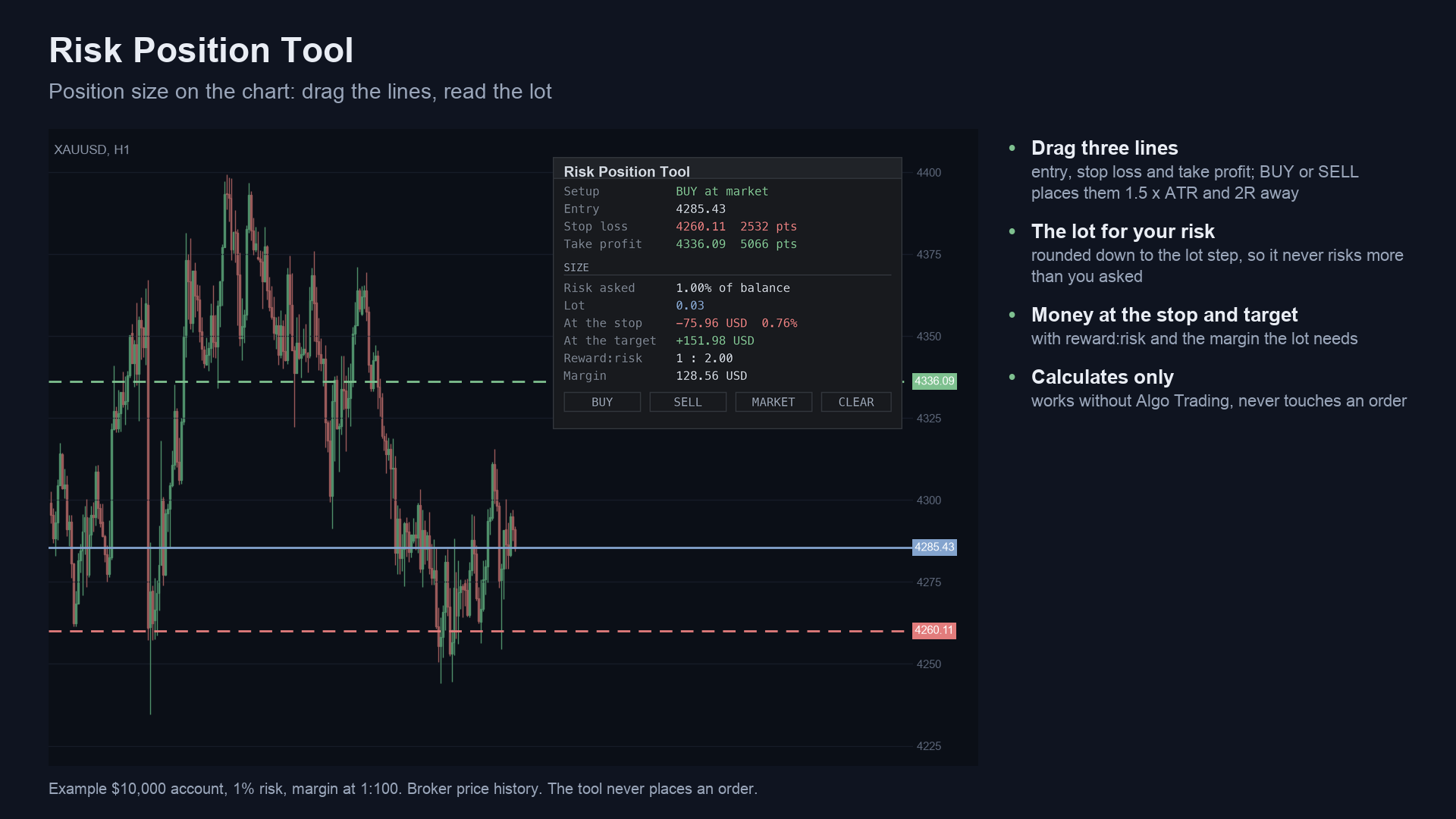
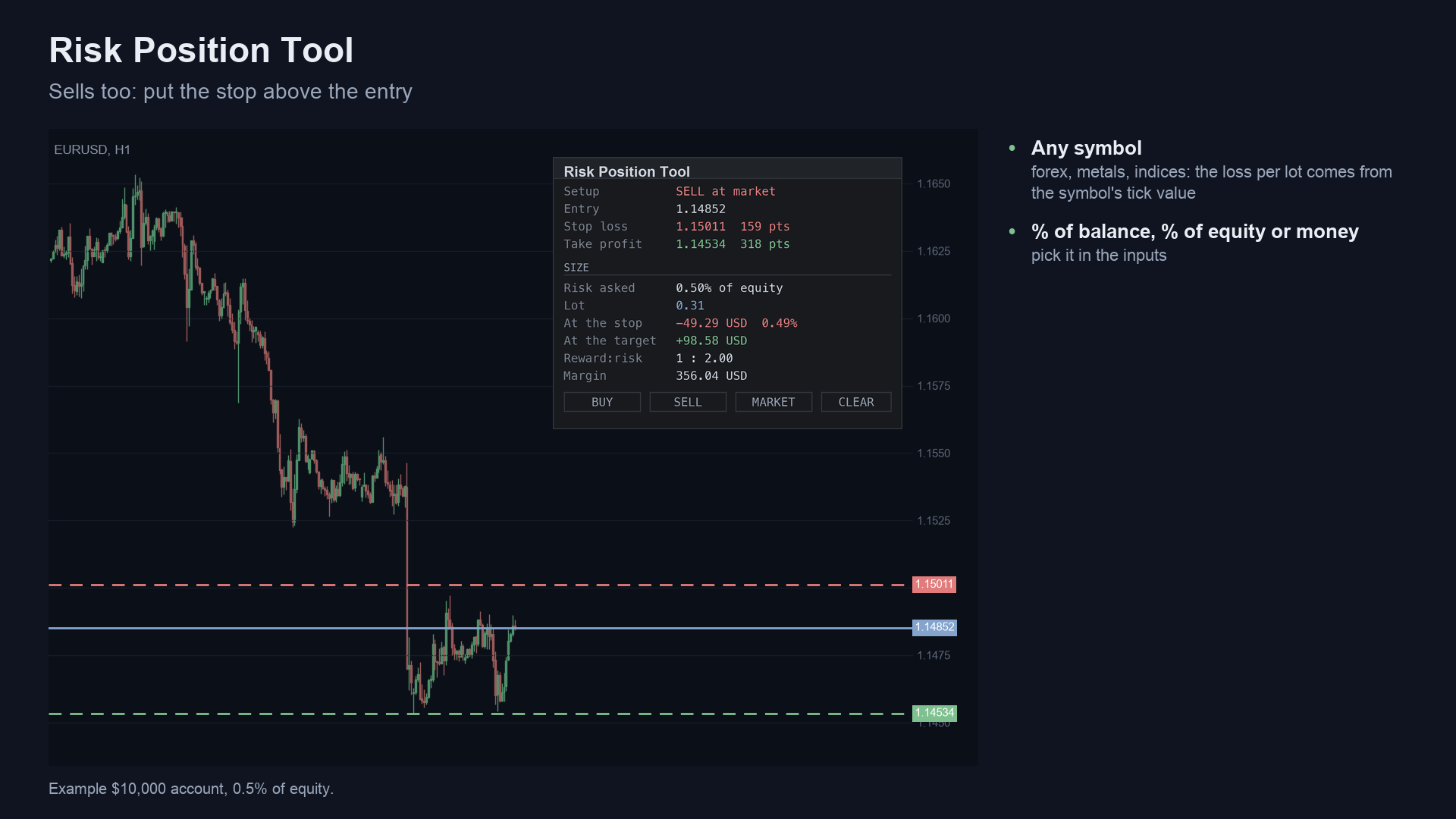
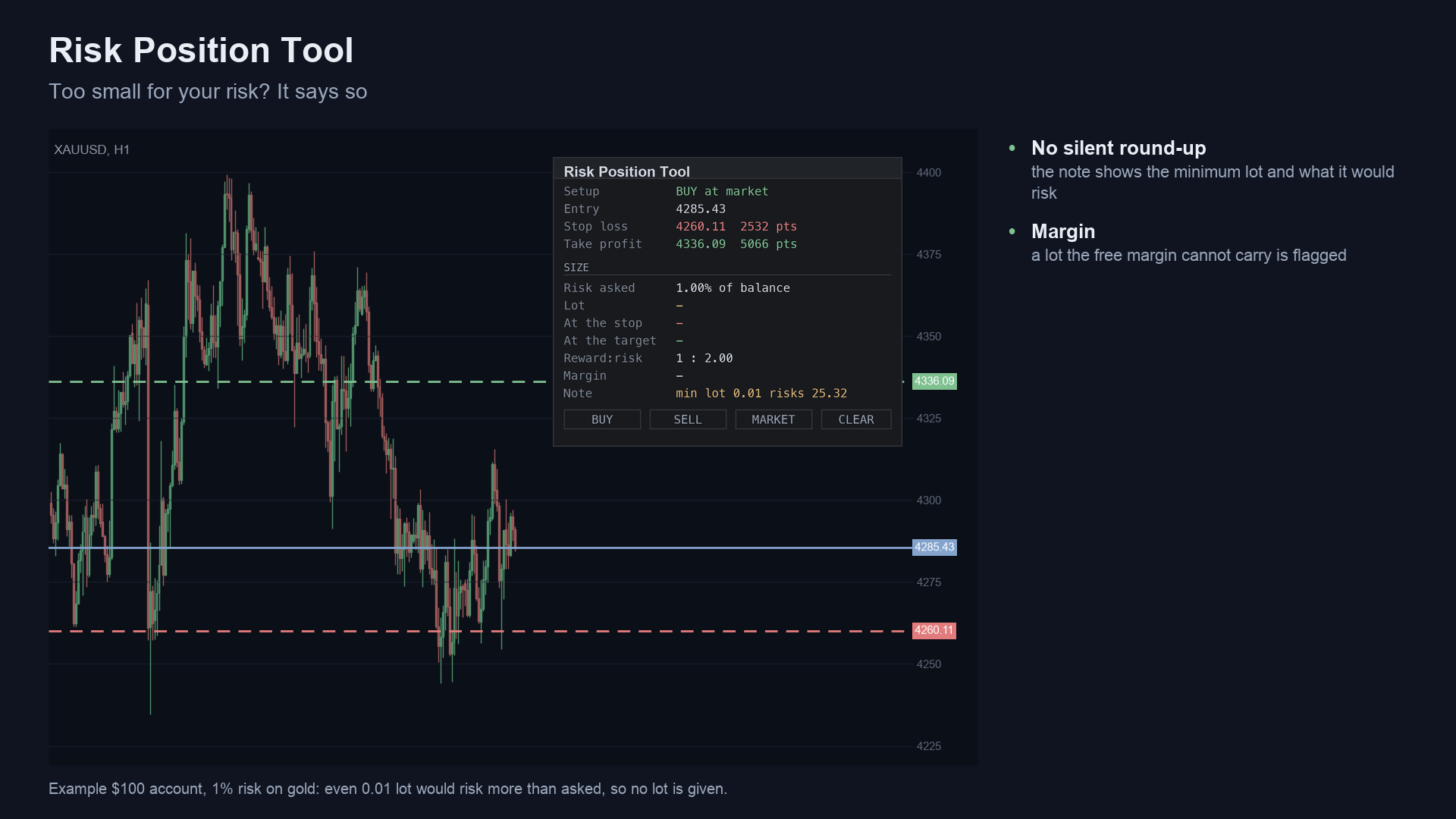
What: press BUY or SELL and three horizontal lines appear: entry (at the market price), stop loss and take profit. Drag any of them. The panel re-computes the lot so that the money lost at the stop is the risk you chose: a percent of the balance, a percent of the equity, or a fixed amount of money. The lot is rounded down to the broker's lot step, so the money at the stop is never above the risk you asked for. If even the minimum lot would risk more, the panel says so and shows what that lot would risk, instead of rounding up.
For: discretionary traders who want to size every trade from the stop, on any symbol (forex, gold, indices, crypto) and in any account currency. Also for developers who want a small, tested example of position sizing in MQL5 and MQL4.
Not for: anyone who wants the tool to send the order or manage the trade. It only shows numbers.
 |
 |
 |
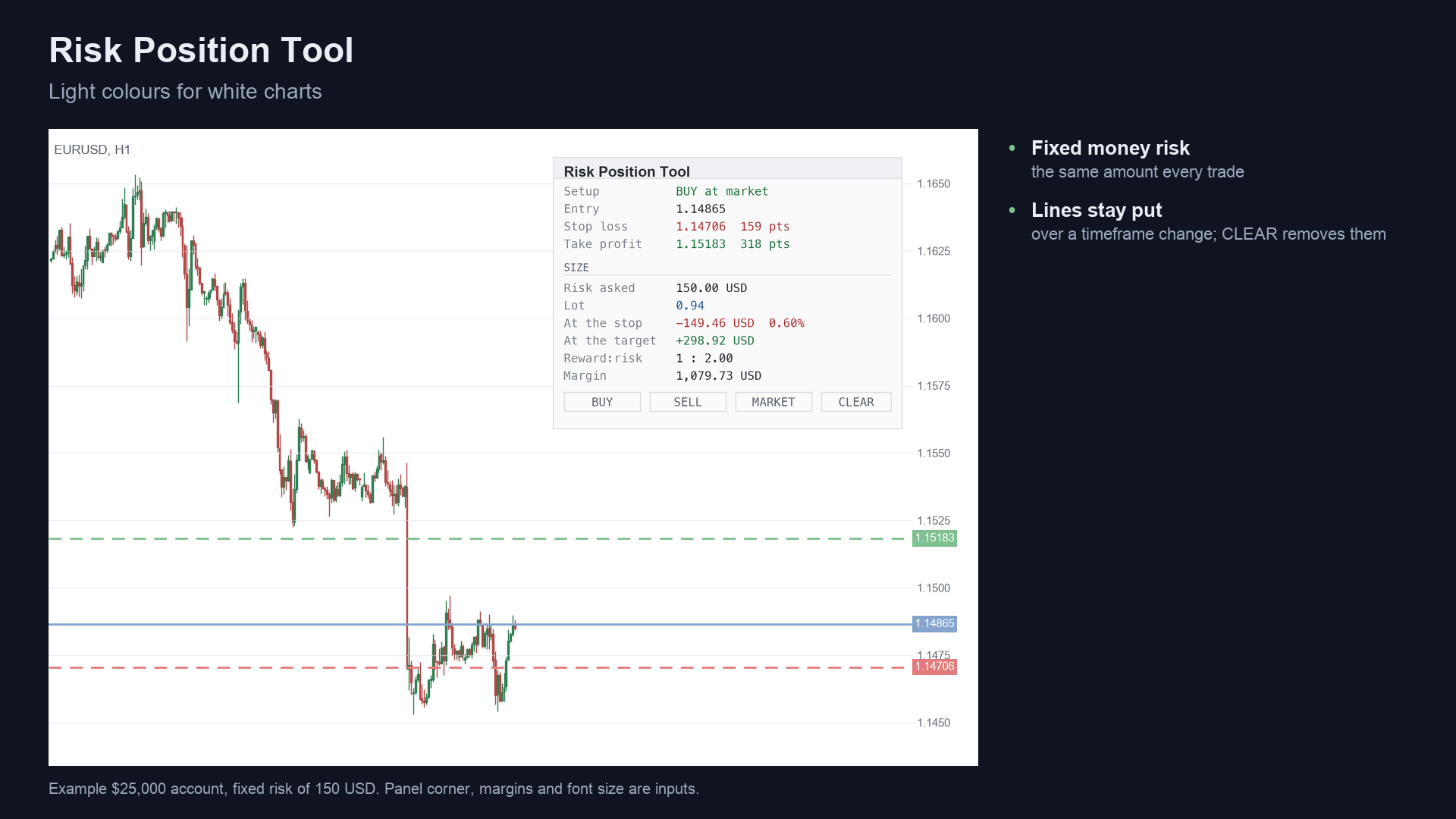 |
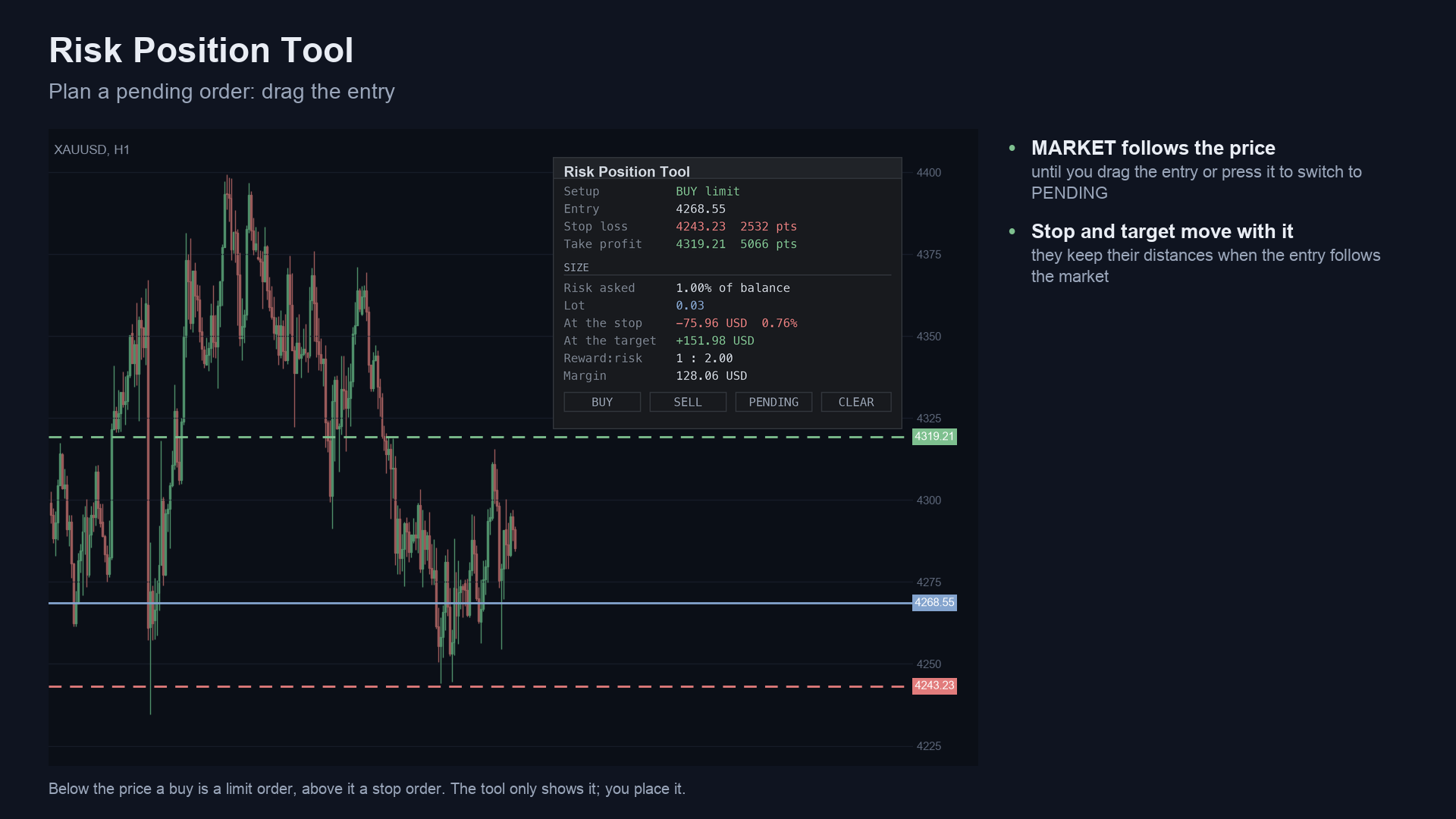
Image notes: the charts are drawn from broker history by a script and the panel text is rendered from the program's own
source, so they are illustrations, not terminal captures. MT4 versions are in docs/images/mt4/.
Why it was built
The motivations, stated with the evidence we actually have:
- Sizing from the stop is the basic habit, and the tools are scattered. Our October 2026 market research (MQL5 Market,
Reddit, GitHub, freelance boards) found "trade manager, break-even, trailing, lot size, risk calculator" is a recurring
request: 205 matching posts in the Reddit archive sample (77 of them name MT4, MT5 or MQL), and a keyword count finds
about 125 of 2,014 MQL5 freelance jobs mentioning lot size, position size, risk calculator, trade manager or trade panel.
The research itself calls MT5 demand on Reddit thin and low-volume; a drag-and-drop lot-size panel was the best-received
tool post in
r/metatraderin the 2026 set. - The space is crowded. The same research found a popular free open-source position sizer on GitHub, and several free utilities near the top of the MQL5 Market lists next to paid managers with hundreds of reviews. So this is not a claim of an unmet need. It is a free, readable tool with source, built to a stricter rule than most: the money at the stop is never above the risk asked.
- Provable behaviour. The rounding and minimum-lot rules are written down in
tests/reference.pyand checked on 200,000 random cases, not promised.
mindmap
  root((Risk Position Tool))
    Problem
      Lot sizing done by hand from the stop
      Calculators that round the lot up
      Tick value differs per symbol and currency
    Design rules
      Lot rounded DOWN to the lot step
      Below the minimum lot say so, never round up
      Sized on the prices an order is sent with
      Calculates only, never touches an order
    Proof
      Python statement of the rules
      200000 random cases, 0 violations
      Compiles 0 errors 0 warnings, MT5 and MT4
How it works
The maths, step by step
Let E, S, T be the entry, stop and target prices read from the lines, tick the symbol's tick size, step, vmin,
vmax its lot step, minimum and maximum lot, and R the risk setting.
- Prices an order is sent with. Each price is rounded to the tick:
P = round(p / tick) x tick. The size is measured on these, so the stop the broker would receive is the stop that was sized. - Direction. A stop below the entry is a buy, a stop above it is a sell.
- Distances.
stop_pts = |E - S| / point,target_pts = |T - E| / point,reward:risk = target_pts / stop_pts. - Risk money. Fixed money:
R. Percent of balance:balance x R / 100. Percent of equity:equity x R / 100. - Loss of one lot from entry to stop.
- MT5: the larger of
|E - S| / tick x tick_value_lossand the terminal's ownOrderCalcProfitfor one lot. - MT4 (no
OrderCalcProfit):|E - S| / tick x tick_value. Where MT4 reports a tick value of 0 (some gold and crypto symbols in the tester), it usestick size x contract sizein the profit currency, converted to the account currency.
- MT5: the larger of
- Lot.
raw = risk money / loss per lot, thenlot = floor(raw / step + 1e-9) x step, capped atvmax. Iflot < vminthe panel shows no lot and the notemin lot <vmin> risks <money>. - At the stop
= lot x loss per lot(and as a percent of the balance). At the target: the profit oflotfromEtoT. Margin: the terminal's margin forlotatE. If the margin is above the free margin, the note saysnot enough free margin.
A worked example, from the first screenshot: a USD 10,000 account, risk 1% of balance (USD 100), gold buy with a stop of
2,532 points. Loss per lot is USD 2,532, so raw = 100 / 2532 = 0.0395 lots, and the lot is floor(0.0395 / 0.01) x 0.01 = 0.03, which loses USD 75.96 (0.76% of the balance) at the stop.
When the lines are placed with BUY or SELL, the stop is stop distance x ATR(14) away (default 1.5; ATR here is the plain
mean of the last 14 true ranges, at least 10 points) and the target is reward:risk times that distance (default 2).
Per-update algorithm
flowchart TD
    A[Timer 300 ms, a drag or a click] --> B[Read entry, stop, target prices]
    B --> C[Round each price to the symbol tick]
    C --> D{Entry and stop set and different?}
    D -- no --> Z[Panel: place entry and stop]
    D -- yes --> E[Direction: stop below entry = buy]
    E --> F[Risk money from the input]
    F --> G[Loss per lot from entry to stop]
    G --> H{Loss per lot above 0?}
    H -- no --> Y[Panel: no tick value for symbol]
    H -- yes --> I[raw lot = risk money / loss per lot]
    I --> J[Round DOWN to the lot step, cap at the maximum]
    J --> K{Lot at least the minimum?}
    K -- no --> L[No lot. Note: min lot risks X]
    K -- yes --> M[Money at the stop and at the target, reward:risk]
    M --> N{Margin above free margin?}
    N -- yes --> O[Note: not enough free margin]
    N -- no --> P[Show the lot]
    L --> Q[Draw the panel]
    O --> Q
    P --> Q
Entry line states
stateDiagram-v2
    [*] --> NoLines
    NoLines --> AtMarket: press BUY or SELL (lines placed, entry = ask or bid)
    AtMarket --> AtMarket: price moves, entry follows, stop and target keep their distance
    AtMarket --> Pending: drag the entry line
    Pending --> AtMarket: press the MARKET / PENDING button
    AtMarket --> NoLines: CLEAR
    Pending --> NoLines: CLEAR
    Pending --> Pending: drag stop or target, lot re-computed
    AtMarket --> AtMarket: drag stop or target, lot re-computed
In Pending, the panel names the order kind from where the entry line sits: below the ask a buy is a limit, above it a
stop; for a sell the other way round.
Drag-to-lot flow
sequenceDiagram
    participant U as You
    participant C as Chart
    participant T as Tool
    participant K as Terminal
    U->>C: press BUY or SELL
    C->>T: click event
    T->>K: ask or bid, last 14 bars for ATR(14)
    T->>C: three horizontal lines
    U->>C: drag the stop line
    C->>T: object drag event
    T->>C: read the three line prices
    T->>K: symbol tick size and value, lot limits, margin
    T->>C: panel: lot, money at stop and target, reward:risk, margin
What the sizing rule produces (measured)
Counts from the property test on 200,000 random setups (six symbol kinds, five lot-step/minimum combinations; source:
tests/results/check-sizing.txt). A random risk smaller than the minimum lot's risk gives
no lot, by design.
xychart-beta
    title "200,000 random cases by outcome"
    x-axis ["Lot given", "Lot capped at max", "Below min lot (0 + note)"]
    y-axis "cases" 0 --> 160000
    bar [145832, 4105, 50063]
How it was tested
Only what was actually run is listed here.
| Check | Result |
|---|---|
Property test of the sizing rules, 200,000 random cases (tests/check_sizing.py, fixed seed) |
PASS, 0 violations |
| Largest shortfall of the money at the stop below the risk, in lot steps | 0.999998 (the rule is: under 1 step) |
| MT5 indicator compiled with MetaEditor (clean scratch folder, only this repository's files) | 0 errors, 0 warnings |
| MT4 indicator compiled with MetaEditor 4 (clean scratch folder) | 0 errors, 0 warnings |
| MT5 Market build | passed the MQL5 Market's automated product validation before publication (the Market's own check) |
What the property test asserts for every case: the money lost at the stop is never above the risk; it is within one lot step of the risk when a lot can be given; the lot is a whole number of steps and between the minimum and the maximum; a risk too small for the minimum lot gives 0 plus a note.
flowchart LR
    G[Random symbol, lot limits, entry, stop, risk] --> R[reference.py<br/>the sizing rules in Python]
    R --> C{check_sizing.py<br/>invariants hold?}
    C -- all 200,000 yes --> P[PASS]
    C -- any no --> F[print the case, fix, rerun]
    S5[RiskPositionTool.mq5] --> M5[MetaEditor<br/>0 errors, 0 warnings]
    S4[RiskPositionTool.mq4] --> M4[MetaEditor 4<br/>0 errors, 0 warnings]
    M5 --> V[MQL5 Market validation<br/>MT5 build]
Not covered: the Python statement re-states the rules; it is not a bar-by-bar comparison with a terminal, and the tick-value inputs of the random symbols are synthetic. The MT4 edition has not been through Market validation (it is not published yet). Brokers whose tick value or margin the terminal reports in unusual ways may differ from these results.
Architecture
flowchart TB
    subgraph MT5["mql5"]
        A5[Indicators/RiskManager/RiskPositionTool.mq5<br/>inputs, timer, events, Draw]
        V5[Include/RiskManager/RiskView.mqh<br/>the setup and size rows]
        C5[Include/RiskManager/RiskCore.mqh<br/>lines, loss per lot, RTMCompute]
        P5[Include/RiskManager/Panel.mqh<br/>cached labels, boxes, buttons, rows]
        A5 --> V5
        V5 --> C5
        V5 --> P5
    end
    subgraph MT4["mql4"]
        A4[RiskPositionTool.mq4]
        C4[RiskCore.mqh<br/>MT4 loss per lot, margin]
        V4[RiskView.mqh and Panel.mqh<br/>same text as MT5]
        A4 --> V4
        V4 --> C4
    end
    subgraph TESTS["tests"]
        R[reference.py]
        K[check_sizing.py]
        K --> R
    end
    R -. same rules .-> C5
classDiagram
    class RiskPositionTool {
        +InpRiskMode ENUM_RTM_RISK
        +InpRisk double
        +InpStopATR double
        +InpRR double
        +OnInit()
        +OnTimer()
        +OnChartEvent()
        +Draw()
    }
    class RiskCore {
        +RTMCalc
        +RTMCompute()
        +RTMLossPerLot()
        +RTMTickPrice()
        +RTMResetLines()
        +RTMFollowMarket()
        +RTMDeleteLines()
    }
    class RiskView {
        +RTMDrawSetup()
    }
    class Panel {
        +Text()
        +Box()
        +Button()
        +Row()
        +Section()
    }
    class reference {
        +size()
        +loss_per_lot()
        +tick_price()
    }
    RiskPositionTool --> RiskView
    RiskView --> RiskCore
    RiskView --> Panel
    reference ..> RiskCore : same rules, checked by check_sizing
Inputs, install and compile
| Input | Default | Meaning |
|---|---|---|
| Risk measured as | % of balance | or % of equity, or fixed money |
| Risk per trade (% or money) | 1.0 | the amount of risk to size for |
| Stop distance, x ATR(14) | 1.5 | where the stop line is placed by BUY / SELL |
| Target, x the stop distance | 2.0 | where the target line is placed |
| Entry / Stop-loss / Take-profit line colours | blue / red / green (MT4); theme colours (MT5) | line colours (MT5: None = the theme colour) |
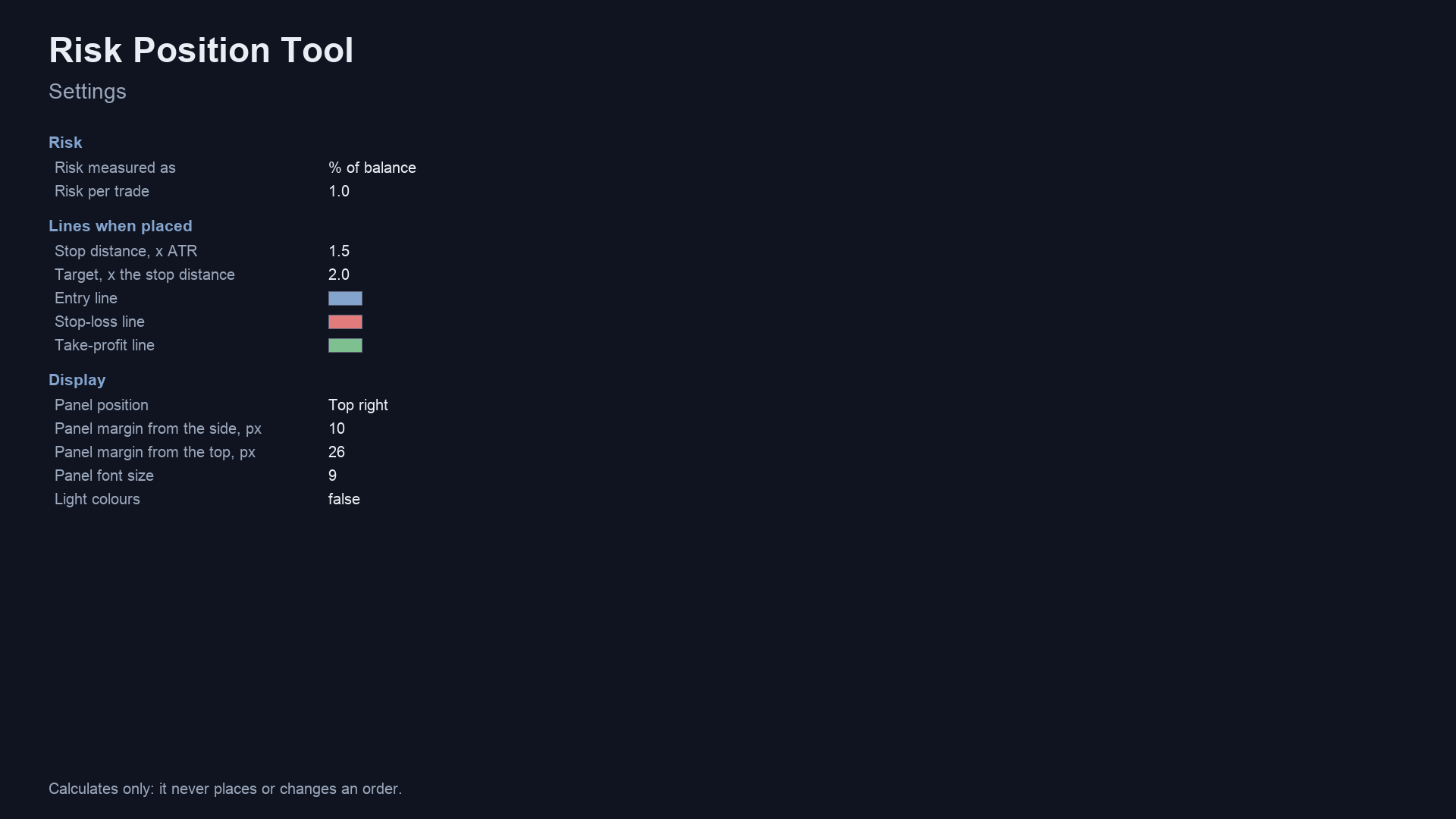
| Panel position, margins, font size | top right, 10 / 26 px, 9 | placement of the panel |
| Risk/reward box on the chart (MT5) | true | Draws the box between entry, stop and target |
| Colours (MT5) / Light colours (MT4) | Auto / false | panel theme: auto, light or dark (MT4: light for white charts) |
| Colour-blind friendly (MT5) | false | blue/orange instead of green/red |
| Debug log for bug reports | false | Writes extra lines to the Experts tab, to attach when you report a problem |
Panel buttons: BUY and SELL place the lines, MARKET / PENDING switches the entry between following the price and a fixed price, CLEAR removes the lines. The lines stay on the chart over a timeframe change.
Install from source. Copy the mql5 folder content into <terminal data folder>/MQL5/ (MT5) or the mql4 folder
content into <data folder>/MQL4/ (MT4), keeping the Include/RiskManager and Indicators/RiskManager folders. Open
RiskPositionTool.mq5 or .mq4 in MetaEditor and press Compile (F7). Both compile with 0 errors and 0 warnings (checked
on a Windows machine with MetaEditor, in a scratch folder holding only these files; the compiled files are not in the
repository). The Chart Kit files (theme, risk box, debug log) are needed as well: copy mql5/Include/ChartKit/ (MT5) or mql4/Include/ChartKit/ (MT4) into the Include folder of the data folder.
Run the Python reference and the test
python3 tests/check_sizing.py            # 200,000 random cases, fixed seed; prints PASS or FAIL
python3 tests/check_sizing.py 1000000    # more cases
import sys; sys.path.insert(0, "tests")
from reference import Symbol, size
eurusd = Symbol(tick_size=0.00001, tick_value=1.0, vol_step=0.01, vol_min=0.01, vol_max=100)
lots, money_at_stop, note = size(eurusd, entry=1.1000, sl=1.0950, risk_money=100)   # (0.2, 99.99999999999787, ''), i.e. 0.2 lots, about 100
The test needs only the Python standard library.
Honest limits
- A size is not a strategy. The tool does not pick entries, stops or targets, and says nothing about whether a trade is a good one.
- The risk is not exact. The lot is rounded down, so the money at the stop is at or below what you asked. A stop can fill further away than its line (slippage, gaps), spread and commission are not in the number, and a broker may change a symbol's tick value or margin.
- Minimum lot. If the minimum lot risks more than you asked, no lot is shown. The tool does not round up.
- Prices are rounded to the tick before sizing. A line dragged between two ticks is sized as the tick it would be sent at.
- One symbol per chart. The lines belong to the chart's symbol.
- Scope of the tests. The property test uses synthetic symbol data and checks rules, not a terminal. See How it was tested.
- No profit or accuracy claim is made.
Licence
Everything in this repository is © 2026 Allan Niñal under the
PolyForm Noncommercial License 1.0.0: source-available, free for personal and
other noncommercial use, not for commercial use. Each source file has an SPDX-License-Identifier line. Text:
LICENSE. The licence applies to this source, not to anything you build or trade with the tool. Trading
involves risk; the software is provided as is.
Website: allanninal.dev/mql5 · MT4 · allanninal.dev · Questions: message me on LinkedIn.