

Session Levels (MetaTrader 5 and MetaTrader 4)
A free indicator that draws the Asia, London and New York session boxes, the previous day and previous week high and low and today's open, with session times entered in New York time and converted from your broker's clock, so daylight saving is right on any broker. It alerts when a closed bar breaks the previous day or the Asia range. Source for both editions, a Python reference of the rules, and the tests that were used to check that MT5, MT4 and Python all agree.
Website: allanninal.dev/mql5 (indicators) · MT4 editions · allanninal.dev · Contact: message me on LinkedIn.
It shows levels, not entries. It places no trades and gives no buy or sell advice. Nothing here is a profit claim (see Honest limits).
Get it on the MQL5 Market
| Edition | Platform | Price | Link |
|---|---|---|---|
| Session Levels | MT5 | free | https://www.mql5.com/en/market/product/201881 |
| Session Levels MT4 | MT4 | free | https://www.mql5.com/en/market/product/202384 |
The Market builds are the same calculation as the source in this repository.
Contents
- What it is and who it is for
- Why it was built
- How it works
- Non-repainting: the proof and how it was tested
- Architecture and buffers
- Inputs, alerts, install and compile
- Run the Python reference and the tests
- Honest limits
- Licence
What it is and who it is for
What:
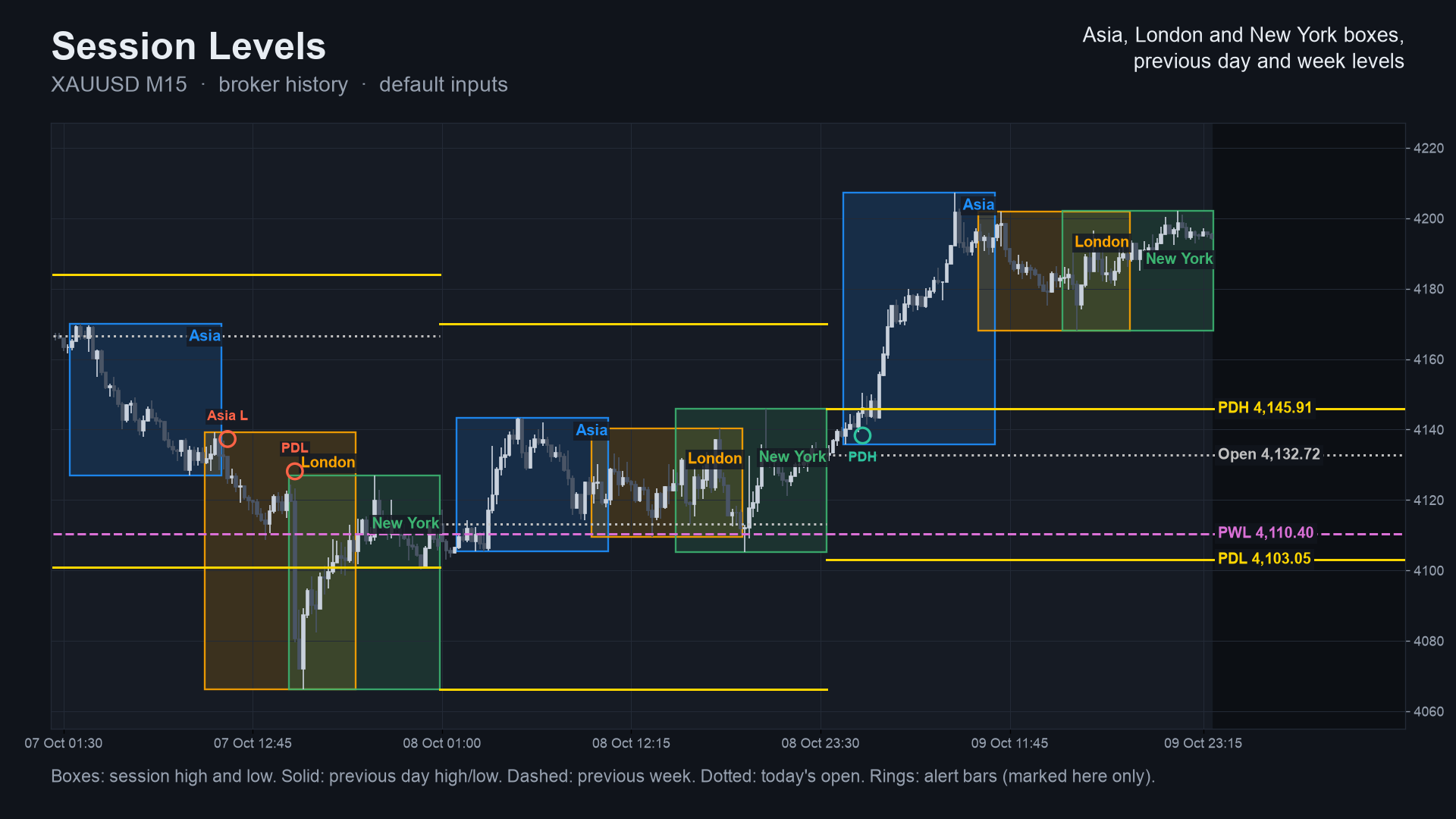
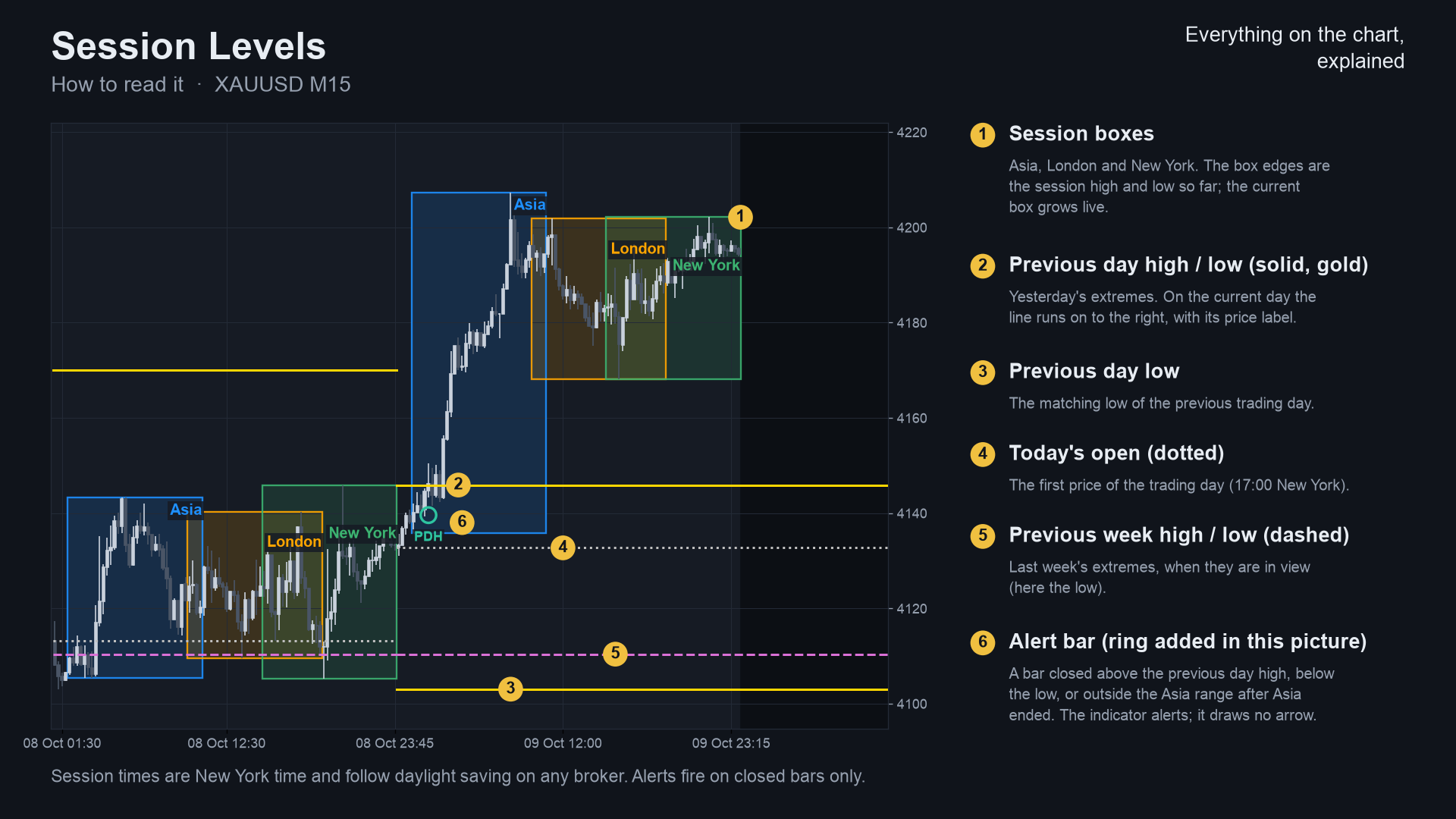
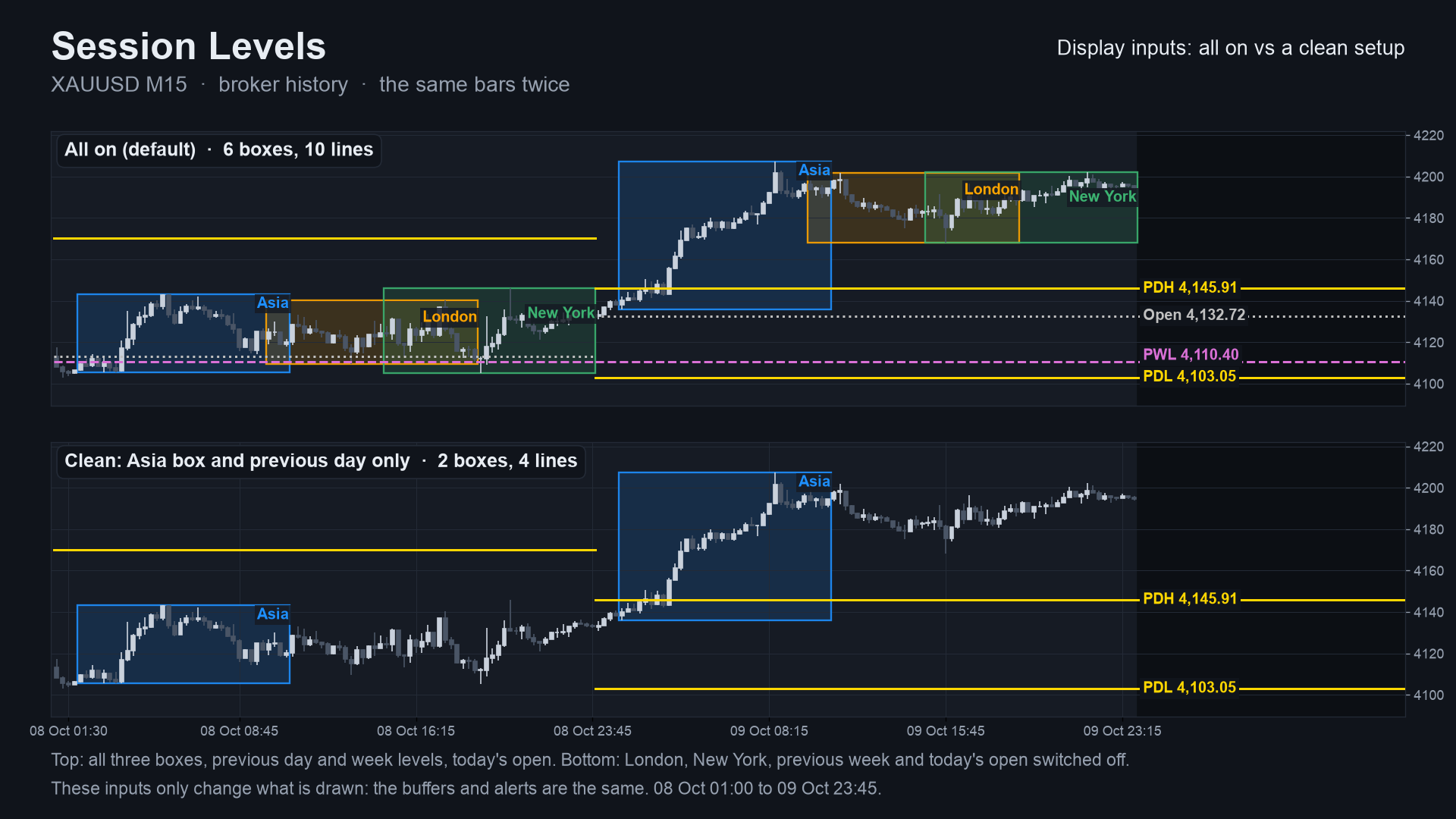
- Three session boxes (Asia 19:00 to 04:00, London 03:00 to 12:00, New York 08:00 to 17:00, New York time). The box edges are the session high and low; the current session grows live.
- Previous day high and low (solid), previous week high and low (dashed) and today's open (dotted), as lines per day; on the current day they run to the right edge with price labels.
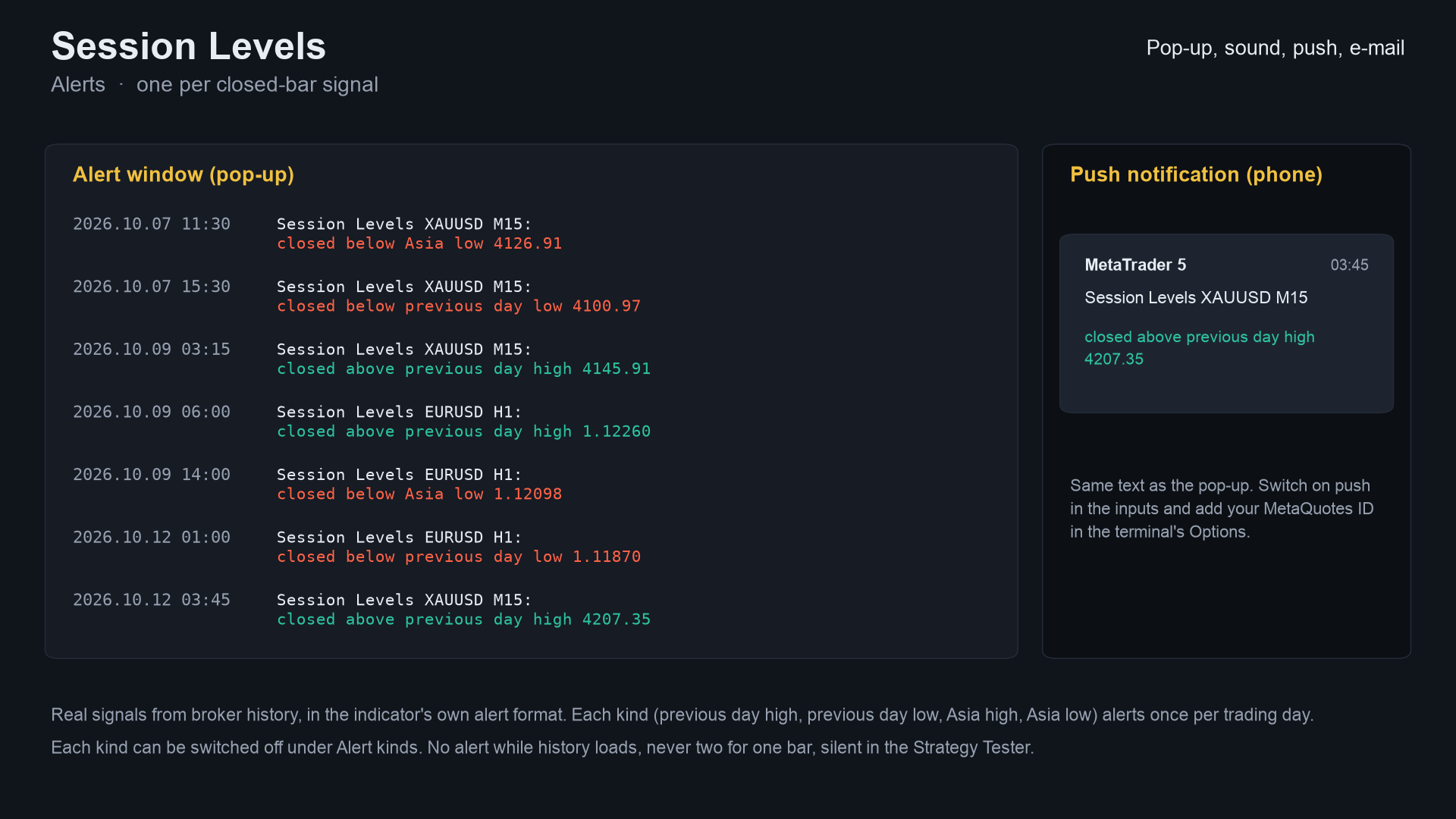
- Alerts on closed bars: a close above the previous day high, below the previous day low, and, after the Asia session, above its high or below its low. Each kind at most once per trading day.
- Sessions and the open on M1 to H4; above H4 only the previous day and week levels.
For: traders who mark session ranges and daily or weekly levels by hand and want them drawn automatically, correctly
shifted for their broker and for daylight saving, on any symbol. Also for developers: seven documented buffers for iCustom.
Not for: anyone who wants buy and sell arrows or an automatic system. This is a level map.
 |
 |
 |
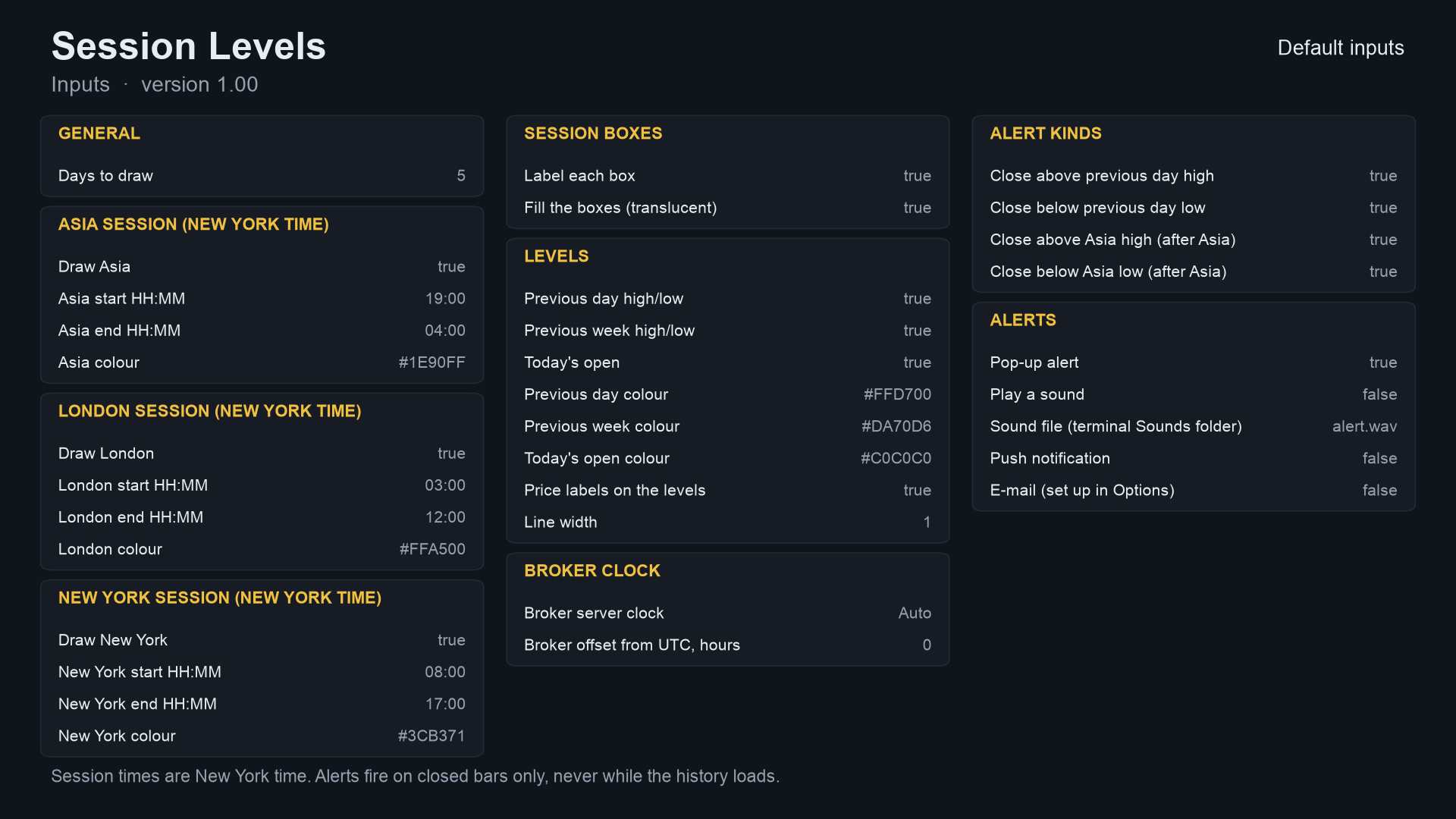 |
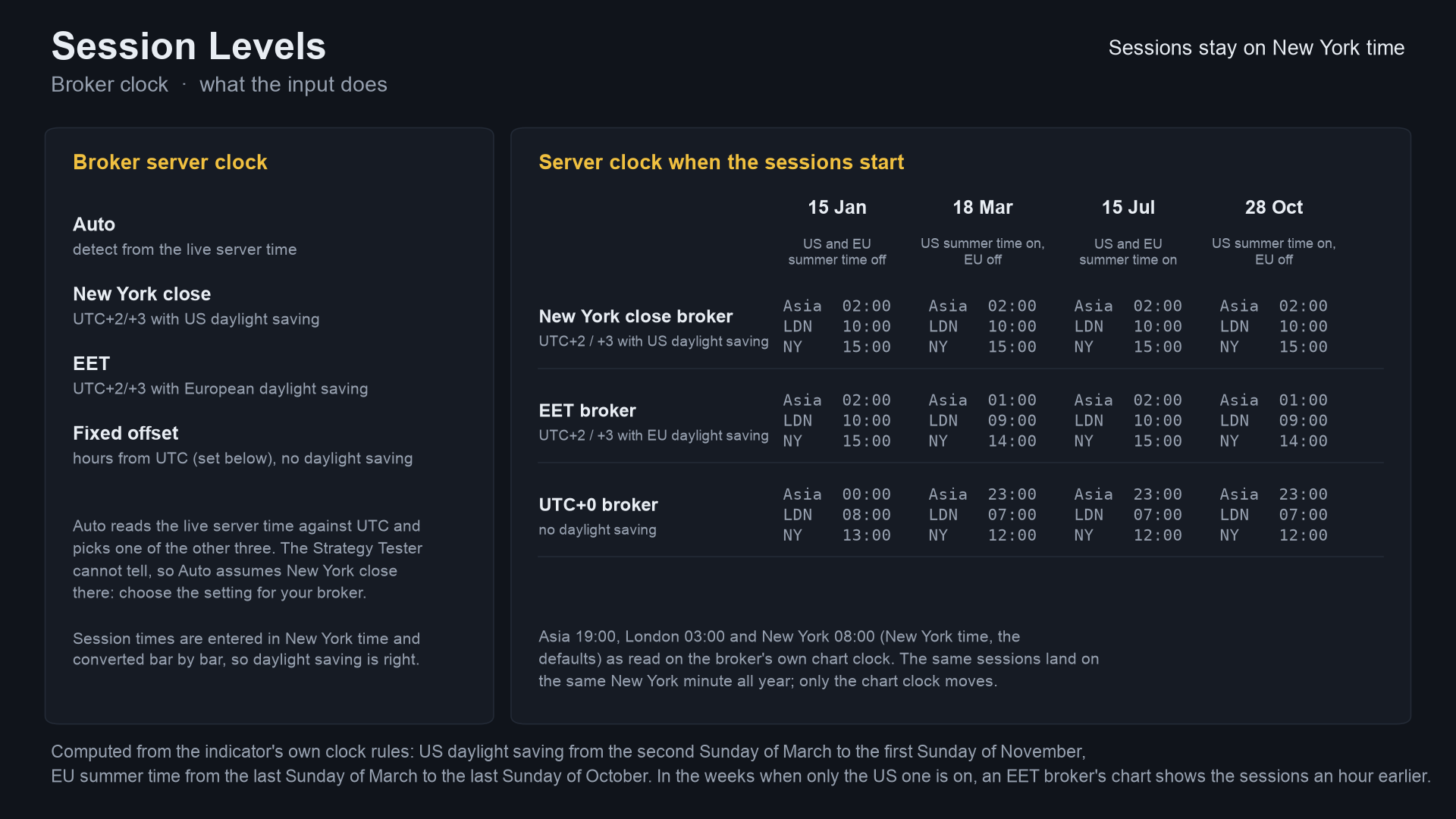
Image notes: charts are drawn by the Python reference on broker history (the same numbers the indicator shows); the alert text
is the indicator's real text but the pop-up and phone card around it are mock-ups; the Data Window panel is a mock-up of the
buffer map. They are illustrations, not terminal captures. More images, including the MT4 versions, are in
docs/images/.
Why it was built
Session boxes and previous-day levels are among the most hand-drawn things on a chart. The reasons, with the evidence we have:
- Brokers differ in clock and daylight saving. A box that says "London 03:00 to 12:00" is only right if the indicator knows whether your server is on a New York close, EET or a fixed offset, and which weeks each side has shifted. The point of this indicator is to get that right and to say how.
- Demand is steady but small-ticket. On the MQL5 Freelance board, 72 of 2,014 scraped jobs (Nov 2025 to Oct 2026) were about session logic (Asian range, killzones, session breakouts); typical budgets are 30 to 100 USD. Free session tools already sit in the Market's top lists, so this is a free reference, not a claim of a gap.
- Provable behaviour. Alerts use closed bars only and every number here comes from an executed check.
mindmap
  root((Session Levels))
    Problem
      Hand-drawn session boxes
      Broker clocks and daylight saving differ
      Previous day and week levels drift
    Design rules
      Times entered in New York time
      Clock detected or chosen
      Alerts on closed bars, once per day per kind
    Proof
      Python reference
      7 buffers compared bar by bar
      Tester repaint probe
      Market validation
How it works
The rules, step by step
- Broker clock to New York time. A trading day runs from 17:00 to 17:00 New York time. Each bar's broker time is converted with one of four clocks: Auto (compares the live server time with UTC and picks one of the others; in the Strategy Tester it cannot tell and assumes New York close), New York close (UTC+2 / +3 with US daylight saving), EET (UTC+2 / +3 with European daylight saving) or a fixed offset. US daylight saving runs from the second Sunday of March to the first Sunday of November; European from the last Sunday of March to the last Sunday of October. In the weeks when only one side has shifted, an EET broker's chart shows the sessions an hour earlier.
- Sessions. A bar belongs to a session by its open time. A session that crosses midnight (Asia) belongs to the trading day it ends on. Box edges are the highest high and lowest low so far.
- Previous day and week. The previous trading day's high and low, and the previous Monday-based week's. The first day and week in the data have no "previous". On D1 and above the day and week are built from the chart's own bars.
- Today's open is the first price of the trading day (17:00 New York).
- Signals (buffer 6, closed bars only, each kind at most once per trading day):
+1the first close above the previous day high,-1the first close below the previous day low,+2the first close above the Asia high after Asia ended,-2the first close below the Asia low. If two kinds fire on one bar the priority is: previous day high, previous day low, Asia high, Asia low.
Per-bar algorithm
flowchart TD
    A[Bar i] --> B[Broker time to New York time<br/>by the chosen clock]
    B --> C[Trading day and week of the bar]
    C --> D[Update day and week high, low, open]
    D --> E[Which session is the bar in? by open time]
    E --> F[Update box high and low,<br/>Asia range so far]
    F --> G{Bar is closed?}
    G -- no, live bar --> H[Draw only, no signal]
    G -- yes --> I{Close beyond a level<br/>not yet signalled today?}
    I -- no --> Z[Nothing]
    I -- yes --> J[Signal in buffer 6]
    J --> K[Alert, once per bar, only when live]
Trading-day states
stateDiagram-v2
    [*] --> DayStart: 17:00 New York, today's flags cleared
    DayStart --> AsiaRange: Asia (from 19:00) builds its high and low
    AsiaRange --> RangeFixed: Asia ends (04:00)
    DayStart --> PrevDayBreak: first close beyond the previous day high or low (+1 or -1, once each)
    AsiaRange --> PrevDayBreak: same rule, any time of the day
    RangeFixed --> AsiaBreak: first close beyond the Asia high or low (+2 or -2, once each)
    PrevDayBreak --> DayEnd
    AsiaBreak --> DayEnd
    RangeFixed --> DayEnd: 17:00
    DayEnd --> DayStart: levels roll to the next day
Alert flow
sequenceDiagram
    participant T as Terminal
    participant I as Session Levels indicator
    participant H as Alert helper
    participant U as You
    T->>I: OnCalculate (history load, prev_calculated = 0)
    I->>I: recompute the levels and signals of every bar
    I-->>H: nothing (never alert during history load)
    T->>I: OnCalculate (a bar closes)
    I->>I: test the bar that just closed
    I->>H: SignalAlert(text, bar time, live = true)
    alt newer than the last alert and not in the tester
        H->>U: pop-up (optional sound, push, e-mail)
    else same bar again or tester run
        H-->>I: nothing sent
    end
How many signals each timeframe gives (measured)
Signal values (buffer 6) over the same XAUUSD history with default inputs. Source:
tests/results/parity-mt5.txt. This counts signals only; it says nothing about whether
breaking a level is worth trading.
xychart-beta
    title "Signal values on XAUUSD, default inputs"
    x-axis ["M15", "H1", "H4"]
    y-axis "signal values" 0 --> 1400
    bar [1165, 1038, 840]
Coarser bars give fewer signals because several breaks can share one bar and each kind fires once per day.
Non-repainting: the proof and how it was tested
"Non-repainting" is easy to claim. Here is what was actually run. Raw result files are in tests/results/.
1. Three implementations, compared bar by bar. The Python reference (tests/reference.py) was written
from the rules above, not from the MQL code. The MT5 and MT4 indicators were dumped bar by bar (7 buffers) in the MetaTrader
Strategy Tester and tests/check_parity.py compared each dump with the reference. Pass means: on
every closed bar all seven buffers match (levels within 1e-9 relative, signals exactly, blank where the reference is blank).
| MT5 | MT4 | |
|---|---|---|
| dumps compared | 24 (4 symbols x M15/H1/H4 x 2 input sets) | 25 (the same 24 + one every-tick EURUSD H1) |
| bars compared | 652,332 | 509,573 |
| signal values compared | 24,804 | 19,342 |
| result | ALL PASS | ALL PASS |
Symbols: EURUSD, XAUUSD, GBPJPY, BTCUSD. Input sets: defaults; London 02:00 to 05:00 and New York 07:00 to 10:00 ("kill
zones"). The test server uses a New York close clock, which the reference assumes (see Honest limits).
Sources: tests/results/parity-mt5.txt, tests/results/parity-mt4.txt.
The MT4 test history is shorter on the FX pairs, which is why the bar counts differ.
xychart-beta
    title "Signal values compared, Python vs indicator (all 0 differences)"
    x-axis ["MT5", "MT4"]
    y-axis "signal values" 0 --> 28000
    bar [24804, 19342]
2. Repaint probe. A probe records the signal buffer on each bar at the moment it closes, then reads the same bars again at the end and counts any value that changed. It also counts any signal ever shown on the still-forming bar.
| Run | Closed bars checked | Signals seen at close | Changed afterwards | Signals on the live bar |
|---|---|---|---|---|
| MT5, EURUSD H1, every tick, 10,411,052 ticks | 4,644 | 345 | 0 | 0 |
| MT4, 25 runs combined | 506,172 | 19,020 | 0 | 0 |
Source: tests/results/repaint-summary.md. The MT5 probe ran once (EURUSD H1, default
inputs); the MT4 probe ran on every dump run.
3. Market validation. Both Market builds passed the MQL5 Market's automated product validation before publication (the Market's own check, not part of this repository).
flowchart LR
    R[reference.py<br/>Python, rules as code] --> P
    S5[MT5 indicator] --> T5[Tester script<br/>DumpIndicator<br/>every bar to CSV]
    S4[MT4 indicator] --> T4[Tester EA<br/>SessionLevelsDump + Dump4.mqh<br/>CSV + repaint log]
    T5 --> P[check_parity.py<br/>7 buffers, 1e-9]
    T4 --> P
    S5 --> RP[RepaintProbe EA<br/>values at close vs final]
    T4 --> RL[repaint log<br/>per run]
    P --> V{all pass?}
    RP --> V
    RL --> V
    V -- yes --> M[Market validation]
    V -- no --> F[fix, rerun everything]
Why the design cannot repaint
- Signals are written only for closed bars; the forming bar's signal buffer is empty.
- A level of the previous day or week never changes once that day or week is over. A box edge of a session in progress does move as price moves; that is the drawing of the live session, not a signal.
- Each signal kind fires at most once per trading day, and alerts fire only for the bar that just closed, after the history load, once per bar, and never in the tester.
Architecture and buffers
flowchart TB
    subgraph MT5["mql5/Indicators/SessionLevels"]
        A5[SessionLevels.mq5<br/>inputs, clock, sessions, levels, drawing]
        B5[SignalAlerts.mqh<br/>alert inputs, TfName, SignalAlert]
        A5 -- include --> B5
    end
    subgraph MT4["mql4/Indicators/SessionLevels"]
        A4[SessionLevels.mq4]
        B4[SignalAlerts.mqh<br/>MT4 edition]
        A4 -- include --> B4
    end
    subgraph TESTS[tests]
        R[reference.py]
        C[check_parity.py]
        D5[mql5: DumpIndicator, RepaintProbe, Params.mqh]
        D4[mql4: SessionLevelsDump.mq4, Dump4.mqh]
        C --> R
    end
    D5 -. IndicatorCreate .-> A5
    D4 -. iCustom .-> A4
classDiagram
    class SessionLevels {
        +InpDays int
        +InpClock enum
        +InpAsiaStart string
        +InpShowPD bool
        +OnInit()
        +OnCalculate()
    }
    class SignalAlerts {
        +InpAlertPopup bool
        +InpAlertSound bool
        +InpAlertPush bool
        +InpAlertEmail bool
        +SignalAlert()
    }
    class reference {
        +session_levels()
    }
    SessionLevels --> SignalAlerts : alerts
    reference ..> SessionLevels : same rules, compared by check_parity
iCustom buffer table (for EA developers)
| Buffer | Content |
|---|---|
| 0 | previous day high |
| 1 | previous day low |
| 2 | previous week high |
| 3 | previous week low |
| 4 | Asia high so far (the current trading day's Asia session; empty before it starts) |
| 5 | Asia low so far |
| 6 | signal: +1 close above previous day high, -1 below previous day low, +2 above the Asia high, -2 below the Asia low |
| 7 to 19 | internal calculation buffers |
Empty value is EMPTY_VALUE. Read closed bars (shift 1 and higher). iCustom parameters follow the input order; in MT5
the input group headings also count as string parameters when you build a handle with IndicatorCreate (see
tests/mql5/Include/IndTest/Params.mqh). In MT4 the same seven buffers are available; a filled box is the session colour
blended into the chart background (MT4 has no translucency).
Inputs, alerts, install and compile
| Input | Default | Meaning |
|---|---|---|
| Days to draw | 5 | Days that get boxes and lines |
| Draw Asia / London / New York | true | Per-session switch, each with its own start, end (HH:MM New York time) and colour |
| Session times | Asia 19:00-04:00, London 03:00-12:00, New York 08:00-17:00 | New York time |
| Label each box / Fill the boxes | true / true | Box text and fill |
| Previous day / previous week / today's open | true | Levels, each with a colour |
| Price labels on the levels / Line width | true / 1 | Appearance |
| Broker server clock | Auto | Auto, New York close, EET or Fixed offset |
| Broker offset from UTC, hours | 0 | Fixed offset only |
| Alert kinds | all four on | Previous day high / low, Asia high / low |
| Fakeout marker: on, markers | true, true | Marks a break of the overnight range that closes back inside |
| Fakeout range / window (New York time) | 17:00-02:00 / 02:00-11:00 | The overnight range and the window in which fakeouts are marked |
| Bars to close back inside | 2 | 1 = the break bar only, 2 = the break bar or the next |
| Daily-structure filter, fakeout colours | false, red / blue | Bearish only after lower highs and lows (bullish after higher); marker colours |
| Alert on a fakeout | true | Adds fakeouts to the alert kinds |
| Pop-up / sound / push / e-mail | true / false / false / false | Delivery (push needs your MetaQuotes ID) |
| Debug log for bug reports | false | Writes extra lines to the Experts tab, to attach when you report a problem |
An alert reads, for example, Session Levels EURUSD M15: closed above previous day high 1.0850.
Install from source. Copy mql5/Indicators/SessionLevels/ into <terminal data folder>/MQL5/Indicators/ (MT5) or
mql4/Indicators/SessionLevels/ into <data folder>/MQL4/Indicators/ (MT4), open SessionLevels.mq5 or .mq4 in MetaEditor
and press Compile (F7). Both compile with 0 errors (checked with the MetaEditor of a MetaTrader 5 and a MetaTrader 4 build on
a Windows machine; the compiled files are not in the repository). Keep the two files of each edition together. The debug log needs the Chart Kit file as well: copy mql5/Include/ChartKit/ (MT5) or mql4/Include/ChartKit/ (MT4) into the Include folder of the data folder.
Run the Python reference and the tests
python3 -m venv .venv && . .venv/bin/activate && pip install -r requirements.txt
import sys; sys.path.insert(0, "tests")
from reference import session_levels
# t (epoch seconds, server time), o, h, l, c: arrays of bars, oldest first; the last bar is the live bar.
# Assumes a New York close server clock (server = New York + 7 h). Returns an (n, 7) array: the seven buffers.
out = session_levels(t, o, h, l, c, asia_start="19:00", asia_end="04:00")
To repeat the parity check on your own data:
- Compile the indicator and the test tool for your platform (
tests/mql5/Scripts/DumpIndicator, ortests/mt4/SessionLevelsDump.mq4withtests/mql4/Include/IndTest4/Dump4.mqhin yourMQL4/Include/IndTest4/; MT5 also needstests/mql5/Include/IndTest/Params.mqh). - Run it for each symbol and timeframe with the input sets in
tests/configs.tsv(MT5) ortests/mt4/configs.tsv(MT4), on a server whose clock is New York close. Each run writes one CSV per symbol and timeframe. python3 tests/check_parity.py <folder with the CSVs>(add--mt4for MT4 dumps). It prints PASS or FAIL per file.- Repaint: run
tests/mql5/Experts/RepaintProbein the MT5 Strategy Tester (every tick); MT4 writes its repaint log with the dump.
The price dumps used for the published numbers are not in this repository (they are broker price data).
Honest limits
- Levels, not entries. A previous-day break is a fact about a close, not a prediction. No profit or accuracy claim is made; the numbers are about consistency and frequency.
- The parity tests cover one clock. The Python reference assumes a New York close server clock, and the test server had one. The other clocks (EET, fixed offset, Auto) follow the stated daylight-saving rules but were not compared against the reference. In the Strategy Tester, Auto cannot detect the clock and assumes New York close, so choose it yourself there.
- Sessions are conventions. Session hours are the defaults above; change them if you use others.
- A session box in progress moves as price moves; only alerts and the signal buffer are closed-bar facts.
- Above H4 only the previous day and week levels are drawn; on D1 and above they are built from the chart's own bars.
- Scope of the tests. Four symbols, three timeframes, two input sets, one MT5 repaint run. Other symbols, timeframes and settings are not covered by the published numbers. The MT5 build was not run on a live chart as part of these numbers.
Licence
Everything is © 2026 Allan Niñal under the
PolyForm Noncommercial License 1.0.0: source-available, free for personal and
other noncommercial use, not for commercial use. Each source file has an SPDX-License-Identifier line; the text is in
LICENSE. The licence applies to this source, not to anything you build or trade with the indicator. Trading
involves risk; the software is provided as is.
Website: allanninal.dev/mql5 · MT4 · allanninal.dev · Questions: message me on LinkedIn.