- MQL5 67.8%
- MQL4 21.4%
- Python 10.8%
| Filename | Latest commit message | Latest commit date |
|---|---|---|
|
|
||
| docs | ||
| LICENSES | ||
| mql4 | ||
| mql5 | ||
| tests | ||
| .gitignore | ||
| LICENSE | ||
| README.md | ||
| requirements.txt | ||


UT Bot Signal Alerts (MetaTrader 5 and MetaTrader 4)
A free ATR trailing-stop indicator that draws one stop line and one buy or sell arrow per signal, on closed bars only, and sends an alert for each arrow. Source for both editions, a Python reference of the maths, and the tests that were used to check that the MT5 and MT4 code, the Python reference and each other all agree.
Website: allanninal.dev/mql5 (indicators) · MT4 editions · allanninal.dev · Contact: message me on LinkedIn.
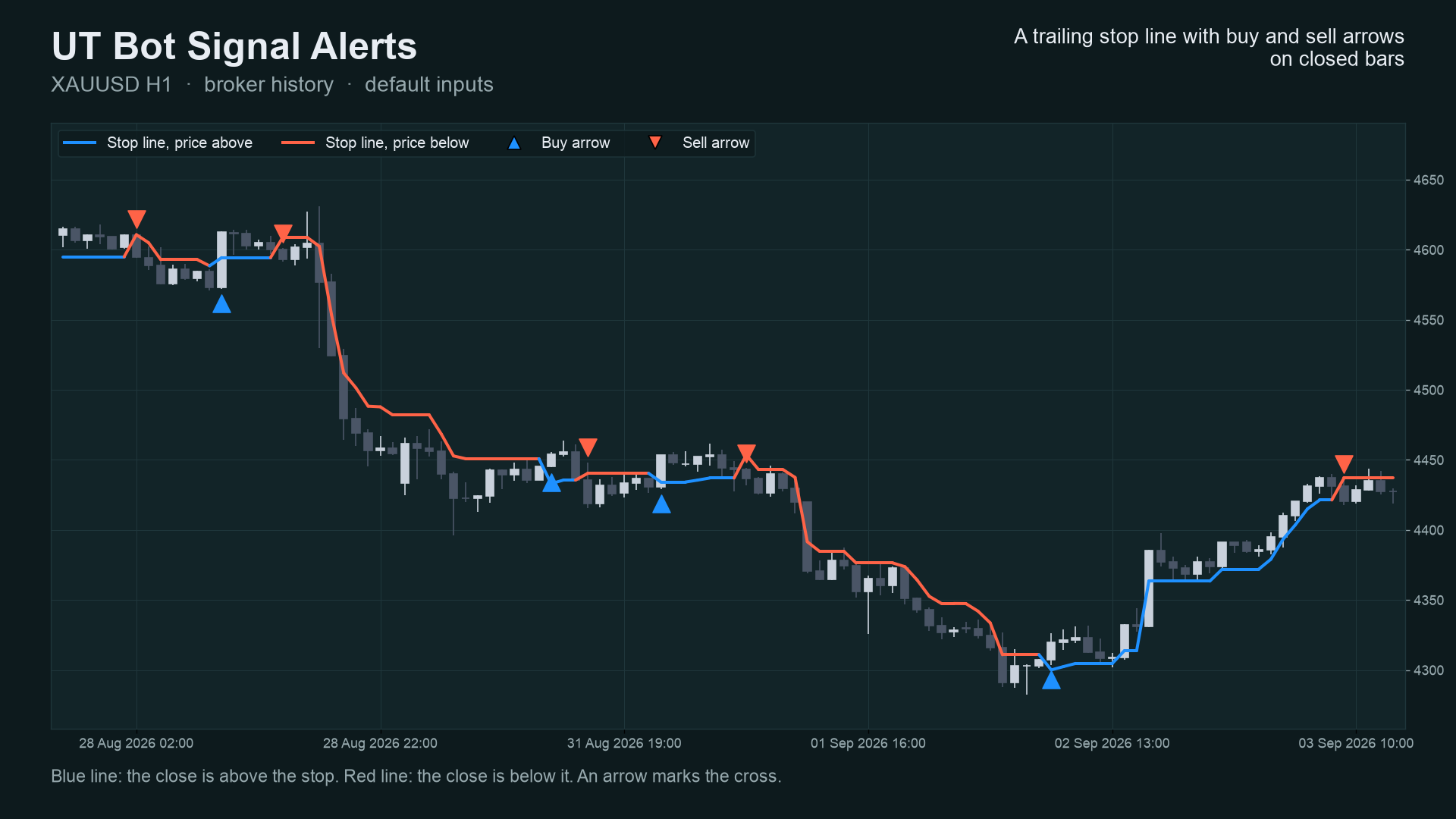
It is an indicator, not a strategy. It draws a line and arrows and places no trades. Nothing here is a profit claim (see Honest limits).
Get it on the MQL5 Market
| Edition | Platform | Price | Link |
|---|---|---|---|
| UT Bot Signal Alerts | MT5 | free | https://www.mql5.com/en/market/product/201607 |
| UT Bot Signal Alerts MT4 | MT4 | free | https://www.mql5.com/en/market/product/202304 |
The Market builds are the same calculation as the source in this repository.
Contents
- What it is and who it is for
- Why it was built
- How it works
- Non-repainting: the proof and how it was tested
- Architecture and buffers
- Inputs, alerts, install and compile
- Run the Python reference and the tests
- Honest limits
- Licence and credits
What it is and who it is for
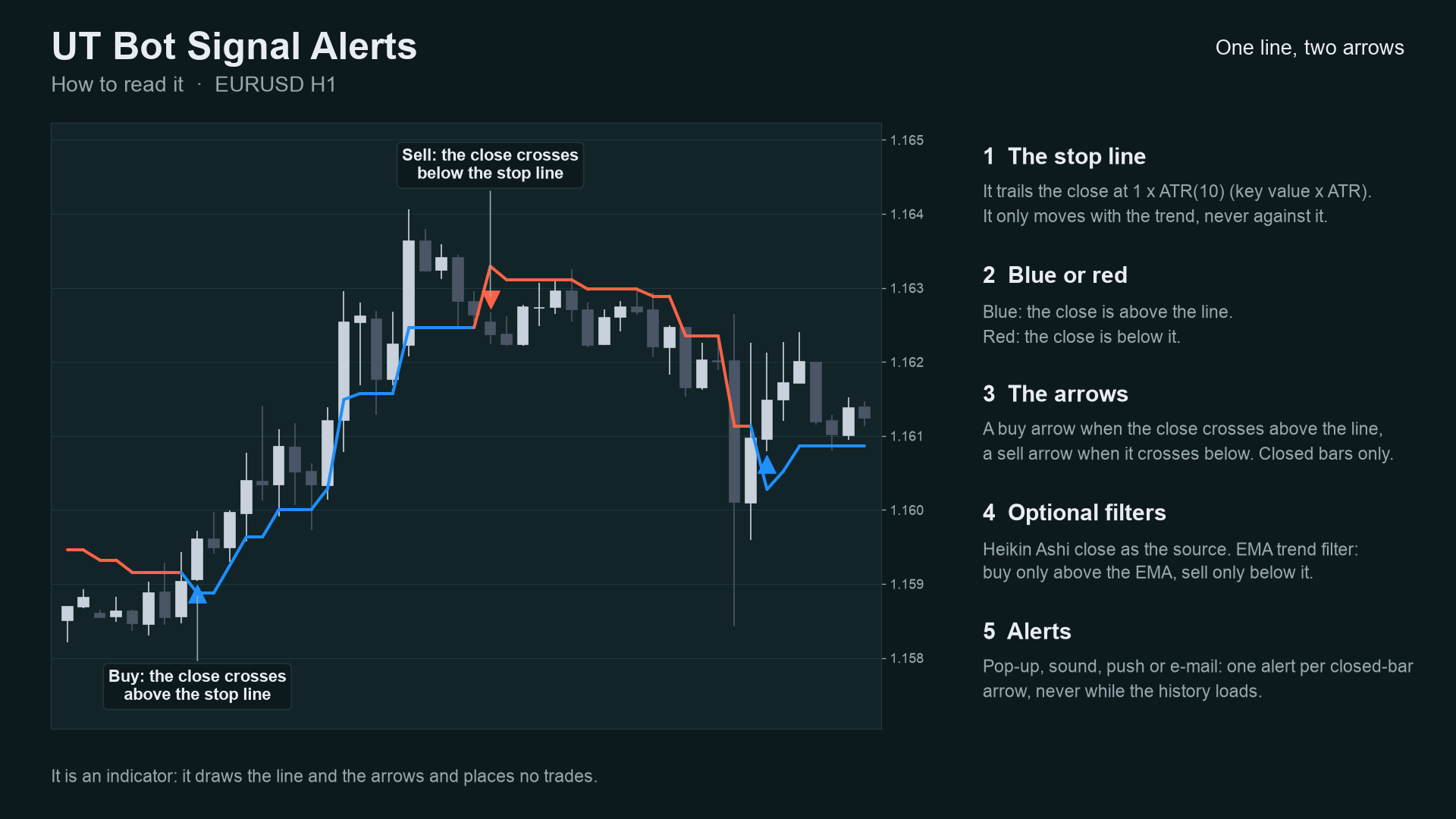
What: the "UT Bot" method as a native MetaTrader indicator. A trailing stop sits key value x ATR away from price. It
only ratchets with the trend. When the close crosses the line, you get an arrow (buy above, sell below) and an alert
(pop-up, sound, push, e-mail). Two optional filters: a Heikin Ashi close as the source, and an EMA trend filter.
For: traders who want a clean, readable trend-flip marker on any symbol and timeframe, and who want to know the arrow
they saw will still be there tomorrow. Also for developers who want a small, tested indicator with documented buffers to
read from an EA with iCustom.
Not for: anyone who expects arrows to predict direction. They mark where the close crossed a volatility-scaled stop.
 |
 |
 |
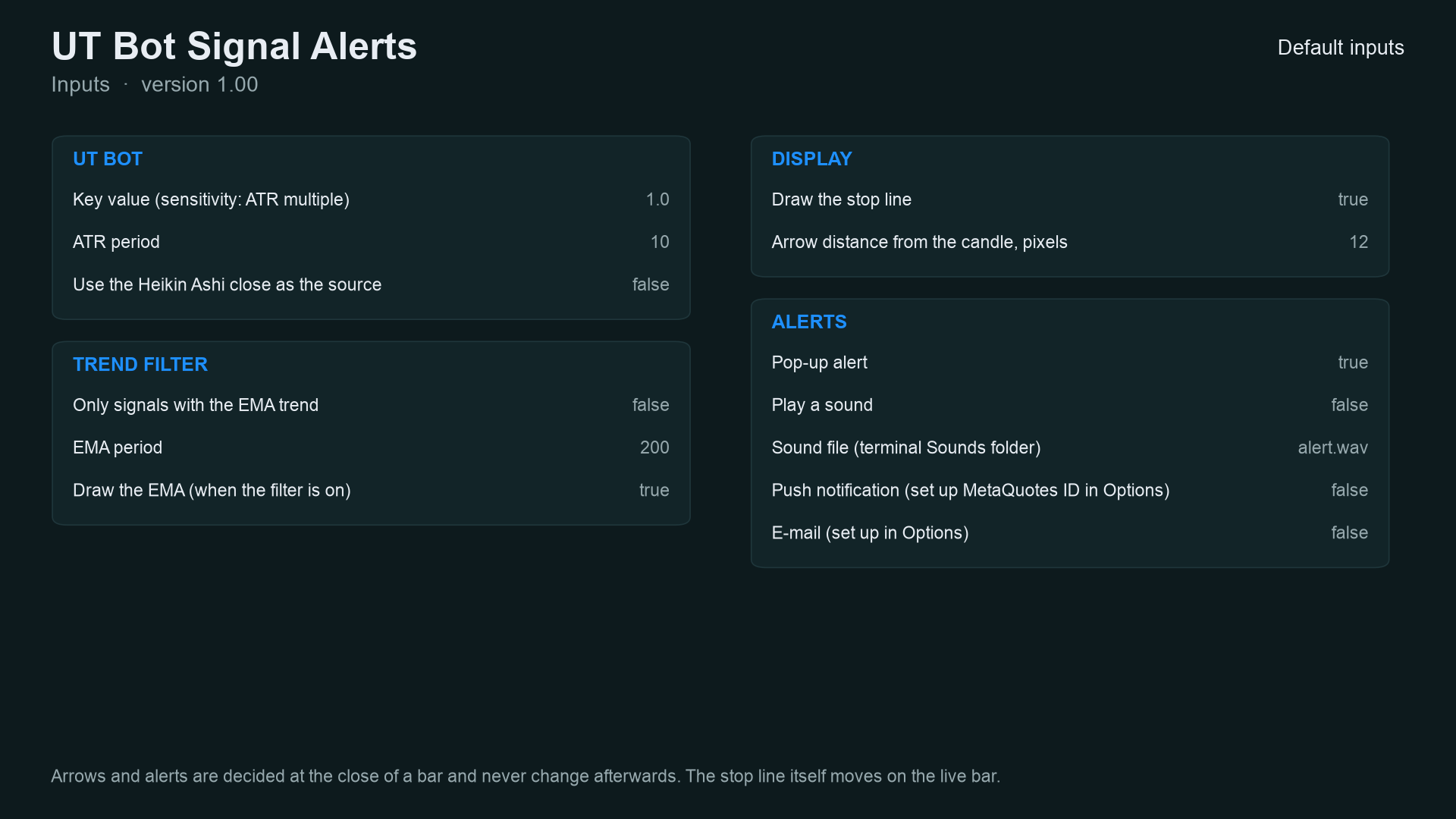 |
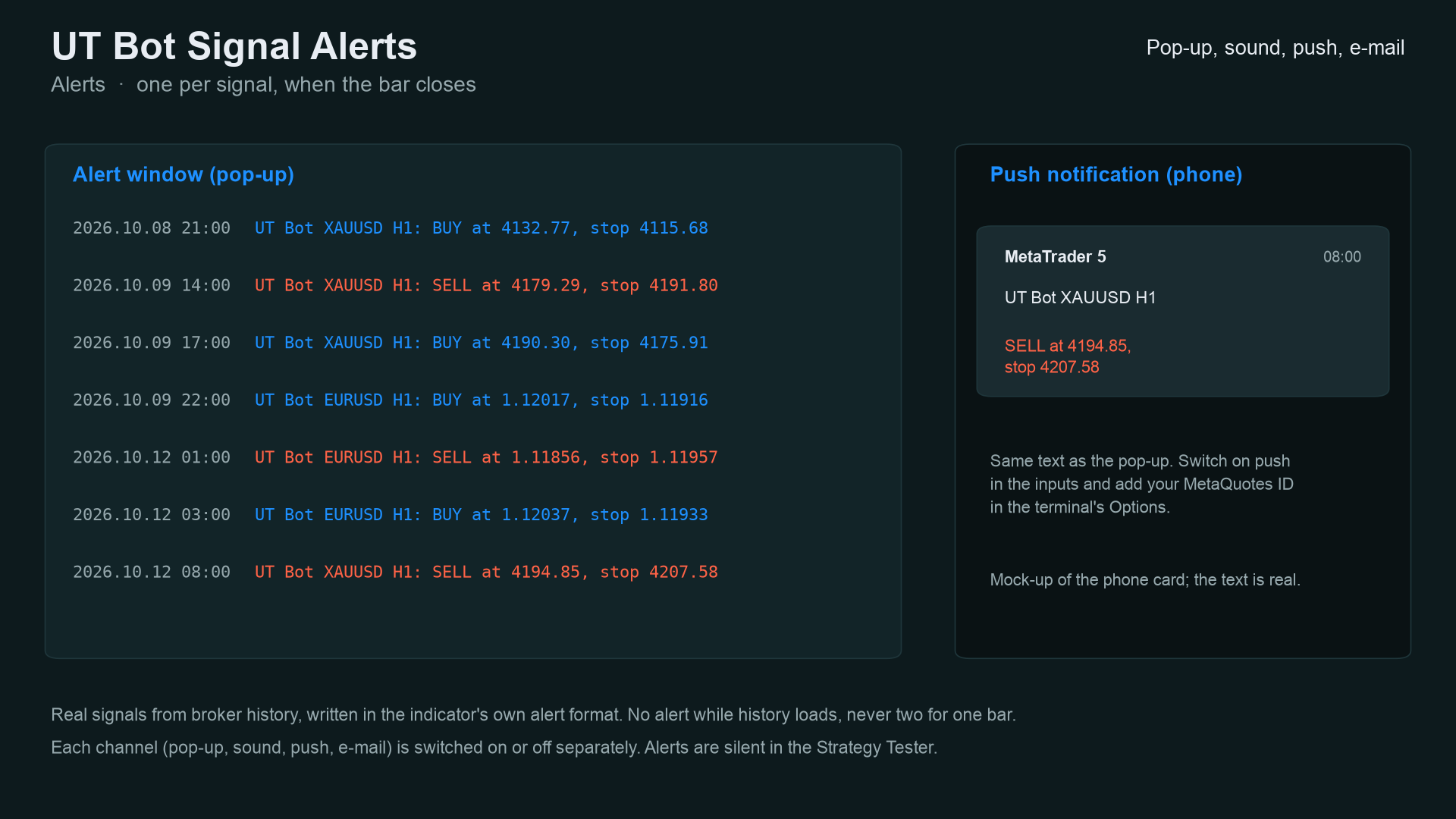
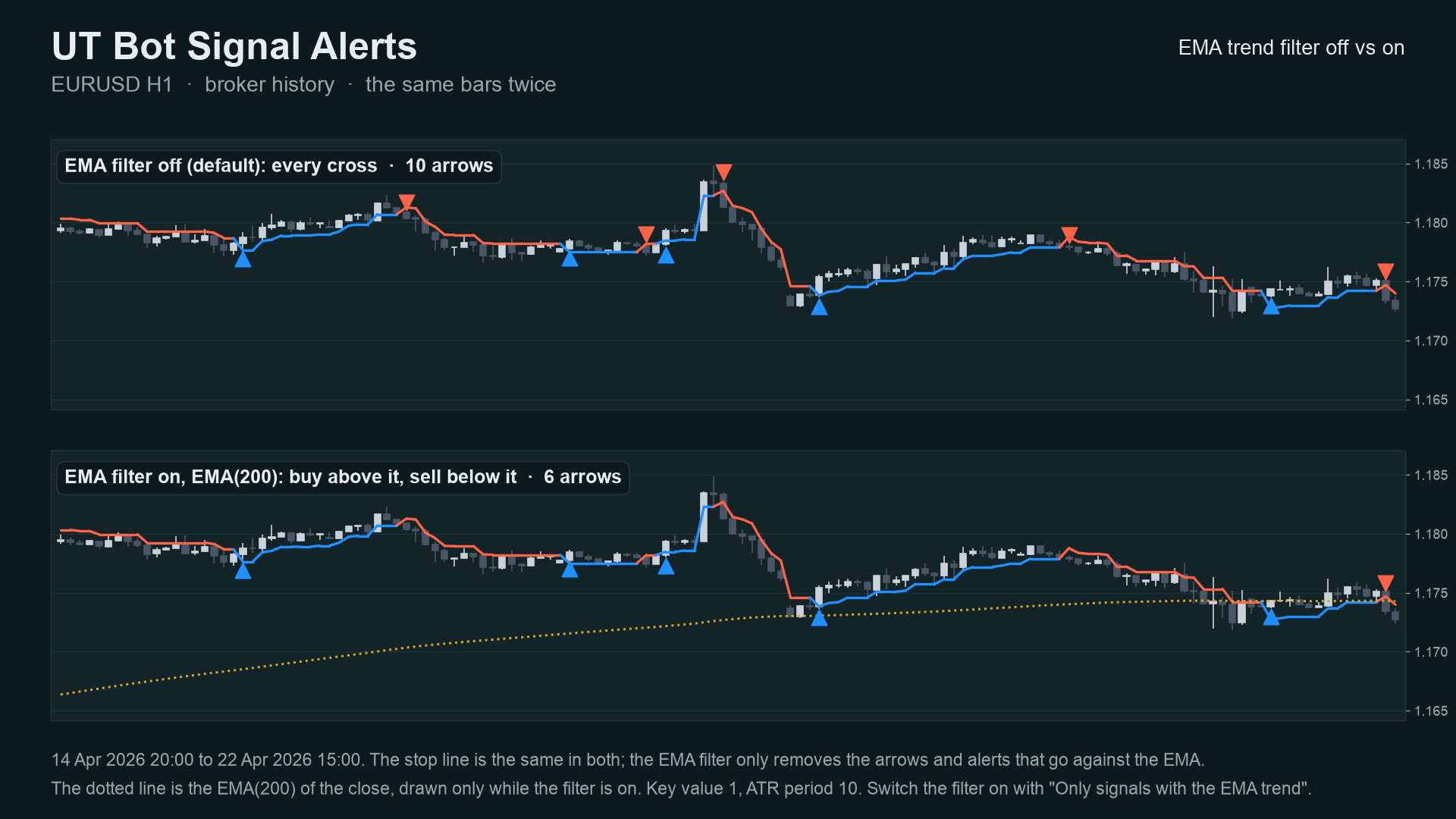
Image notes: charts 01-03 are drawn by the Python reference on broker history (the same numbers the indicator shows); the
alert text on 06 is the indicator's real text but the pop-up and phone card around it are mock-ups; the Data Window panel
on 08 is a mock-up of the buffer map. They are illustrations, not terminal captures. MT4 versions are in
docs/images/mt4/.
Why it was built
The UT Bot is one of the most copied TradingView scripts, and traders who move to MetaTrader keep asking for it. The motivations, stated with the evidence we actually have:
- A native, readable port. The method is simple (an ATR trailing stop) and does not need a closed-source box.
- Trust in the arrows. Our market research (demand scan of MQL5 Market, forums and freelance boards, October 2026) found repeated complaints about arrow indicators that repaint, and a 2026-07 request for "arrows confirmed on bar close". The design rule follows: an arrow is only drawn on a bar that has closed, and never moves afterwards.
- Honest scale of demand. The same research found that named classic indicators such as UT Bot are requested only rarely by name (1 to 14 requests per board). So this is a free tool that gives a clean reference implementation and builds a track record, not a claim of mass demand.
- Provable behaviour. Every number in this README comes from an executed check, listed below, not from a promise.
mindmap
  root((UT Bot Signal Alerts))
    Problem
      TradingView script, no clean MetaTrader port
      Arrow indicators that repaint
      Alerts that fire twice or during history load
    Design rules
      Signals on closed bars only
      One alert per bar
      Same maths on MT5 MT4 and Python
    Proof
      Python reference
      Bar by bar parity
      Tester repaint probe
      Market validation
How it works
The maths, step by step
Let O, H, L, C be the bar's open, high, low, close, i the bar index (oldest = 0), n the ATR period and k the key value.
-
True range
TR[i] = max(H[i]-L[i], |H[i]-C[i-1]|, |L[i]-C[i-1]|), andTR[0] = H[0]-L[0]. -
ATR (Wilder's smoothing, seeded with a simple average, as on TradingView)
ATR[n-1] = mean(TR[0..n-1]), thenATR[i] = (ATR[i-1] * (n-1) + TR[i]) / n. -
Source
src[i]: the closeC[i], or with Heikin Ashi on(O+H+L+C)/4. -
Loss distance
nLoss[i] = k * ATR[i]. -
Trailing stop
T[i], withT[-1] = 0:- price above the stop on this and the previous bar:
T[i] = max(T[i-1], src[i] - nLoss[i])(the stop only rises) - price below the stop on this and the previous bar:
T[i] = min(T[i-1], src[i] + nLoss[i])(the stop only falls) - otherwise (the first bar after a flip):
T[i] = src[i] - nLoss[i]ifsrc[i] > T[i-1], elsesrc[i] + nLoss[i]
- price above the stop on this and the previous bar:
-
Signals (on closed bars only):
- Buy:
src[i] > T[i]andsrc[i-1] <= T[i-1] - Sell:
src[i] < T[i]andsrc[i-1] >= T[i-1] - With the EMA filter: a buy also needs
C[i] > EMA[i], a sellC[i] < EMA[i], whereEMAis seeded with the average of the firstpcloses and thenEMA[i] = EMA[i-1] + 2/(p+1) * (C[i] - EMA[i-1]).
- Buy:
The stop line is blue while the source is above it and red while below. The live bar's line may move; arrows are never drawn on it.
Per-bar algorithm
flowchart TD
    A[New or updated bar i] --> B[Source: close, or Heikin Ashi close]
    B --> C[True range, then Wilder ATR]
    C --> D{ATR available? i >= n-1}
    D -- no --> Z[No line, no arrow]
    D -- yes --> E[nLoss = key x ATR]
    E --> F{src and previous src both above stop?}
    F -- yes --> G[stop = max of previous stop, src - nLoss]
    F -- no --> H{both below stop?}
    H -- yes --> I[stop = min of previous stop, src + nLoss]
    H -- no --> J[stop = src -/+ nLoss on the flip side]
    G --> K[Colour: blue if src above stop, else red]
    I --> K
    J --> K
    K --> L{Bar is closed?}
    L -- no, live bar --> M[Line only, no arrow, no alert]
    L -- yes --> N{src crossed the stop?}
    N -- no --> Z
    N -- yes --> O{EMA filter on?}
    O -- yes --> P{Close on the trend side of the EMA?}
    P -- no --> Z
    P -- yes --> Q[Arrow on the bar]
    O -- no --> Q
    Q --> R[Alert, once per bar, only when live]
Signal states
stateDiagram-v2
    [*] --> Warmup
    Warmup --> Bullish: ATR ready and src above stop
    Warmup --> Bearish: ATR ready and src below stop
    Bullish --> Bullish: src stays above, stop only rises
    Bearish --> Bearish: src stays below, stop only falls
    Bullish --> Bearish: closed bar crosses below (sell arrow, alert)
    Bearish --> Bullish: closed bar crosses above (buy arrow, alert)
    Bullish --> Bullish: cross suppressed by EMA filter (no arrow)
    Bearish --> Bearish: cross suppressed by EMA filter (no arrow)
Alert flow
sequenceDiagram
    participant T as Terminal
    participant I as UT Bot indicator
    participant H as Alert helper
    participant U as You
    T->>I: OnCalculate (history load, prev_calculated = 0)
    I->>H: signal on last closed bar? live = false
    H-->>I: ignored (never alert during history load)
    T->>I: OnCalculate (new bar closes, prev_calculated > 0)
    I->>I: recompute last bars, test the bar that just closed
    I->>H: SignalAlert(text, bar time, live = true)
    alt bar time is newer than the last alert and not in the tester
        H->>U: pop-up (optional sound, push, e-mail)
    else same bar again or tester run
        H-->>I: nothing sent
    end
What the key value does (measured)
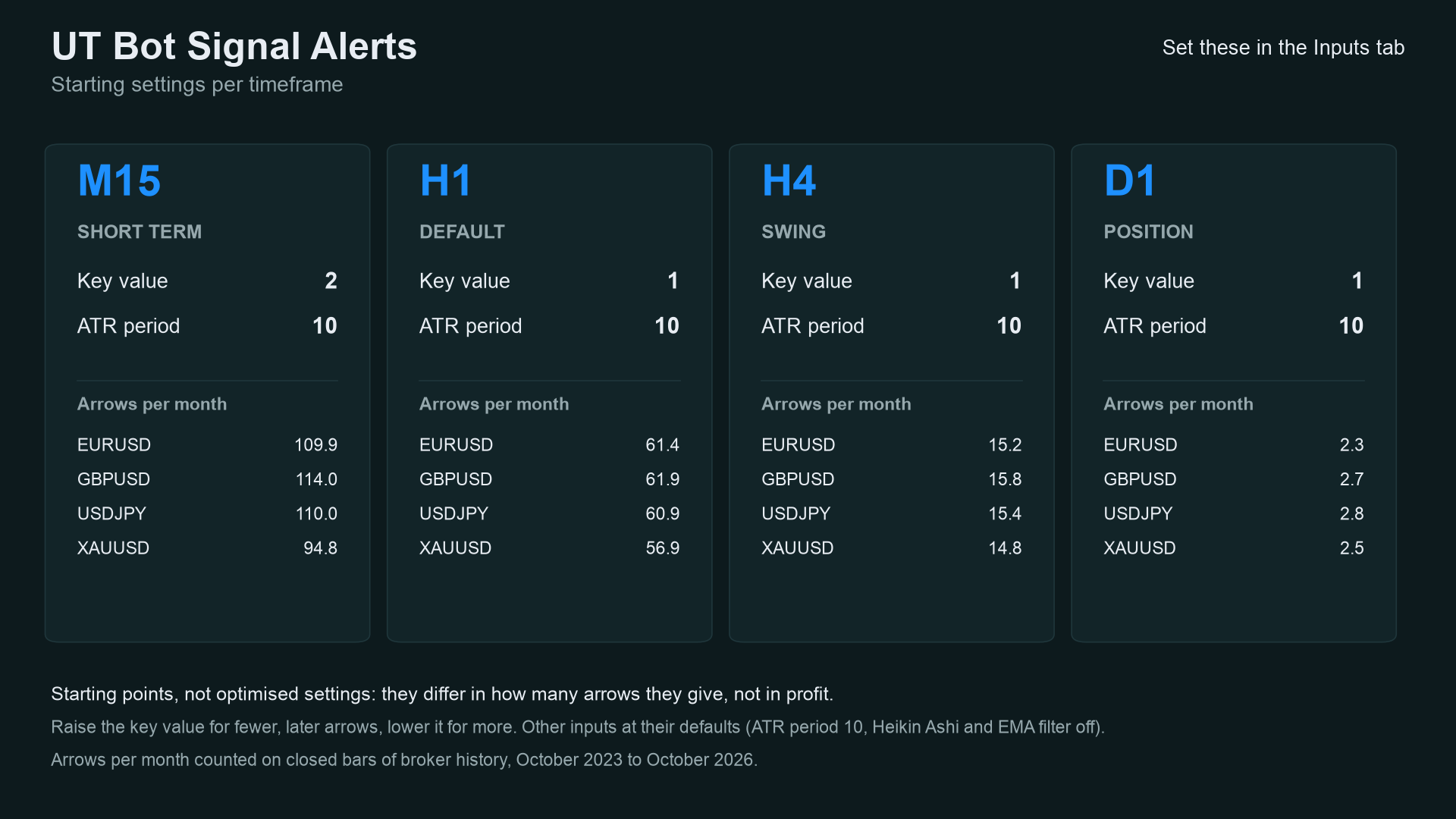
More sensitivity, more arrows. Arrows (buy plus sell) per month on closed bars of broker history, 2023-10-02 to
2026-10-12, ATR period 10, other inputs default. Source: docs/data/arrows-per-month.json.
This counts arrows only. It says nothing about profit.
xychart-beta
    title "H1 arrows per month by key value (EURUSD and XAUUSD)"
    x-axis ["0.5", "0.75", "1.0", "1.5", "2.0", "3.0", "4.0"]
    y-axis "arrows per month" 0 --> 130
    line [116.7, 83.5, 61.4, 37.9, 26.2, 14.1, 9.3]
    line [110.5, 77.1, 56.9, 33.8, 23.7, 12.8, 8.6]
First line EURUSD, second XAUUSD.
xychart-beta
    title "Arrows per month by timeframe, key value 1.0 (XAUUSD)"
    x-axis ["M15", "H1", "H4", "D1"]
    y-axis "arrows per month" 0 --> 260
    bar [237.4, 56.9, 14.8, 2.5]
Non-repainting: the proof and how it was tested
"Non-repainting" is easy to claim. Here is what was actually run. Raw result files are in tests/results/.
1. Three implementations, compared bar by bar. The Python reference
(tests/reference.py) was written from the TradingView script's behaviour, not translated from the
MQL code. The MT5 and MT4 indicators were then dumped bar by bar (stop line, buy, sell buffers) in the MetaTrader
Strategy Tester, and tests/check_parity.py compared each dump with the reference. Pass means:
every closed bar's line within 1e-9 relative, and arrows on exactly the same bars.
| MT5 | MT4 | |
|---|---|---|
| dumps compared | 36 (4 symbols x M15/H1/H4 x 3 input sets) | 37 (same 36 + one every-tick EURUSD H1) |
| bars compared | 978,390 | 761,453 |
| arrows compared (buy + sell) | 78,321 | 61,457 |
| result | ALL PASS | ALL PASS |
Symbols: EURUSD, XAUUSD, GBPJPY, BTCUSD. Input sets: defaults; key 2.0 / ATR 14 / EMA filter on; Heikin Ashi on.
Source: tests/results/parity-mt5-and-mt4.txt. MT5 history starts in 2024 and the MT4 test history is shorter on the FX pairs, which is why the bar counts
differ.
xychart-beta
    title "Arrows compared, Python vs indicator (all 0 differences)"
    x-axis ["Defaults MT5", "EMA filter MT5", "Heikin Ashi MT5", "Defaults MT4", "EMA filter MT4", "Heikin Ashi MT4"]
    y-axis "arrows compared" 0 --> 45000
    bar [40927, 8599, 28795, 32470, 6639, 22348]
(MT4 "Defaults" is 31,756 arrows over 12 runs plus 714 in the every-tick run = 32,470.)
2. Repaint probe. An EA records which signal buffers are set on each bar at the moment it closes, then reads the same bars again at the end and counts any value that changed. It also counts any signal ever shown on the still-forming bar.
| Run | Closed bars checked | Signals seen at close | Changed afterwards | Signals on the live bar |
|---|---|---|---|---|
| MT5, EURUSD H1, every tick, 10,411,052 ticks | 4,644 | 559 | 0 | 0 |
| MT4, 37 runs combined | 756,852 | 61,150 | 0 | 0 |
Source: tests/results/repaint-summary.md. The MT5 repaint probe was run once (EURUSD H1,
default inputs); the MT4 probe ran on every dump run.
3. Market validation. Both Market builds passed the MQL5 Market's automated product validation before publication (this is the Market's own check, not part of this repository).
flowchart LR
    R[reference.py<br/>Python, from the TradingView behaviour] --> P
    S5[MT5 indicator] --> T5[Tester script<br/>DumpIndicator<br/>every bar to CSV]
    S4[MT4 indicator] --> T4[Tester EA<br/>UTBotDump + Dump4.mqh<br/>CSV + repaint log]
    T5 --> P[check_parity.py<br/>line 1e-9, same arrows]
    T4 --> P
    S5 --> RP[RepaintProbe EA<br/>values at close vs final]
    T4 --> RL[repaint log<br/>per run]
    P --> V{all pass?}
    RP --> V
    RL --> V
    V -- yes --> M[Market validation]
    V -- no --> F[fix, rerun everything]
Why the design cannot repaint
- Arrows are written only when
i <= rates_total - 2, i.e. never on the forming bar. - Each bar's stop depends only on that bar and earlier bars (a recursive formula, no look-ahead).
- Alerts fire only for the bar that just closed, only after the history load, once per bar, and never in the tester.
- What does move: the stop line on the forming bar, because the live close changes. That is shown in the "live bar" line above and is not a signal.
Architecture and buffers
flowchart TB
    subgraph MT5["mql5/Indicators/UTBotAlerts"]
        A5[UTBotAlerts.mq5<br/>inputs, buffers, OnCalculate]
        B5[SignalAlerts.mqh<br/>alert inputs, TfName, SignalAlert]
        A5 -- include --> B5
    end
    subgraph MT4["mql4/Indicators/UTBotAlerts"]
        A4[UTBotAlerts.mq4]
        B4[SignalAlerts.mqh<br/>MT4 edition]
        A4 -- include --> B4
    end
    subgraph TESTS[tests]
        R[reference.py]
        C[check_parity.py]
        D5[mql5: DumpIndicator, RepaintProbe, Params.mqh]
        D4[mql4: UTBotDump.mq4, Dump4.mqh]
        C --> R
    end
    D5 -. iCustom/IndicatorCreate .-> A5
    D4 -. iCustom .-> A4
classDiagram
    class UTBotAlerts {
        +InpKey double
        +InpATR int
        +InpHeikin bool
        +InpUseEMA bool
        +InpEMA int
        +OnInit()
        +OnCalculate()
    }
    class SignalAlerts {
        +InpAlertPopup bool
        +InpAlertSound bool
        +InpAlertPush bool
        +InpAlertEmail bool
        +g_alert_last datetime
        +TfName()
        +SignalAlert()
    }
    class reference {
        +true_range()
        +rma()
        +ema()
        +utbot()
    }
    UTBotAlerts --> SignalAlerts : alerts
    reference ..> UTBotAlerts : same maths, compared by check_parity
iCustom buffer table (for EA developers)
| Buffer | MT5 | MT4 |
|---|---|---|
| 0 | stop line (colour line) | stop line (not drawn; read this one) |
| 1 | colour index of the line (0 blue, 1 red) | blue half of the drawn line |
| 2 | Buy arrow price (bar low), empty otherwise | Buy arrow price, empty otherwise |
| 3 | Sell arrow price (bar high), empty otherwise | Sell arrow price, empty otherwise |
| 4 | trend EMA (when the filter is on) | red half of the drawn line |
| 5 | calculation buffer | trend EMA (when the filter is on) |
| 6-8 (MT5) / 6-9 (MT4) | calculation buffers (ATR, source, Heikin Ashi open, EMA) | calculation buffers |
Empty value is EMPTY_VALUE. Read arrows on closed bars (shift 1 and higher). iCustom parameters follow the input
order: key, ATR period, Heikin Ashi, EMA filter, EMA period, show EMA, show line, arrow gap, pop-up, sound, sound file,
push, e-mail, debug. In MT5 the input group headings also count as string parameters when you build a handle with
IndicatorCreate (see tests/mql5/Include/IndTest/Params.mqh).
Inputs, alerts, install and compile
| Input | Default | Meaning |
|---|---|---|
| Key value | 1.0 | ATR multiple. Higher: fewer, later arrows. Lower: more arrows |
| ATR period | 10 | Wilder ATR length |
| Use the Heikin Ashi close as the source | false | Source is (O+H+L+C)/4 |
| Only signals with the EMA trend | false | Buy only above, sell only below the EMA |
| EMA period | 200 | Length of the trend EMA |
| Draw the EMA | true | Show the EMA when the filter is on |
| Draw the stop line | true | Show or hide the line (arrows stay) |
| Arrow distance from the candle | 12 px (MT5) / 0.3 x ATR (MT4) | Gap between arrow and candle |
| Pop-up alert | true | Terminal alert window |
| Play a sound / sound file | false / alert.wav | File from the terminal's Sounds folder |
| Push notification | false | Needs your MetaQuotes ID in Options |
| false | Needs e-mail set up in Options | |
| Debug log for bug reports | false | Writes extra lines to the Experts tab, to attach when you report a problem |
Install from source. Copy mql5/Indicators/UTBotAlerts/ into <terminal data folder>/MQL5/Indicators/ (MT5) or
mql4/Indicators/UTBotAlerts/ into <data folder>/MQL4/Indicators/ (MT4), open UTBotAlerts.mq5 or .mq4 in MetaEditor
and press Compile (F7). Both compile with 0 errors and 0 warnings (checked on a Windows machine with MetaEditor; the
compiled files are not in the repository). Keep the two files of each edition together: the indicator includes
SignalAlerts.mqh from its own folder. The debug log needs the Chart Kit file as well: copy mql5/Include/ChartKit/ (MT5) or mql4/Include/ChartKit/ (MT4) into the Include folder of the data folder.
Run the Python reference and the tests
python3 -m venv .venv && . .venv/bin/activate && pip install -r requirements.txt
import sys; sys.path.insert(0, "tests")
import numpy as np
from reference import utbot
# o, h, l, c are float arrays of OHLC bars, oldest first
trail, buy, sell = utbot(o, h, l, c, key=1.0, atr_period=10)   # buy/sell hold the arrow price or NaN
To repeat the parity check on your own data:
- Compile the indicator and the test tool for your platform (
tests/mql5/Scripts/DumpIndicator, ortests/mql4/UTBotDump.mq4withtests/mql4/Include/IndTest4/Dump4.mqhin yourMQL4/Include/IndTest4/; MT5 also needstests/mql5/Include/IndTest/Params.mqh). - Run it in the Strategy Tester (MT4) or as a script (MT5) for each symbol and timeframe, with the input sets in
tests/configs.tsv(MT5) /tests/mql4/configs.tsv(MT4). The tool writes one CSV per symbol and timeframe. python3 tests/check_parity.py <folder with the CSVs>(MT4 dumps use text times; the script reads the MT5 format, so convert them or adaptcheck()for MT4 CSVs). It prints PASS or FAIL per file and an overall result.- Repaint: run
tests/mql5/Experts/RepaintProbein the MT5 Strategy Tester (every tick); MT4 writes its repaint log with the dump.
The price dumps used for the published numbers are not in this repository (they are broker price data).
Honest limits
- An indicator signal is not a strategy. No stop-loss, position sizing or exit rules are provided or implied, and the arrows were not optimised or back-tested for profit. Whether a trend flip makes money depends on your market, costs and rules.
- No profit or accuracy claim is made. The only numbers here are about consistency (the three implementations agree, signals do not move) and frequency (arrows per month).
- Lag is built in. A trailing stop confirms a move after it started; fewer arrows (higher key value) come later still.
- Sideways markets produce frequent flips; the EMA filter reduces some of them but not all.
- Data-dependent. ATR is seeded from the first bars in the terminal's history, so the very first arrows of a short history can differ from a longer one.
- Scope of the tests. Four symbols, three timeframes, three input sets, one MT5 repaint run. Other symbols and timeframes are not covered by the published numbers. The MT5 build was not run on a live chart as part of these numbers.
Licence and credits
Origin of the maths. The UT Bot idea, an ATR trailing stop on the close, is by Yo_adriiiiaan ("UT Bot Strategy" on TradingView), from an original idea by HPotter. The TradingView script "UT Bot Alerts" (published 8 February 2020) is by QuantNomad; it is open source on TradingView. Thank you to all three.
What this means for the licence. TradingView publishes open-source scripts under the Mozilla Public License 2.0 unless the author states another licence. I could not retrieve the original script's header to confirm that it states MPL-2.0, so I took the conservative route: the three files that implement the UT Bot calculation are licensed MPL-2.0:
mql5/Indicators/UTBotAlerts/UTBotAlerts.mq5mql4/Indicators/UTBotAlerts/UTBotAlerts.mq4tests/reference.py
They are independent implementations in other languages (the Python one written from the script's described behaviour, not translated), plus additions (closed-bar signals, alerts, EMA filter), but treating them as derived from an MPL-2.0 work is the safe reading. MPL-2.0 is file-level: changes to those files must stay MPL-2.0 and be shared.
Everything else (alert helper SignalAlerts.mqh, test tools, parity checker, docs, images) is © 2026 Allan Niñal under the
PolyForm Noncommercial License 1.0.0: free for personal and other
noncommercial use, not for commercial use. Each source file has an SPDX-License-Identifier line. Texts:
LICENSE, LICENSES/MPL-2.0.txt. The licence applies to this source, not to anything
you build or trade with the indicator. Trading involves risk; the software is provided as is.
Website: allanninal.dev/mql5 · MT4 · allanninal.dev · Questions: message me on LinkedIn.