
Smart Liquidity Hunter
An OHLC-based indicator for MetaTrader 4 and MetaTrader 5 that marks qualifying sweeps of previously confirmed swing highs and lows. It evaluates closed candles and provides chart references for reviewing a setup in context.
Documented release: v1.11. Both platform editions use the same signal rules. The indicator is published by fxliner on MQL5.
Downloads and documentation
| Platform or resource | Link |
|---|---|
| MetaTrader 4 source | Smart_Liquidity_Hunter_MT4.mq4 |
| MetaTrader 5 source | Smart_Liquidity_Hunter_MT5.mq5 |
| Published MT4 release | MQL5 Code Base — 79545 |
| Published MT5 release | MQL5 Code Base — 79546 |
| Installation, settings, and calculations | Usage guide |
| Version changes | Changelog |
| Verification evidence and limits | Validation notes |
| Illustrated website guide | Smart Liquidity Hunter on ForexSignal24 |
| Educational chart review | EURUSD H4 — What a Bullish Liquidity Sweep Actually Tells Us |
| Related website | ForexReview.top |
What it shows
- Green arrows below candles that meet the bullish sweep conditions.
- Red arrows above candles that meet the bearish sweep conditions.
- Dotted reference levels for eligible swing highs and lows.
- An optional dashboard with the symbol, timeframe, reference levels, and the latest signal found in the scanned history.
- Optional popup, sound, and push notifications for qualifying newly closed candles.
“Liquidity” here means a price-based reference around a swing. The indicator uses open, high, low, and close data; it cannot observe resting orders or other traders' actual stop-loss orders.
Signal logic at a glance
- Find an eligible swing that was already confirmed before the candidate signal candle began. The default strength requires three candles on each side of the pivot.
- Select the nearest eligible high and low within the configured swing age. With the freshness filter enabled, an earlier penetration can disqualify a reference; a touch is allowed.
- Require a sweep strictly greater than the larger of the fixed point threshold and the volatility threshold. Volatility is a simple mean of preceding true ranges, excluding the signal candle.
- For a bullish marker, require a move below the swing low and a close back above it. For a bearish marker, require a move above the swing high and a close back below it. The relevant wick and closing-position filters must also pass.
- Apply the optional candle-color filter. Skip candles that qualify in both directions. The open candle receives no signal arrow.
The defaults require a rejection wick of at least 25% of the candle's range. The close must be at least 60% of the way up from the low for a bullish signal, or down from the high for a bearish signal. Candle color is optional and is not required by default.
See the full rules and input reference for formulas, boundary conditions, and a worked example.
Install
- Download the source file for your desktop terminal from this repository or the matching Code Base publication.
- In that terminal, select File → Open Data Folder.
- Copy the MT4 file into
MQL4/Indicators, or the MT5 file intoMQL5/Indicators. - Open the file in the matching MetaEditor and select Compile, or press F7. Check the compiler result before continuing.
- Refresh Navigator → Indicators in the terminal and attach the indicator to a chart. Start with the defaults and allow sufficient price history to load.
The source is standalone: it has no external include or DLL dependency. For alert configuration and multiple instances on one chart, see the usage guide.
Historical chart examples
MetaTrader 4 — EURUSD H4
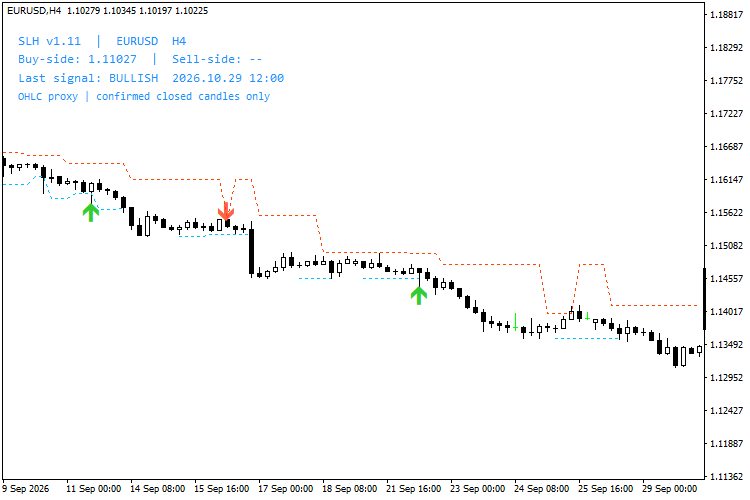
Smart Liquidity Hunter v1.11 on EURUSD H4. The visible date labels cover part of September 2026. The dashboard's latest signal is from a later part of the scanned history, outside the visible chart window.
MetaTrader 5 — EURUSD H1
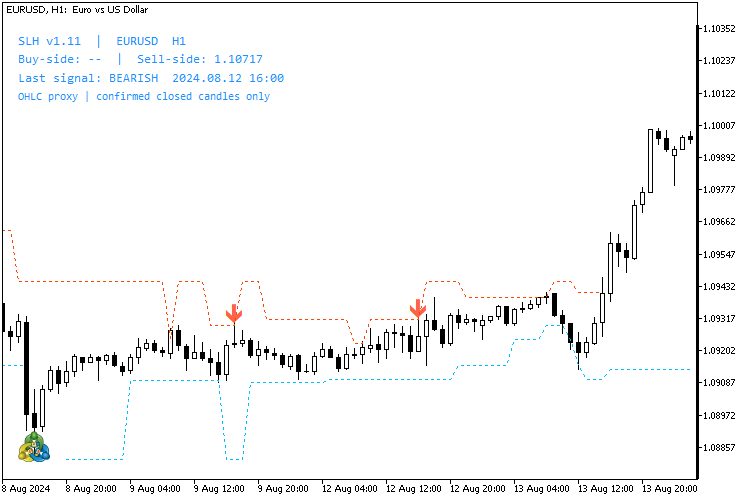
Smart Liquidity Hunter v1.11 on EURUSD H1. The visible date labels cover part of August 2024.
These existing MetaTrader screenshots illustrate the indicator's appearance and historical markings. They are not current trade signals, a record of executed trades, or evidence of a win rate. The dashboard reports the latest signal within the calculation window, which may be outside the portion of the chart currently visible.
The linked MetaTrader educational publication uses a native web chart for EURUSD H4 context and refers separately to the historical MT4 screenshot. It does not demonstrate Smart Liquidity Hunter running on the MetaTrader.com web chart.
Scope and limitations
An arrow identifies a candle that passed the configured pattern filters. Subsequent price movement can invalidate an interpretation of that candle.
- The indicator does not place, modify, or close trades.
- It does not calculate an entry recommendation, stop loss, profit target, or position size.
- Arrow prices include visual padding and are not trade execution levels.
- Closed-candle evaluation avoids provisional arrows on the unfinished candle. Historical output can still change after input changes, history corrections, or changes to the calculation window. Older signals leave the displayed window as new bars arrive.
- Swing confirmation introduces a delay. Broker feeds and symbol specifications can produce different results.
For a repeatable review, record the platform, broker/server, symbol, timeframe, inputs, and relevant candle times. Keep unsuccessful examples alongside favourable ones. See Reviewing a setup.
Repository contents
| Path | Purpose |
|---|---|
mt4/ |
MetaTrader 4 indicator source |
mt5/ |
MetaTrader 5 indicator source |
docs/USAGE.md |
Installation, signal calculations, inputs, alerts, and troubleshooting |
docs/VALIDATION.md |
Recorded verification evidence and its limits |
assets/images/ |
Historical chart screenshots used by the documentation |
evidence/2026-11-14/ |
Original historical runtime reports described in the validation notes |
CHANGELOG.md |
Release changes |
SHA256SUMS |
Checksums for the documented repository files |
.gitignore |
Exclusions for generated and local files |
LICENSE |
Original MIT license text |
When reporting a problem, include the platform build, exact inputs, broker/server and symbol, timeframe, and a reproducible candle timestamp. Describe the expected and observed behaviour without including account credentials or other private account data.
License
The released source declares the MIT License. See the original LICENSE for its terms and copyright notice.