
6.4 KiB





Simple perfect hash generator, driven by a YAML config file.
Runs as an EA: reads your key/value map from
YAML, builds a perfect hash with PerfectHashByLeo,
and emits a ready-to-include .mqh with the tables and lookup function already written.
A perfect hash function maps a fixed, known set of keys to distinct slots with no collisions so lookups are just a couple of arithmetic ops and an array index, no chaining or probing needed. SimPHash builds that table for you at design time from a YAML key list.
Main Features
- YAML-driven, no code required: you don't write the perfect hash tables by hand you list your keys (and optionally values) in a YAML file, run the EA once, and it generates the
.mqhfor you. - Two swappable hash stages, matching how PerfectHashByLeo works internally: a bucket hash (FNV-1a 64 or xxHash64) followed by a final displacement hash (MurMur-style, SplitMix64, fmix64 or Fibonacci hashing).
- Two output modes: either a table of final values (the generated function returns your mapped value directly) or a table of indices (the function returns a position into your own array useful when the value is too complex to inline).
- Optional binary export: alongside the
.mqh, you can dump the seeds/hashes/values/meta as raw.binfiles (useful if you want to load the table at runtime instead of compiling it in). - Generates a complete, working lookup function both a
string-keyed overload and a pre-hashedulong-keyed overload, so callers who already computed the hash elsewhere can skip re-hashing.
Every parameter accepted by the YAML config is documented, with a ready-to-copy template, in Src/Template/README.md.
Usage: the process
1. Write your YAML config list your keys, pick your hash stages, point file_name_out at the .mqh you want generated. Full parameter reference: Src/Template/README.md.
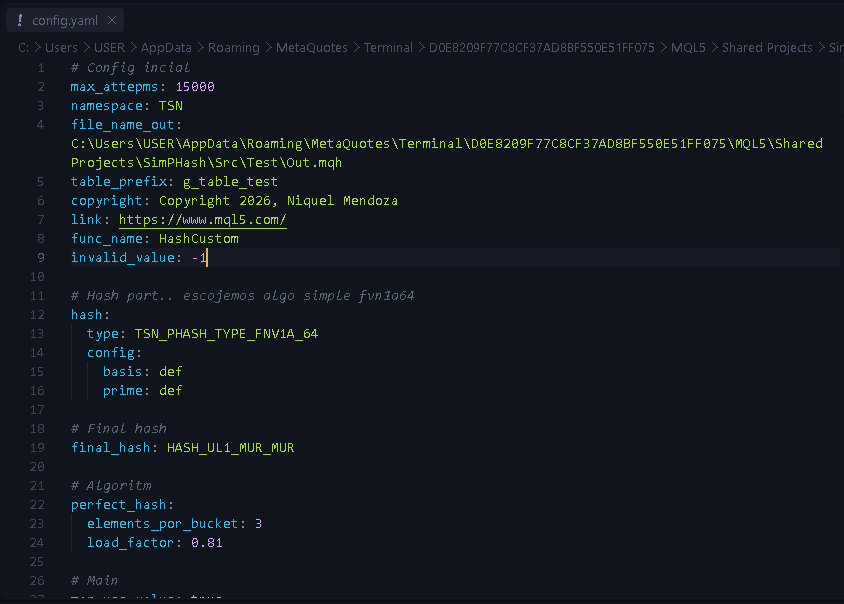
2. Run SimpHash.mq5 pointing InpYamlFileName at that config. It generates the .mqh with the seed/hash/value tables plus a ready HashCustom(const string& key) / HashCustom(const ulong key_hash) function:
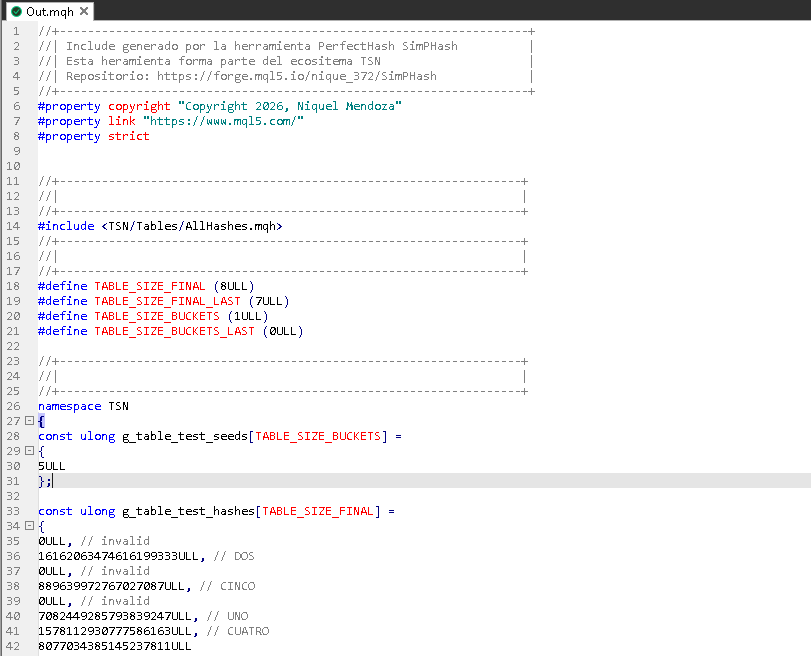
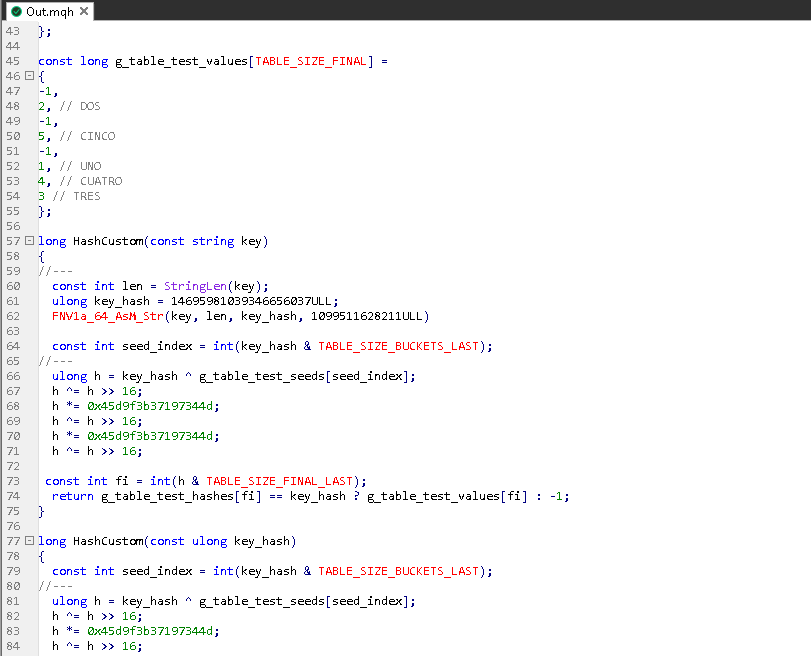
3. Include the generated file in your own project and call the generated function:
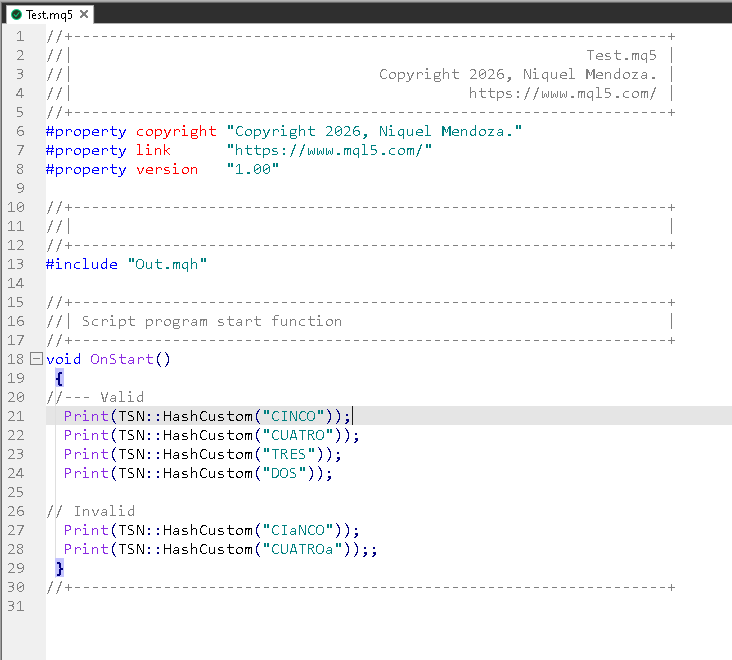
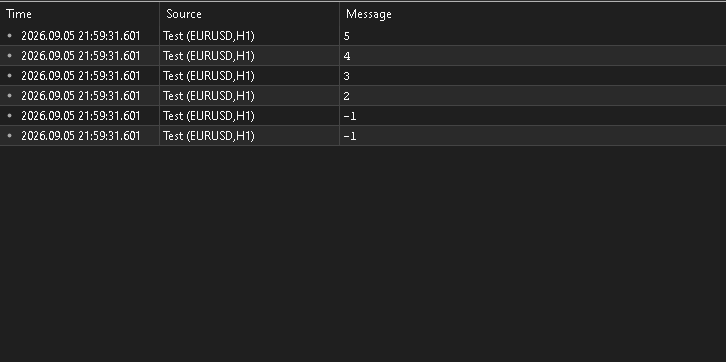
4. Done valid keys resolve to their value, unknown keys return invalid_value:
Repository Structure
SimPHash/
├── SimpHash.mq5          # Main EA reads the YAML config and generates the .mqh
├── dependencies.json     # tsndep manifest (private repos required to compile)
├── Src/
│   ├── PerfectHash.mqh   # Core generator logic
│   ├── Def.mqh
│   ├── Hash/             # Hash strategies (bucket hash + final displacement hash)
│   ├── EnumReg/          # YAML enum registry
│   ├── Template/         # config.yaml template + full parameter reference (README.md)
│   └── Test/             # Sample config.yaml, generated Out.mqh and Test.mq5
└── Market/               # Screenshots used in this README and MQL5 Market version (free DLL)
Installation
MetaTrader 5 build 5430 or later is required either way. Pick the path that matches what you want to do:
For developers
Check dependencies.json, and:
-
Install them with
tsndep(available on PyPI) from yourShared Projectsfolder it reads dependencies.json and downloads everything declared there:cd "C:\Users\YOUR_USER\AppData\Roaming\MetaQuotes\Terminal\YOUR_ID\MQL5\Shared Projects" tsndep install "https://forge.mql5.io/nique_372/SimPHash.git"
For users
You don't need the source or its private dependencies to use SimPHash pick one of these two options:
Option A Manual (from the repo's releases)
- Download the latest compiled EA from Releases and move it into your terminal's
MQL5/Expertsfolder. - Clone the
TsnTablesrepository into yourIncludefolder the generated.mqhincludes it (e.g.#include <TSN/Tables/AllHashes.mqh>) to resolve the shared hash tables. See the MqlIncludes convention for how these proxy includes work.
Option B MQL5 Market (recommended, no manual steps)
- Get SimPHash from the MQL5 Market it installs directly into your terminal, no moving files around.
- Clone the
TsnTablesrepository into yourIncludefolder, same as in Option A.
The Market build does not support the DLL-enabled code path it ships DLL-free.
Either way, once the EA is in place and TsnTables is available, jump to Usage: the process above.
License
By downloading, cloning, forking, or otherwise using this repository, you accept the license terms.
Contact
- Platform: MQL5 Community
- Profile: https://www.mql5.com/es/users/nique_372
- Articles: https://www.mql5.com/es/users/nique_372/publications